


Fargo ID Card Hologram Layouts Explained!
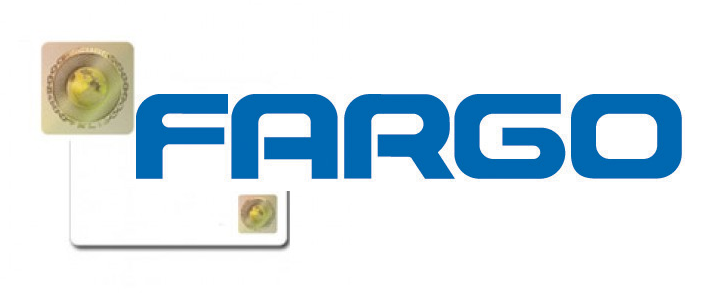 Holograms are a great feature to have on an ID card to help prevent fraud and improve the security of your card issuance. Â Many times, to incorporate a hologram you would need a laminating printer like the DTC4500Â and a special laminate that has embedded holograms. Â If you don’t have a laminating printer though, there is still an option to create cards with holograms.
Fargo offers a variety of ID cards that have holograms already embedded in the card itself.  Their VeriMark and Holomark cards come with hologram options in 8 different possible positions on the card.  Using a non-laminating printer like the DTC1000, all you need to do is make sure you print design doesn’t cover  the location of the hologram.
Teklynx and Epson Offer A GHS Compliant Chemical Labeling Solution
 Teklynx announced that it has teamed up with Epson to offer a turnkey solution for Globally Harmonized System of Classification and Labeling of Chemicals (GHS) compliant chemical labeling.
Together, Epson’s TM-C3400 inkjet printer (which prints color, on-demand labels) and Teklynx software (which allows for the identification, design and tracking of hazardous labels), offer a completely GHS compliant turnkey solution. This solution ensures compliance for chemical manufacturers, while eliminating the time consuming task of identifying multi-vendor, compatible GHS-compliant components.
On March 26, 2012 the Occupational Safety and Health Administration (OSHA) announced its plans to adopt the GHS labeling standard for the American market with the first steps of implementation beginning in 2013. For chemical manufacturers, an automated way to print color, on-demand labels onto extremely durable media, as well as a software solution that allows for the design and management of the labels, will significantly assist in complying with GHS requirements. The Epson printer paired with Teklynx Central  GHS software, allows customers to benefit from a complete labeling solution for identifying hazardous materials.
Properly Storing Your Blank ID Cards

Having a professional looking identification card with crisp images and no blemishes is must-have in today’s corporate and university environments. Card Printers certainly play a part in the process, but taking care of your blank ID card stock should be a priority. Improperly handling cards before printing can create flaws in your card stock that will be reflected or even magnified in your printed cards. The following are a few tips to consider when handling cards:
- Environment – Cards should be kept in the air-tight, water resistant containers when not in use. Most card stocks from Zebra, Fargo, Datacard, and Evolis come in 5 x 100 card packages. It is best to only open one container at a time. Cards also should be stored in a regulated temperature environment. Extreme heat or extreme cold can make cards brittle and more susceptible to snapping.
- Handling: Oils and fingerprints from your hands can leave a residue on the card that will impact the overall print quality of the card. We recommend only touching the edge of the cards when loading and handling your ID cards. Anti-static gloves can also be worn which will reduce the residue left on cards.
- Inputting: Always inspect the stock to make sure you have received the proper cards and no identifiable blemishes exist with in the cards.
For more information about ID cards and handling, contact us at Barcodes Inc.
How to Make More Secure ID Cards
 Security is a common concern for any organization today from school campuses to production facilities. Protecting assets and keeping individuals safe is essential in all organizations. Utilizing ID cards is an efficient and practical way to protect your business, but what really makes an ID secure?
If you where to open your wallet or purse right now you would most likely find several examples of plastic ID cards. The cards may range from a simple printed card from your local grocery store with nothing more than a basic image and barcode, to a government issued driver’s license with a full color photo, encoded information, and protective holograms!
In both of these cases, the ID is meant to accurately identify a specific person. However, one card is a lot easier to replicate while the other contains several layers of security, which greatly reduce counterfeit and forgery attempts. Features like photos, magnetic stripes, or smart card chips on an ID help improve its security and decreases the likelihood of misuse by unauthorized individuals. Incorporating these elements to your ID issuance are the most effective means to protect your employees and business.
Socket Mobile Adds Android Support to CRS 9P Cordless Ring Scanner
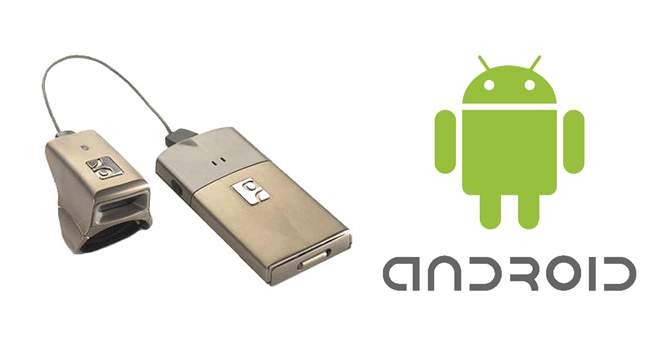 Socket Mobile has released Android support for its Socket Bluetooth Cordless Ring Scanner (CRS) 9P hands-free barcode scanner for warehousing and logistics. The update makes it possible for manufacturers, logistics providers, and package carriers to track assets and inventory in real time using the latest Android smartphones and tablets.
The CRS 9P is a wearable barcode scanner that enables comfortable, hands-free data collection in high-velocity supply chain applications. Socket Mobile has updated both the SocketScan 10 keyboard wedge software and SocketScan 10 Software Development Kit to include Android support for the CRS 9P.
How to Get Your Zebra Printer to Work with Light Colored Ribbons
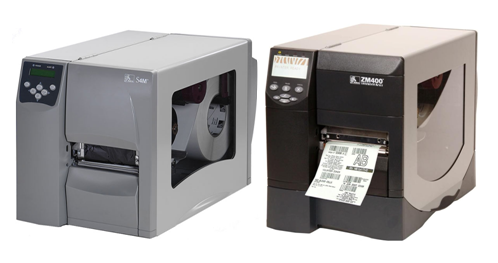 Thermal label printers may only be able to print with a single color ribbon roll but this doesn’t mean you’re stuck with black only. Â A variety of colored ribbons are available for almost every printer model in wax, wax/resin, or resin rolls. Â However, when you start using lighter colors of ribbon (red, yellow, pink), the printer will sometimes have difficulty sensing that a ribbon is installed properly. Most printers just need a little calibration to get up and running.
Zebra printers are some of the most commonly used label printers today and the ZM400, ZM600, and S4M are a few of the more popular models.  Follow these steps from the front control panel on the printer to configure it to handle any color of ribbon with ease
Faster, Easier, Better – The Datacard SD360 and SD260 Card Printers
Datacard has been a leader in ID card printers due for their high quality printers that are easy to use. Â Their current SD360 and SD260 printers are a great for small to medium-sized applications for dual-sided or single-sided printing.
The SD360 and SD260 card printer’s new technology, faster print speeds and user-friendly interface are designed to help any application streamline their day-to-day operations and create safer, more secure environments. Exclusive features include Datacard TruePick anti-jam card handling for reliable operation as well as TrueMatch color matching. When used with Datacard Certified Supplies, TrueMatch color matching produces vibrant images and logos, as well as crisp, bleed-free bar codes and text. Users can also upgrade the printers with smart card and magnetic stripe encoding modules for more complex operations such as meal purchases and attendance tracking.
For more information on the SD series printers, contact us at Barcodes Inc.
Datamax-O’Neil Introduces the NETira Software Suite of Printer Tools
Unlock the power of your printers with the NETira suite of software tools designed to expand and enhance the performance of your Datamax-O’Neil printers. NETira offers users the ability to set-up your printer, design custom labels or manage an entire network of printers with the touch of a few buttons. NETira reduces setup time and provides the tools to effectively utilize all of your printer’s capabilities.
Thoroughly tested and certified by Datamax-O’Neil technicians, NETira provides users with easy-to-use software that presents a consistent look and feel for navigation. Whether it’s a single printer or part of a networked environment, NETira applications reduce setup time and provide users with the tools to effectively utilize all of their printers’ capabilities. The NETira suite includes:
The New Datalogic Touch TD1100 Linear Imager
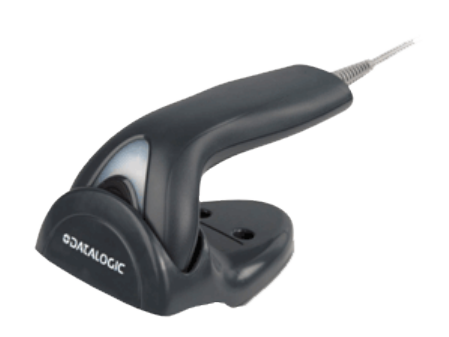 Datalogic has announced the availability of the new Touch TD1100 linear imager contact reader. The Touch TD1100 reader is a linear imager alternative to low-cost laser scanners. It has been developed to enhance the very successful (but dated) Touch 65/90 Pro and Lite models. The Pro and Lite readers have been very successful in the last 10 years and are among the major revenue generators of all time for Datalogic’s handheld product range.
The Touch TD1100 readers feature a stylish new design combined with enhanced performance and durability to provide the new Touch readers with all the requisites needed in
order to compete with a higher-range class of competitive products.
The Touch TD1100 series of linear imaging contact readers represents Datalogic’s solution for customers who require a cost-effective solution for close-contact bar code reading without sacrificing quality or performance. Designed for low throughput applications within multiple markets, the Touch TD1100 readers provide the guarantee of contact reading with an excellent reading capability on virtually all linear bar codes, including damaged or poorly printed codes. Small, lightweight and low on energy consumption, the Touch TD1100 readers continue to provide robustness with a 1.5 m / 5.0 ft drop resistance, which is typical of higher range products.
UPTrade to a New Fargo Printer
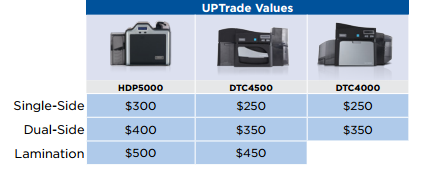 Now through December 31, 2012, customers can trade in all old Fargo card printers as well as any dye-sublimation or reverse image card printer from other manufacturers.
Turn in your old printer and and purchase a new Fargo printer. The UPTrade rebate is available on all DTC4000, DTC4500 and HDP5000 ID Card Printers. Rebate amounts are determined based on purchase of Single Side ID Card Printer, Dual Side ID Card Printer, and Lamination ID Card Printers. The value of the rebates listed below:
Trade-In units must be returned to HID Eden Prairie or a regional office no later than January 14, 2013.
For more information on the trade in program, contact us at Barcodes Inc.