


UPC Barcodes Complete Guide to UPC-A and UPC-E
A UPC barcode identifies an asset so point-of-sale and inventory systems can retrieve the correct product record. For most consumer products, UPC-A is the standard choice. UPC-E is a smaller, zero-suppressed version used when packaging does not have enough room for a full UPC-A symbol. The correct format, number assignment, label material, printing method and scanner all matter if the product barcode must work reliably across stores and distribution networks.
The most important distinction is that a barcode generator creates the machine-readable symbol, but it does not give a business ownership of a globally unique product number. Before generating or printing UPC labels, product managers should obtain and assign valid product identifiers, confirm retailer requirements and test the complete workflow.
What Is a UPC Barcode
UPC stands for Universal Product Code. In the GS1 system, a UPC-A barcode carries a 12-digit Global Trade Item Number, or GTIN-12. The barcode is the data carrier that scanners read; the GTIN-12 is the unique product identifier stored in business systems and shared with trading partners.
A UPC barcode normally identifies a product variation, not an individual physical unit. Different sizes, colors, flavors, pack counts or other variants typically need different GTINs. The symbol itself does not contain the retail price. When a scanner decodes the number, the POS or inventory application uses it to retrieve information such as the item description, price, tax category and inventory record from a database.
For a broader view of linear and two-dimensional options, compare the major barcode symbologies in the types of barcodes overview.
UPC-A vs. UPC-E: Which Product Barcode Should You Use
| Buying consideration | UPC-A barcode | UPC-E barcode |
| Best use | Most retail products and packages | Small packages with limited label space |
| Visible number | 12 digits | Compact 8-digit presentation |
| Underlying identity | GTIN-12 | A zero-suppressed representation of an eligible GTIN-12 |
| Data capacity | Numeric retail product identification | The same product identity in a smaller symbol |
| Key limitation | Requires more horizontal space | Only certain GTIN-12 number patterns can be compressed |
| Buyer guidance | Use by default unless space is constrained | Use only after confirming eligibility and retailer acceptance |
When to Use a UPC-A Barcode
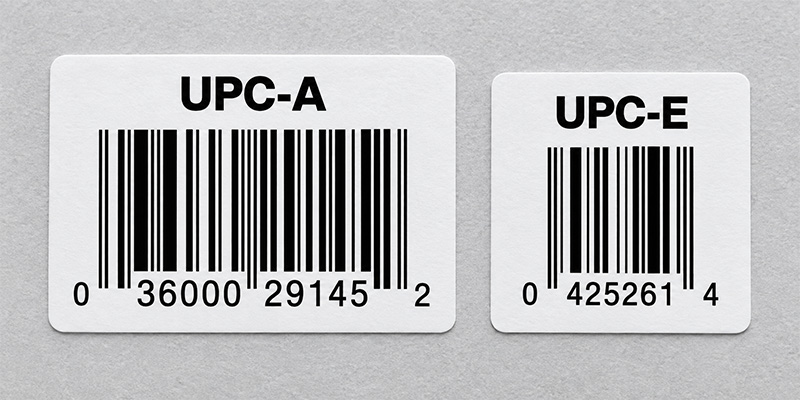
Use UPC-A for most products sold at retail checkout. Its 12 digits include a GS1 Company Prefix and item reference whose lengths can vary, followed by a calculated check digit. UPC-A is familiar across retail supply chains, widely supported by POS scanners and easier to manage than a compressed format when the package provides sufficient space.
When to Use a UPC-E Barcode
Use UPC-E when a full UPC-A symbol will not fit on a small product or package. UPC-E removes eligible zeros from the symbol representation while preserving the underlying GTIN-12 identity. It is not a separate eight-digit product number like GTIN-8, and a business cannot create it by simply deleting zeros from any UPC-A value.
Not every UPC-A number can be represented as UPC-E. Use software that correctly validates the conversion, then confirm how deployed scanners transmit the result to the host system. Some scanners can report the compact UPC-E value, while others may be configured to expand it to the equivalent UPC-A number. The output must match the format expected by the POS or inventory application.
How Do You Get a Valid UPC Barcode Number
Creating a scannable image is only one part of launching a retail product. The number must be unique, assigned to the correct product and accepted by the retailers or marketplaces where it will be used. A practical process is:
- Count the products and variations. Determine how many separate sellable items need identifiers, including changes in size, color, flavor or pack quantity.
- License identifiers through GS1. Brand owners can obtain a single GS1 US GTIN or a GS1 Company Prefix sized for a larger product portfolio.
- Assign and document each GTIN-12. Keep product data, packaging level and lifecycle status accurate so trading partners receive a consistent identity.
- Choose UPC-A or UPC-E. Use UPC-A for the standard case. Consider UPC-E only when space is limited and the assigned number is eligible for zero suppression.
- Generate, print and test the symbol. Confirm the check digit, dimensions, print quality, placement and scanner output before a production run.
Do not reuse a discontinued product’s GTIN for a different item. If product attributes change, consult the current GS1 allocation rules and the requirements of the retailer or marketplace before deciding whether a new identifier is required.
Can a UPC Barcode Generator Create a Valid UPC
A UPC barcode generator converts an existing valid number into bars, spaces and human-readable digits. It can calculate a check digit and produce an image for testing or design work, but it does not assign a globally unique number or register a product with GS1 or a retailer.
Start with the free Barcodes, Inc. barcode generator tools, then open the dedicated UPC/EAN generator to create a UPC-A or an eligible UPC-E symbol. For a production workflow, barcode label software is usually a better choice because it can control dimensions, connect to product data, create batches, manage templates and drive compatible printers.
How to Print UPC Barcodes That Scan Reliably
A valid number can still fail at checkout if the UPC label is resized incorrectly, printed with weak contrast, placed on a difficult surface or damaged in distribution. Use these practices when deciding how to print UPC barcodes:
- Preserve the barcode proportions. Generate the symbol at its intended size instead of stretching or squeezing an exported image.
- Protect the quiet zones. Keep text, borders, artwork and package seams away from the blank areas on both sides of the barcode.
- Use dependable contrast. Dark bars on a light, solid background are the safest choice. Avoid reflective finishes, patterns and low-contrast color combinations unless they have been tested.
- Match printer resolution to symbol size. Small UPC labels require enough resolution to reproduce narrow bars cleanly. Test how the chosen module width maps to the printer’s dots.
- Choose the right label material and adhesive. Account for moisture, refrigeration, abrasion, heat, curved surfaces and the required product life.
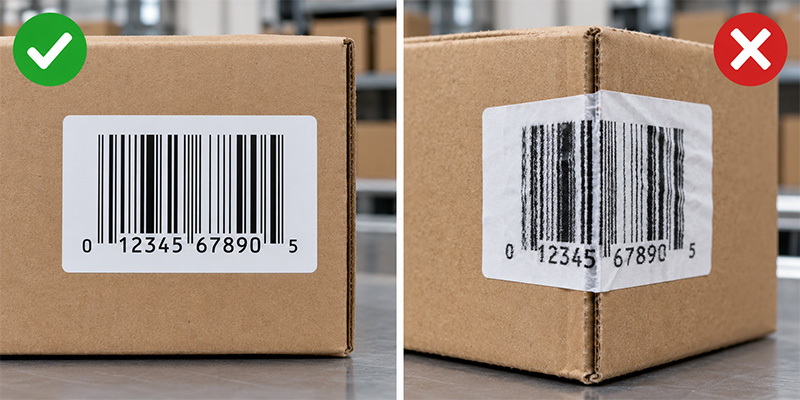
- Place the code on a scanner-friendly surface. Avoid folds, corners, seams, sharp curves and areas likely to be covered or damaged.
- Test production samples. Scan labels from the actual printer on the actual package with the scanners and software used in the workflow. Use formal barcode verification when a retailer or quality program requires it.
Use the complete barcode label design best practices to review quiet zones, contrast, size, materials and testing before production.
Should You Print UPC Labels In-House or Buy Pre-Printed Labels
The best production method depends on volume, change frequency, staffing and quality-control requirements.
| Operating need | Likely approach | Why it fits |
| Small or changing product line | Print on demand with a desktop barcode printer and label software | Fast changes, low setup burden and control over quantities |
| Stable designs or outsourced production | Order pre-printed or custom UPC labels | Consistent output without maintaining an internal print process |
| High-volume manufacturing | Use an industrial printer, managed templates and verification | Throughput, durability and repeatable control across shifts |
| Short-life indoor labels | Consider direct thermal media after testing | No ribbon and a simpler print process |
| Longer-life or demanding labels | Consider thermal transfer media and ribbon | Greater resistance to abrasion, heat and environmental exposure |
Browse UPC labels and barcode media and compatible barcode label printers for in-house production. If printing is not the right fit, compare pre-printed barcode label options or request a custom label quote for a project-specific recommendation.
What Equipment Do You Need for a UPC Barcode Workflow
- UPC labels. Select the size, material, adhesive and print technology for the package and environment.
- Barcode printer. Match the printer to daily volume, label width, resolution, connectivity and operating conditions. A desktop model may suit a small product line, while an industrial printer is better for sustained output.
- Label design software. Use true UPC encoding, controlled templates and trusted data sources. Avoid treating an ordinary font as a complete production system.
- POS barcode scanner. Confirm UPC-A and UPC-E support, decode configuration, presentation style, connectivity and compatibility with the POS application.
- Quality process. Establish approval, sample testing, printhead maintenance and periodic checks so label quality does not drift over time.
Retailers replacing scanning equipment should evaluate two-dimensional imaging as well as 1D UPC performance. A modern 2D imager can read UPC symbols while supporting the growing use of QR Code and Data Matrix at checkout. Compare POS barcode scanners and use the barcode scanner buying guide to assess form factor, scan volume and future requirements.
Common UPC Barcode Use Cases
- Retail checkout. The scanner reads the GTIN and the POS system retrieves the item and price record.
- Receiving and replenishment. Workers scan products or cases to confirm receipts, update inventory and direct restocking.
- E-commerce listings. Marketplaces use product identifiers to match listings with the correct trade items and product data.
- Inventory counts. UPC scanning can improve count speed and accuracy when each unit carries a readable product barcode.
- Returns and price verification. The UPC connects the physical product to the retailer’s transaction and item records.
UPC identifies the product type, not a unique serialized unit, lot or expiration date. If a workflow needs internal alphanumeric identifiers, Code 128 may be a better choice. If it needs richer standardized data in a small area, evaluate a GS1-compatible 2D barcode. Inventory teams can also compare inventory barcode scanners and review how a complete inventory scanning system connects labels, hardware and software.

Are UPC Barcodes Going Away
UPC-A and UPC-E remain important retail product barcodes, but retail scanning is expanding. GS1 Sunrise 2027 is accelerating the ability of POS systems to process approved two-dimensional barcodes that can carry a GTIN plus additional data or connect consumers to digital information. During this transition, brands and retailers may support both established UPC workflows and newer 2D use cases.
The practical buying decision is to solve today’s UPC requirement while avoiding unnecessary hardware limits. If a retailer is purchasing new POS scanners, software or packaging systems, it should confirm current UPC performance and a clear path to standards-based 2D scanning.
Frequently Asked Questions About UPC Barcodes
UPC-A is the full-size format most people mean when they say UPC barcode. It carries a 12-digit GTIN-12. UPC-E is the compact, zero-suppressed form used for eligible numbers on small packages.
No. Only GTIN-12 values with specific zero patterns can be represented in UPC-E. Use a compliant encoder to validate the conversion instead of removing zeros manually.
No. A generator turns a valid number into a barcode image. The brand owner still needs a properly assigned GTIN and accurate product data.
Many retail scanners support both formats, but the symbologies must be enabled and the transmitted data format must match the POS application. Test the final printed label and scanner configuration.
No. The UPC identifies the product. The POS system uses that number to retrieve price and other item data from the retailer’s database.
Usually, yes. Each distinct trade item or sellable variation generally needs its own GTIN. Confirm the current GS1 allocation rules and trading-partner requirements for the change being made.
Build the Complete UPC Labeling and Scanning Workflow
A reliable UPC barcode program connects a valid product identifier with the right symbol, label, printer, software and scanner. Start with UPC-A for most retail products, use UPC-E only when space and number eligibility support it, and validate the full workflow before production. Barcodes, Inc. can help match UPC labels, barcode printers, label software and POS scanners to your product, volume and operating environment.
Contact the Barcodes, Inc. team for help selecting and testing a complete solution that supports dependable scans from packaging through checkout.
Rugged Handheld Barcode and RFID Scanners Compared
Choosing the right handheld scanner starts with the workflow. A barcode scanner is often the most cost-effective choice for item-by-item data capture. An RFID scanner can deliver greater value when workers need to identify multiple tagged items or read data without direct line of sight.
Warehouses, factories, transportation hubs, retailers and healthcare facilities also need devices that withstand drops, dust, moisture and continuous use. The Datalogic PowerScan 9600 and PowerScan 9600 RFID provide options for rugged barcode scanning or hybrid barcode-and-RFID capture.
Why Invest in a Rugged Handheld Scanner?
A general-purpose scanner may cost less initially, but failures can interrupt receiving, production, picking and shipping. Downtime, repairs, replacements and manual data entry can quickly outweigh the upfront savings.
When buying an industrial scanner, compare verified drop resistance, IP ratings, trigger durability, operating temperatures and charging design. These factors indicate whether a device can remain available through demanding shifts—not simply whether it carries a “rugged” label.
Barcode Scanner vs. RFID Scanner
The right choice of technology depends on what employees must identify and how quickly they need to capture it.
| Buying consideration | Barcode handheld scanner | RFID scanner |
| Capture method | Reads printed 1D or 2D barcodes | Reads radio-frequency tags; hybrid models may also scan barcodes |
| Line of sight | Usually required | Not required for RFID |
| Items captured | Typically one targeted code at a time | Can capture multiple tags simultaneously |
| Cost | Lower-cost labels and simpler implementation | Higher tag and deployment costs |
| Best uses | Picking, receiving, checkout and parcel processing | Inventory counts, asset searches and shipment verification |
| Key advantage | Precise item-level scanning | Faster bulk and non-line-of-sight identification |
RFID is most valuable when it reduces time spent counting inventory, locating assets or verifying groups of products. Results depend on tag selection, placement, surrounding materials, software and process design.
Organizations can also use both technologies. A hybrid scanner supports existing barcodes while adding RFID to selected products, assets or workflows.
Where Are Rugged Barcode and RFID Scanners Used?
Manufacturing
Manufacturers use rugged handheld scanners for work-in-process tracking, component verification, material picking, quality control and finished-goods identification. Extended-range barcode scanning can help workers capture labels at different distances, while direct-part-mark reading supports components marked through laser etching, dot peening or other methods.
An RFID scanner can accelerate component identification and track tools, reusable containers or materials when barcodes are obstructed or difficult to reach.
Warehousing and Transportation
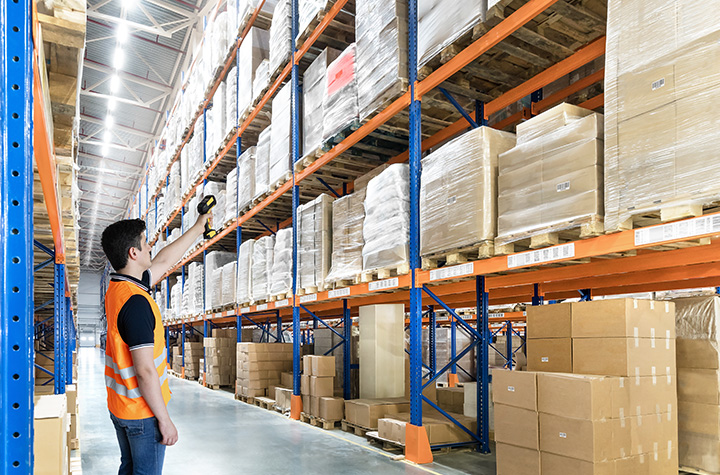
Warehouse and logistics teams rely on scanners for receiving, put-away, picking, packing, shipping and parcel processing. Auto-range barcode models allow workers to scan nearby picklists and labels positioned on elevated racks with one device.
RFID can improve cycle counting, tagged-item searches and shipment verification by capturing multiple tags without requiring employees to aim at each label.
Retail
Retailers can use handheld scanners for inventory management, price verification, checkout, returns and backroom operations. Rugged construction is particularly valuable in high-volume, warehouse-style and home-improvement stores.
RFID supports faster inventory counts, product searches and loss-prevention processes. A hybrid scanner lets employees process conventional barcodes while using RFID where merchandise has been tagged.
Healthcare
Healthcare organizations use barcode scanners to identify supplies, medications, equipment and laboratory items. RFID can support faster counts and help locate tagged medical assets, instruments and consumables. Any healthcare deployment should also evaluate cleaning protocols, tag placement and integration with clinical or inventory systems.
Datalogic PowerScan 9600 Product Comparison
| Feature | PowerScan 9600 | PowerScan 9600 RFID |
| Best fit | Rugged barcode workflows | Hybrid barcode and UHF RFID workflows |
| Data capture | 1D/2D barcodes; DPM or images on select models | 1D/2D barcodes and UHF RFID; images and OCR on select models |
| Mobility | Corded, Bluetooth or Datalogic STAR cordless | Cordless |
| Configurations | Standard Range, High Performance, Document Capture, Auto Range and DPX | Standard Range and Document Capture |
| Charging | Inductive charging on cordless models | Inductive charging |
| Primary advantage | Broad optical and connectivity choices | Barcode and RFID in one device |
| Main consideration | No RFID capability | Requires RFID tags, software and workflow planning |
Datalogic PowerScan 9600 Review
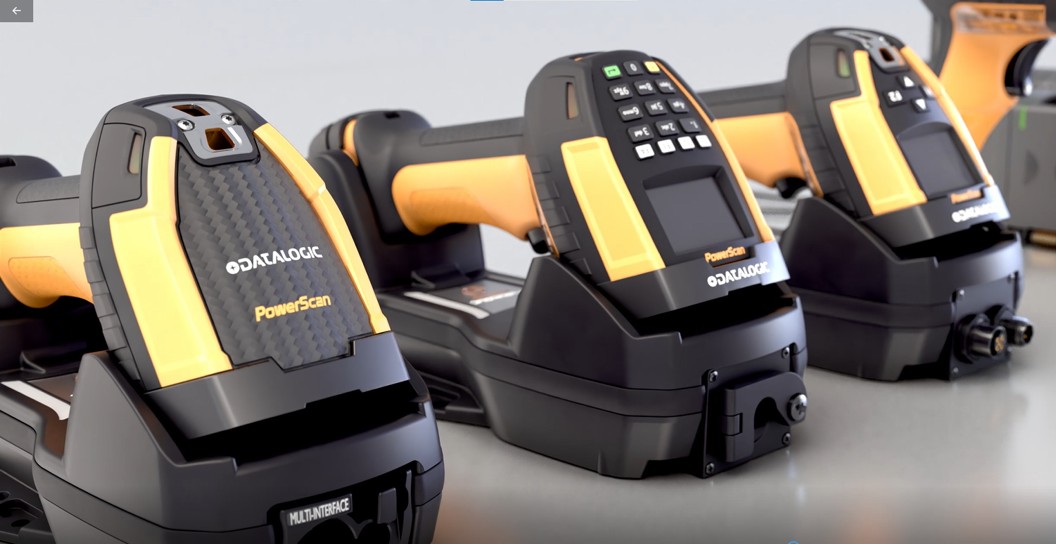
The rugged Datalogic PowerScan 9600 suits businesses that primarily use barcodes but need more durability, range or connectivity than a general-purpose scanner provides.
Datalogic rates the handheld scanner at IP65 and IP67 and for drops from 2.5 meters onto concrete. Its trigger is tested for up to 10 million activations. Standard Range, High Performance, Document Capture, Auto Range and DPX configurations support applications ranging from conventional barcode reading to elevated rack labels and direct part marks.
Buyers can choose corded PD9600, STAR cordless PM9600 or Bluetooth PBT9600 models. Modular interfaces include USB, USB-C, RS-232, Ethernet, EtherNet/IP and PROFINET. Cordless models use inductive charging, eliminating exposed contacts that can become dirty or damaged.
Best for: Barcode-intensive warehouse, manufacturing and logistics applications requiring ruggedness and configuration flexibility.
Buyer’s tip: Businesses planning or currently using RFID should compare the RFID version.
Datalogic PowerScan 9600 RFID Review
The Datalogic PowerScan 9600 RFID combines UHF RFID read-and-write capability with 1D and 2D barcode scanning in one rugged cordless device.
Its configurable RFID range reaches approximately one meter, supporting tagged-item searches, inventory verification and asset tracking. The Standard Range model handles barcode and RFID capture. The Document Capture model adds dual cameras, color image capture, OCR, an OLED display and a 16-key keypad.
Best for: Organizations adopting UHF RFID while retaining barcode-based processes.
Buyer’s tip: Remember compatible RFID tags and software
Which PowerScan 9600 Should You Buy?
Choose the standard PowerScan 9600 when barcodes remain the primary identifier, corded operation is required or the workflow needs Auto Range or DPX scanning.
Choose the PowerScan 9600 RFID when employees must read UHF tags, barcode and RFID tasks overlap or faster inventory counts and asset searches can generate measurable savings.
Frequently Asked Questions
It requires compatible UHF RFID tags for RFID functions. The correct tag depends on the item, material, read range and environment. It can still scan standard barcodes without RFID tags.
The scanner is designed for UHF RFID. NFC and high-frequency RFID use different technologies, so buyers should verify tag standards and regional frequency requirements.
Metal and liquids can reflect or absorb UHF signals. Specialized tags, careful placement and testing may be necessary around machinery, tools, beverages or medical supplies.
Test real labels and tags, read distances, damaged codes, peak volumes, wireless conditions, employee usability and integration with the intended host application.
Yes, especially when downtime could delay production or shipments.
One platform for today’s needs and tomorrow’s technology
The right data-capture technology should make work faster, more accurate and more reliable—not add unnecessary complexity. The biggest advantage of the PowerScan 9600 family is its ability to support different stages of an organization’s data-capture strategy.
For businesses that primarily rely on barcodes, the PowerScan 9600 provides an ultra-rugged platform with high-performance scanning, flexible connectivity, cordless mobility and wireless charging.
For businesses ready to incorporate RFID, the PowerScan 9600 RFID Series adds UHF RFID capabilities without requiring workers to carry a completely separate handheld device. That hybrid capability can make it easier to introduce RFID into existing workflows while continuing to support traditional barcodes.
Contact Barcodes, Inc.to learn more and get help finding the right handheld scanning solution for your needs.
Comparing RFID vs. Barcode Technology: Which is Best for Your Business?

In today’s fast-paced business environment, efficient inventory tracking and asset management are critical for success. Two of the most commonly used technologies for these tasks are RFID (Radio Frequency Identification) and barcode scanning. Both play essential roles in supply chain operations, retail, healthcare, and manufacturing, but they differ in functionality, cost, and efficiency. This article compares RFID vs. barcode technology to help you determine which is the best fit for your business.
Understanding Barcode Technology
Barcode technology has been a staple in inventory management for decades. It uses optical scanning to read printed barcodes, which store data in a linear or 2D format. Each barcode represents a unique identifier that corresponds to product or inventory information stored in a database.
Advantages of Barcode Technology:
- Cost-Effective – Barcodes are inexpensive to produce and print.
- Simplicity – Easy to integrate with existing inventory systems.
- Accuracy – Minimizes manual errors when scanned properly.
- Wide Adoption – Used globally across multiple industries.
Limitations of Barcode Technology:
- Requires Line of Sight – A scanner must be directly pointed at the barcode.
- Limited Data Storage – Traditional barcodes store minimal information.
- Manual Scanning – Each item must be scanned individually, which can be time-consuming.
View best-selling barcode scanners >>>
Understanding RFID Technology
RFID technology uses radio waves to transmit data between a tag (attached to an item) and a reader. Unlike barcodes, RFID tags do not require a direct line of sight and can be scanned from a distance. This technology is increasingly being adopted for real-time asset tracking, automated inventory counting, and supply chain visibility.
Advantages of RFID Technology:
- Faster Data Capture – Can scan multiple tags simultaneously.
- No Line of Sight Required – Readers detect tags even if they are hidden inside packaging.
- Greater Data Storage – RFID tags can store more detailed information.
- Improved Security – Can include encryption and authentication features.
Limitations of RFID Technology:
- Higher Initial Cost – RFID tags and readers are more expensive than barcodes.
- Interference Issues – Metal and liquids can disrupt signals.
- Integration Challenges – Requires specialized software and hardware.
| Feature | Barcode | RFID |
| Cost | Low | Higher initial investment |
| Scanning Speed | One at a time | Multiple at once |
| Line of Sight | Required | Not required |
| Data Storage | Limited | More storage capacity |
| Durability | Can fade or tear | More resistant to damage |
| Interference | No issues | Can be affected by materials like metal and liquids |
View best-selling RFID readers >>>
Which Technology is Best for Your Business?
The choice between RFID and barcode technology depends on several factors, including budget, operational needs, and industry requirements.
- Retail & Small Businesses – Barcodes are typically the better choice due to their low cost and ease of use.
- Warehousing & Logistics – RFID can streamline large-scale inventory tracking and reduce human labor.
- Healthcare & Pharmaceuticals – RFID ensures better tracking of medical supplies and patient records.
- Manufacturing & Automotive – RFID enables real-time asset tracking and quality control.
Conclusion
Both RFID and barcode technology have their unique strengths and limitations. Barcodes remain a cost-effective and widely used solution, while RFID provides faster, more efficient tracking with greater automation potential. Businesses looking for low-cost inventory control may prefer barcodes, whereas companies requiring high-speed, real-time tracking should consider RFID.
Choosing the right AIDC solution depends on your specific business goals, operational scale, and budget. Let Barcodes, Inc. help evaluate your needs carefully, so that you implement the best tracking system to enhance efficiency and accuracy in your operations.
From Farm to Fork: Ensuring Food Safety with Effective Labeling
Food safety is a top priority for everyone involved in the food supply chain, from farmers and manufacturers to distributors, retailers, and ultimately, consumers. Contaminated food can cause serious illness, and preventing these outbreaks requires a multi-pronged approach. One critical element in this strategy is effective food safety labeling. The best food label printers are designed to meet the specific requirements of the food industry, offering advanced features that enhance food safety practices. Read further to learn the importance technology plays in ensuring accurate and efficient labeling practices.
Why Food Safety Labeling Matters
Food safety labeling plays a crucial role in safeguarding consumers from potential hazards. It allows for accurate tracking of food products throughout the supply chain, facilitating swift and targeted action in case of recalls or contamination concerns. Clear and consistent labeling also empowers consumers to make informed choices about the food they eat.
Here are some specific ways food safety labeling contributes to a safer food system:
- Traceability: Labels with essential information like batch numbers, expiration dates, and processing facilities enable tracing in the event of recalls.
- Allergen Awareness: Clear and accurate allergen labeling on food packaging allows consumers with allergies to make safe choices.
- Ingredient Transparency: Detailed ingredient lists on labels help customers with specific dietary needs or preferences make informed choices.
- Best-Before Dates: Best-before dates advise consumers when food maintains its optimal quality and safety.
- Instructions and Warnings: Labels can include instructions for proper handling, storage, and preparation of food.
Technology’s Role in Food Safety Labeling Accuracy and Efficiency
Label printer technology plays a vital role in ensuring the accuracy and efficiency of food safety. As North America’s leading provider of barcode and product labeling, mobile computing, and RFID solutions, Barcodes Inc. partners with the most trusted brands in the food service and grocery industry that offer unique food labeling features.
- Digital Printing Solutions: Advanced digital printing technologies facilitate on-demand printing of labels, allowing for real-time updates and increased flexibility. This reduces waste and ensures the most recent information is included on labels.
- Variable Data Printing: This technology allows for printing unique information like lot codes and expiration dates on each individual label, enhancing traceability and facilitating targeted recalls if needed.
- Label Management Software: Centralized software solutions streamline the creation, approval, and printing of food safety labels, fostering consistency and reducing errors.
- RFID (Radio Frequency Identification) Technology: RFID tags embedded in food packaging offer enhanced traceability as they can track food products throughout the supply chain in real-time.
SATO: Empowering Businesses with Food Safety Labeling Solutions
Not all label printers are created equal. SATO food safety label printers are a top-shelf choice in the food and grocery industry for their durability, resistance to moisture and temperature fluctuations, and crisp, clear label printing. Here are a few reasons SATO printers remain a top choice for food manufacturers and retailers:
Improved Efficiency: High-speed printing and easy integration with existing systems streamline labeling processes, reducing bottlenecks and improving overall productivity.
Enhanced Traceability: Accurate and legible labels facilitate effective tracking of food products throughout the supply chain, ensuring compliance with regulatory requirements.
Durability and Reliability: SATO printers are built to withstand tough conditions, ensuring uninterrupted operation in food production environments.
Versatility: The printers can accommodate a wide range of label materials and printing applications, meeting the diverse needs of the food industry.
SATO is the innovator behind DateRight™ Rotation Labeling, a solution to streamline food storage and rotation in food service outlets. The label incorporates seven color indicators that represent the days of the week, allowing for easy visual identification of expiring products and promoting FIFO (First-In, First-Out) inventory management.
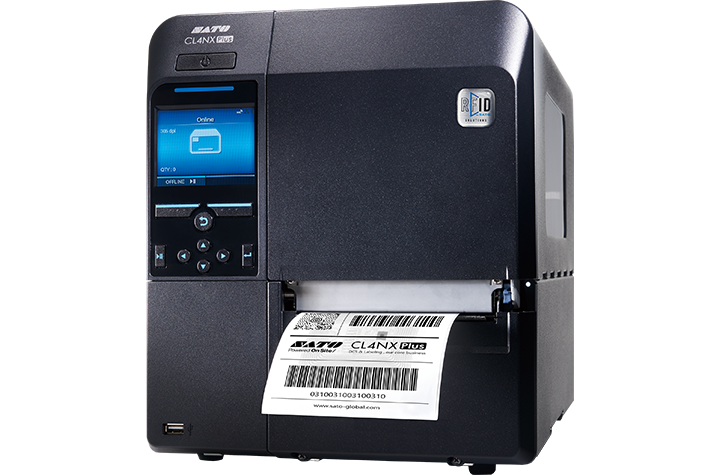
Let’s explore two popular food label printer models by SATO, the CL4NX Plus and CT4-LX printers.
SATO CL4NX Plus RFID Label Printer:
High-Speed Printing: The CL4NX Plus delivers rapid printing speeds up to 10 ips, reducing labeling bottlenecks and improving overall production efficiency.
UHF RFID Module: Print text and barcodes on UHF tags/labels and encode data in their embedded chips at the same time. The CL4NX Plus is even capable of checking RFID chips prior to encoding to verify their readiness to use and to prevent failures.
Flexible Media Handling: The printer can accommodate a wide range of label materials, including those with special coatings or adhesives, ensuring compatibility with various food packaging applications.
Advanced Connectivity Options: The CL4NX Plus offers seamless integration with existing systems, enabling efficient data transfer and label printing.
Learn more about the SATO CL4NX Plus.
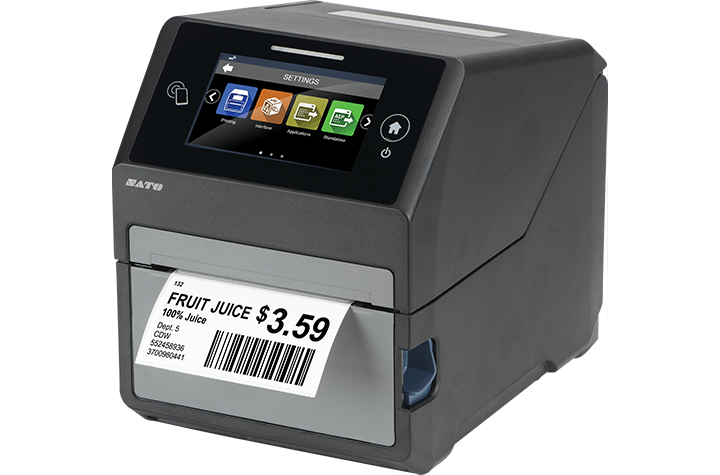
SATO CT4-LX Label Printer:
- Compact and Portable: The CT4-LX is a 4-inch compact and portable printer, making it ideal for mobile labeling applications in food production facilities.
- Patented Label Waste Prevention: SATO’s patented label waste prevention feature helps minimize label waste, contributing to cost savings and environmental sustainability.
- High-Resolution Printing: The printer delivers clear and legible labels, ensuring accurate product information and traceability.
- Wireless Connectivity: The CT4-LX offers wireless connectivity options, enabling mobile workers to print labels from remote locations.
Learn more about the SATO CT4-LX.
By incorporating high-quality food label printers like the SATO CL4NX Plus RFID and CT4-LX printers into their operations, businesses can enhance food safety labeling practices, improve efficiency, and ensure compliance with regulatory standards. Barcodes, Inc. is a leader in supply chain solutions, offering high-quality thermal printers and compatible labels specifically designed for unique industries. For help finding the right labeling solutions for your business, contact Barcodes Inc. today.
Mobile Devices Revolutionizing Retail & Manufacturing
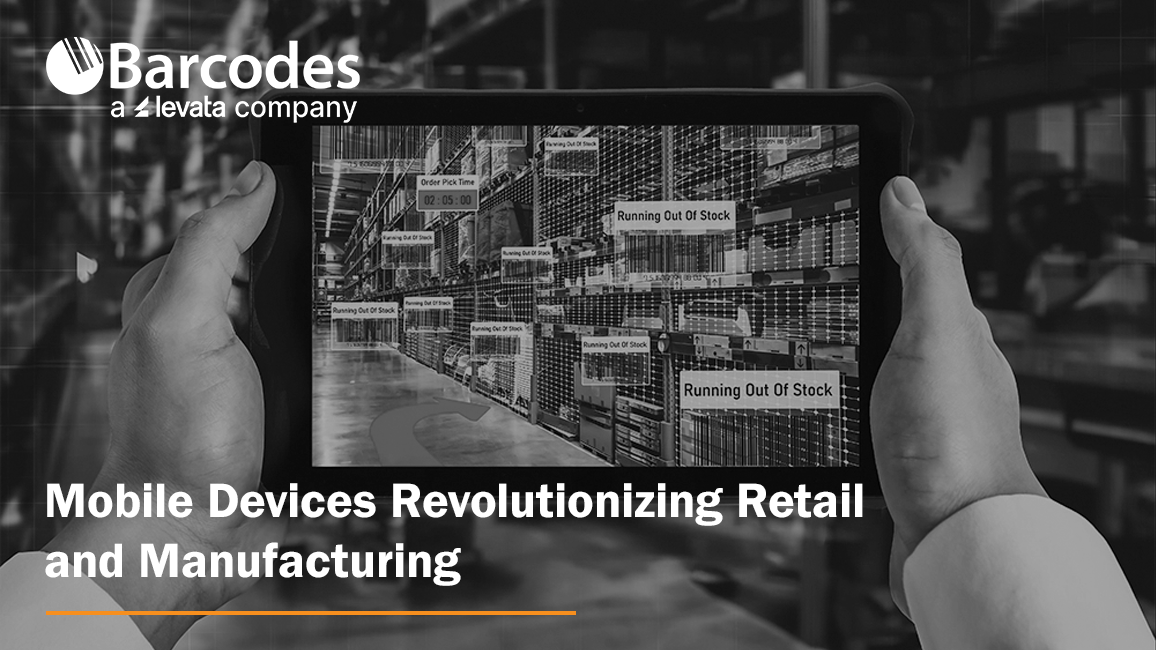
Enterprise mobility has rapidly evolved, driven by technological advancements and changing business needs. Organizations are increasingly embracing mobile solutions to streamline operations, enhance productivity, and improve customer experiences. Thanks to strong relationships with partners who share a passion for innovative technology trends in modern environments, Barcodes Inc. can share insights on the best mobile devices for retail and manufacturing industry operations.
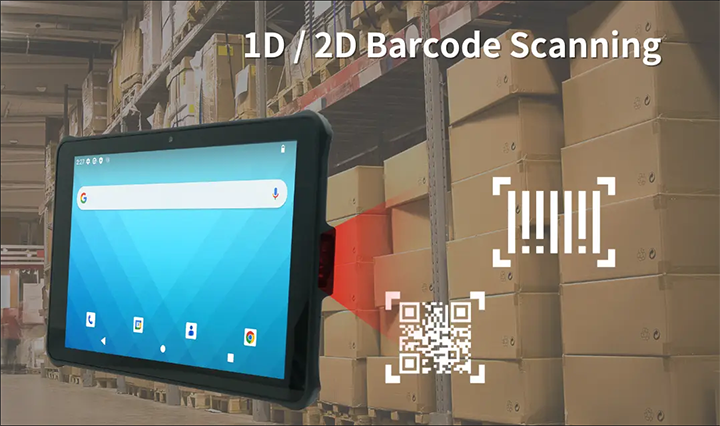
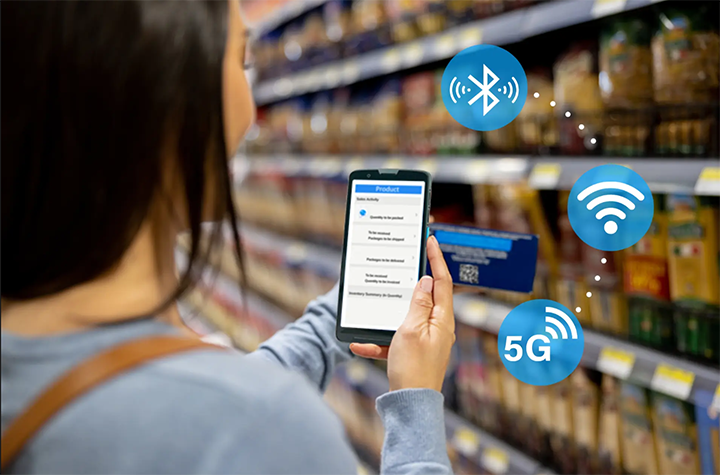
Unitech’s Android-powered mobile tablet RT112 and EA660 rugged handheld computer are leading the charge in the mobility transformation. These ultra-portable devices offer the durability, flexibility, and functionality needed to meet the challenges of modern retail and manufacturing environments. With 1D/2D scanning that enables barcode reading at distances of up to 10m (12m for the EA660 smartphone) with 5G and Wi-Fi 6E connectivity, users capture real-time data collection that instantly connects to backend systems that confirm in-stock quantities or process online customer orders. From the rigors of retail to the harsh elements introduced on the manufacturing floor, the versatility and durability of Unitech mobile computing devices deliver the performance retail and manufacturing businesses need.
A Rugged Mobile Tablet Built for Demanding Use
When it comes to mobile devices designed for efficiency and reliability, the Unitech RT112 rugged mobile tablet won’t disappoint. Its durable construction with IP67 protection and drop test resilience up to 1.5 meters earned it MIL-STD810H certification. It is uniquely designed for field service and industries such as manufacturing and retail.
Retail Applications:
- Inventory Management: Real-time stock tracking, cycle counting, and price audits can be efficiently performed using the RT112. Its large 10.1-inch display and intuitive interface facilitate quick data entry and retrieval.
- Point of Sale (POS): By integrating the RT112 with POS software, retail store employees are empowered to streamline checkout processes and reduce wait times on the shop floor with the ability and take payments anywhere.
- Customer Service: Equipped with barcode scanning capabilities, the RT112 can quickly access product information, check inventory levels, and process returns, improving overall customer service.
Manufacturing Applications:
- Warehouse Management: The RT112 can be used for tasks such as picking, packing, shipping, and improving order accuracy and efficiency. Its data capture capabilities ensure seamless integration with warehouse management systems.
- Quality Control: Inspection processes can be streamlined with the RT112, allowing for real-time data collection and analysis. Its rugged design enables it to withstand harsh manufacturing environments.
- Asset Management: Tracking and managing assets is simplified with the RT112. Its barcode scanning functionality and data collection capabilities ensure accurate asset information.
A Compact, Rugged Handheld Smartphone Mobile Workers Will Love
The Unitech EA660 rugged smartphone with 6-inch display is a powerful solution with similar functionality to its mobile tablet counterpart. It offers an even more compact solution for mobile workers in retail and manufacturing, enhanced by an ergonomic design and durable build that lends well to various applications.
Retail Applications:
- Mobile Sales: Sales associates can access product information, pricing, and inventory levels on the go, enhancing customer engagement and closing deals faster.
- Price Checks: The EA660 can be used to quickly verify product prices, preventing errors and improving customer satisfaction.
- Loss Prevention: Equipped with advanced data capture capabilities, the EA660 can assist in loss prevention efforts by tracking inventory and identifying discrepancies.
Manufacturing Applications:
- Work Order Management: Mobile workers can access work orders, update progress, and capture data on the EA660, improving operational efficiency.
- Maintenance Management: Field service technicians can use the EA660 to access equipment information, troubleshoot issues, and schedule repairs.
- Supply Chain Management: The EA660 can be used to track shipments, manage inventory, and optimize logistics operations.
- Safety and Compliance: push-to-talk capabilities offer critical communication in emergencies, and safety applications monitor environmental conditions and alert workers to hazards.
Mobile Devices: The Backbone of Retail and Manufacturing Success
As the retail and manufacturing industries continue to evolve, the role of durable, high-performance mobile devices will only become more critical in driving success and innovation. In retail, mobility devices streamline inventory management, improve customer service, and offer flexible POS solutions. In manufacturing, rugged tablets and handheld computers deliver the durability, reliability, and functionality required to manage workflows, collect data, and ensure safety in challenging environments.
If you’re interested in exploring the Unitech RT112 tablet or EA660 handheld mobile computer, plus other mobile solutions from Barcodes Inc., contact us today.
Grow Your Business With Enhanced Shipping Labels
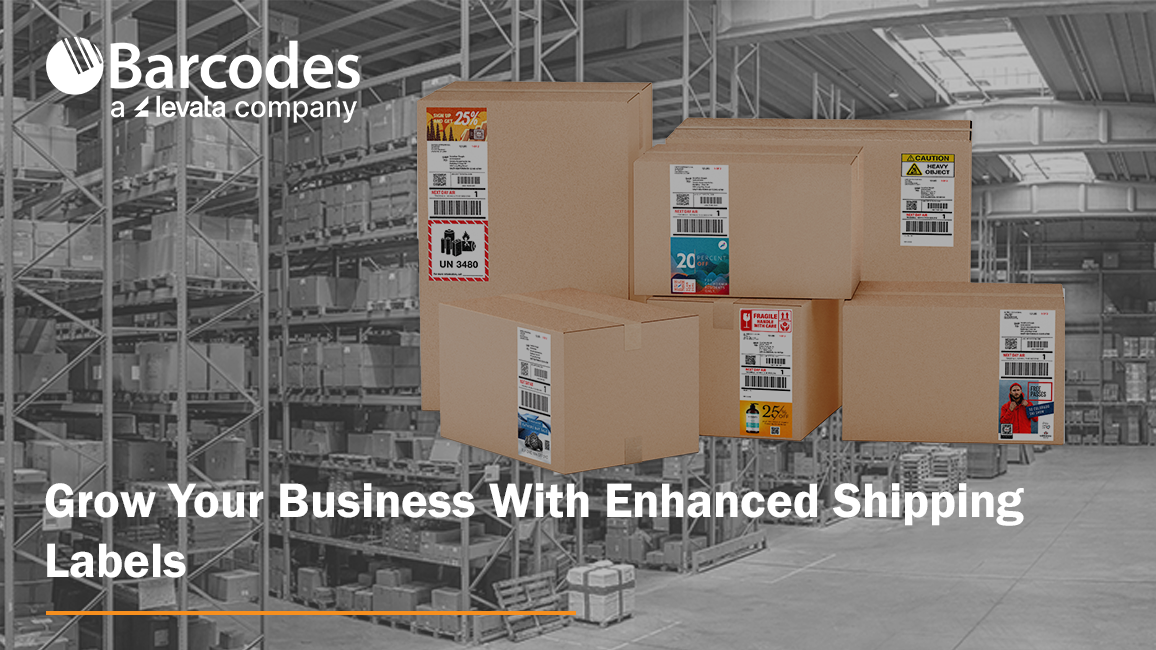
In the dynamic world of retail and ecommerce, product packaging is more than just a container, it’s a crucial element of your brand’s identity and a powerful tool for attracting and retaining customers. With increasing competition and discerning consumers, businesses need to take advantage of every opportunity to increase customer engagement. Enter Epson Label Boost software, a revolutionary tool designed to transform the way you create and manage labels, ensuring your products not only stand out but also convey the right message to your customers. Paired with Barcodes Inc. color label printers and labeling supplies, Label Boost reimagines the possibilities for shipping labels.
How Do Integrated Secondary Labels Work?
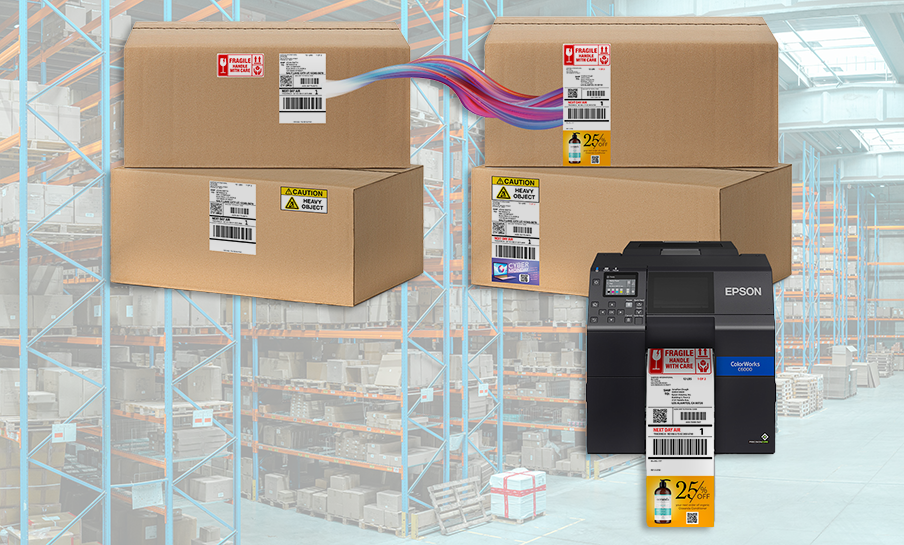
Integrated labels transform your existing black-and-white shipping labels by adding vibrant, full-color elements such as coupons, targeted ads, and secondary labels for regulatory or shipping-and-handling information. You can also emphasize critical details, like parcel count or expedited shipping, to ensure accuracy and prompt delivery.
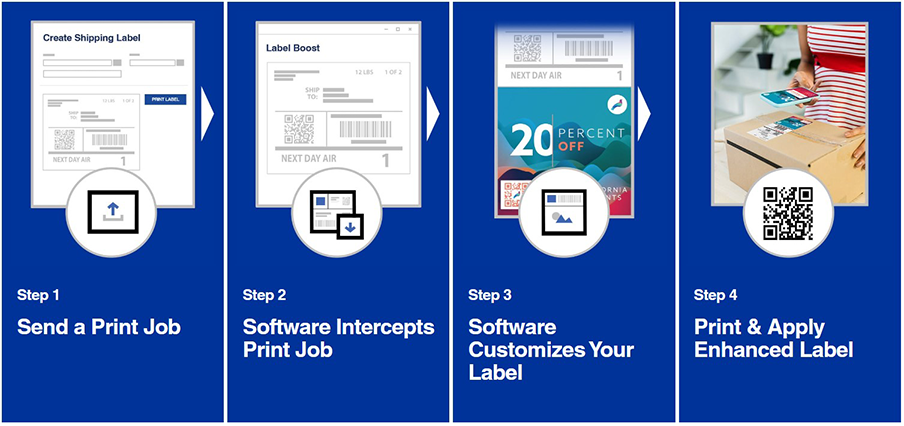
Epson Label Boost is a software solution designed for effortless integration. It allows you to keep the bulk of your label creation process unchanged, making modifications only at the final step before printing. This software works seamlessly with your existing shipping software, ensuring uninterrupted delivery operations. Label Boost is compatible with most Epson ColorWorks® printers, guaranteeing that your labels are printed with exceptional image quality that enhances your brand.
Benefits of Integrated Messaging on Shipping Labels
1. Better Brand Image
A cohesive and attractive brand image is vital. With label-enhancing software like Epson Label Boost, businesses can design labels that are consistent with their brand’s aesthetics, ensuring that every product looks professional and aligned with the overall brand strategy.
2. Grow Sales & Customer Retention
Boost sales and customer retention by incorporating marketing messages and promotions on shipping labels, transforming each package into a dynamic touchpoint that engages customers and incentivizes repeat purchases.
3. Increased Workflow Efficiency
Simplifying your label printing processes will save you time and resources. By printing shipping details, critical shipping notices, and marketing promotions all on one label, you’ll cut manual data entry, reduce chances for mistakes, decrease workflow steps, and reduce labeling supplies.
4. Cost-Effective Printing
The ability to produce high-quality labels in-house reduces the need for outsourcing, resulting in cost savings. Additionally, the software’s efficiency and integration capabilities mean lower labor costs and increased productivity.
5. Targeted Campaigns with Customization & Personalization
Consumers appreciate products that feel tailored to them. With Epson Label Boost, businesses can easily produce customized labels for special promotions, seasonal products, or personalized marketing campaigns. This level of customization helps to engage customers and build brand loyalty.
6. Compliance and Accuracy
For industries with stringent labeling requirements, such as food and pharmaceuticals, Epson Label Boost ensures that all necessary information is accurately presented. This helps in meeting regulatory standards and avoiding costly compliance issues.
Start Elevating Your Brand Today
At Barcodes Inc., we’re more than a label printer and supplies provider, we’re an end-to-end supply chain and enterprise mobility services leader. Through our partnership with Epson, we’re proud to offer Label Boost as an integrated shipping label software solution that offers our customers a comprehensive tool that can elevate your brand, streamline your processes, and save you money. Whether you’re a small business or a large enterprise, Epson Label Boost provides the tools you need to create professional, high-quality labels that make a lasting impression.
Contact Barcodes Inc. today to learn more about how to improve brand identity, product visibility, customer retention, and compliance.
Rugged Mobile Computing Solutions for the Most Challenging Environments

With the dynamic conditions found in logistics, transportation, warehousing, and field services, there’s no room for error. You need reliable, efficient technology that can keep up with the demands of your industry. Barcodes Inc. excels in providing businesses operating in fast-paced environments with top-tier mobile computing solutions. The Honeywell CT47 Rugged Mobile Computer stands out as a powerful solution designed to meet the needs of businesses serious about device lifecycle, security, and durability. Let’s explore what makes the Honeywell Ultra-Rugged CT47 a game-changer in mobile computing.
Designed for Convenience in Tough Environments
For operations that journey wherever business takes them, phone-sized mobile computers are highly appealing due to their portability and convenience, allowing employees to carry powerful computing tools in their pockets. Compact devices like the Honeywell CT47 facilitate real-time data access and communication, enhancing productivity and responsiveness in any environment.
The ultra-rugged Honeywell CT47 is built to withstand the harshest environments. Whether it’s extreme temperatures, drops, or exposure to dust and water, the CT47 can handle it all.
- The CT47 earned an IP67 rating, meaning it is completely protected against dust and can withstand immersion in water up to 1 meter deep for 30 minutes.
- Drop-tested from heights of up to 1.8 meters (6 feet) onto concrete, ensuring durability in the most challenging conditions.

Engineered for Enterprise Mobility
Enterprise mobility solutions are tailored to enhance business efficiency and productivity. Underneath its tough exterior, the Honeywell CT47 is powered by advanced technology that ensures the best in mobility.
- Operate on a solid, secure foundation. Security is a top priority in today’s digital landscape. Honeywell’s Mobility Edge platform offers robust security features such as device encryption, secure boot, and regular security updates to protect sensitive data from unauthorized access and cyber threats.
- Work smarter. With a powerful, cloud-based Operational Intelligence suite, you can prevent issues before they happen and lower total cost of ownership.
- Work faster. Lightning-fast processing speeds enable seamless multitasking and rapid data processing. Battery life won’t slow you down, either. This device can last through long shifts, and it comes with a high-capacity, hot-swappable battery that ensures continuous operation throughout the day.
- Superior Scanning Capabilities. The Honeywell CT47 boasts a best-in-class N6703 2D scan engine, delivering fast and accurate barcode scanning, even in poor lighting conditions or with damaged barcodes. Capture data from 3 inches up to 80 feet away.
- Advanced Connectivity Options. A wide range of connectivity options include the latest 5G and Wi-Fi 6E technology for seamless connectivity indoors and outdoors. It ensures high bandwidth and low latency for transport, delivery, and warehouse workers, maintaining reliable uptime.

Versatile Applications
The Honeywell CT47 is versatile and adaptable, making it suitable for various industries and applications. In retail, it can be used for point-of-sale transactions, inventory checks, and customer service. In logistics, it can streamline warehouse operations, track shipments, and manage deliveries. In field services, it enables real-time communication, job tracking, and data collection.
Explore the Future of Mobile Computing
Specializing in cutting-edge mobile computing devices, such as mobile-phone sized computers, Barcodes Inc. ensures that businesses can operate seamlessly in dynamic, fast-paced environments. With its robust design, high-performance specifications, superior scanning capabilities, and advanced connectivity options, the Honeywell CT47 Mobile Computer is an invaluable tool for industries that require reliable and efficient mobile computing solutions. Explore the future of mobile computing with the Honeywell CT47 and experience the difference in your business operations.
Brady V4500 Scanner: Precision and Durability in Barcode Scanning
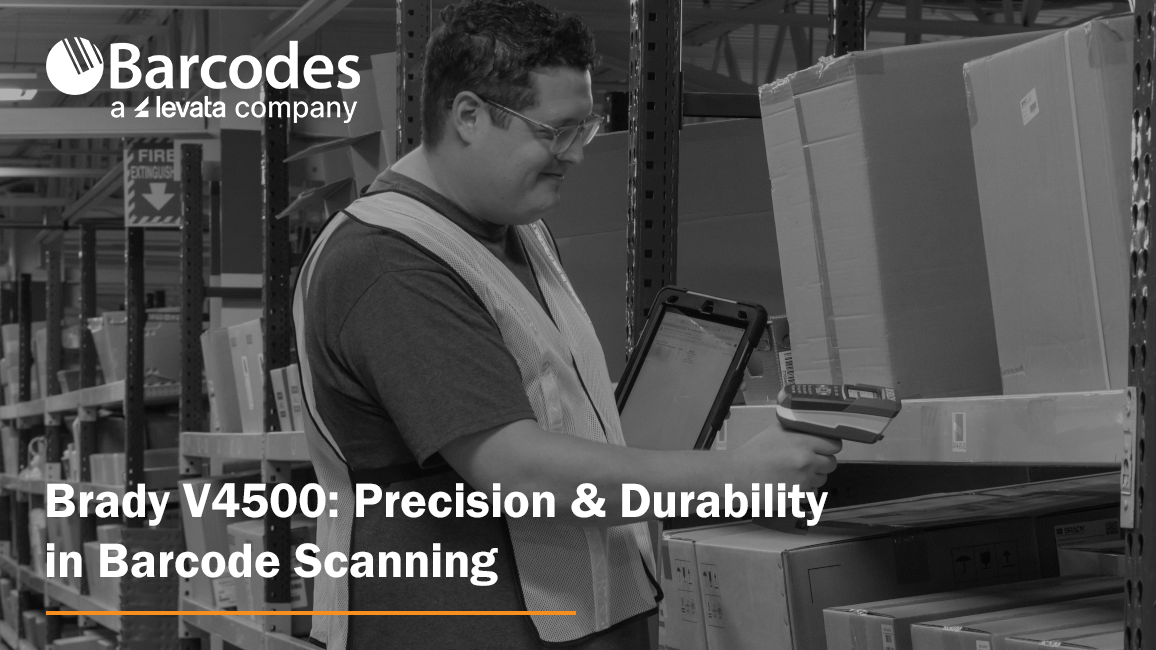
Barcodes Inc. provides comprehensive solutions like the Brady V4500 barcode scanner to help organizations with unique barcode scanning requirements streamline their workflows and enhance operational efficiency. By incorporating advanced scanning technology and durable design, the Brady V4500 enables accurate and rapid barcode scanning for even the most difficult to scan barcodes, reducing errors and saving time. Barcodes Inc. ensures that businesses have access to top-tier equipment and expert support, facilitating seamless integration into existing systems and optimizing overall productivity.
What makes the Brady V4500 Scanner unique?
Barcodes Inc. boasts top-tier partnerships with leading manufacturers and distributors like Brady to provide the most effective solutions endorsed by our industry experts. These strategic collaborations ensure access to cutting-edge technology and high-quality products, like the Brady V4500 scanner. Tailored to meet the diverse needs of businesses, the Brady V4500 wireless Bluetooth programmable scanner is engineered to provide exceptional scanning capabilities in various settings, from warehouses and manufacturing floors to retail environments and healthcare facilities.
V4500 Barcode Scanner features
The wireless V4500 is designed for use in fast-paced environments with versatile barcode scanning requirements. In one robust scanner, give employees the capability to manage inventory, reprint barcodes, and execute packout tasks.
Scan the most difficult-to-capture barcode labels. With its state-of-the-art scanning technology, the Brady V4500 is a top choice for industries scanning hard-to-read surfaces that might otherwise require manual data input prone to error. Built with omni-directional scanning, the V4500 will capture high-speed, accurate scans off tiny labels, shiny barcode surfaces, and even curved labels applied to server cabling, laboratory assets, or wires. Without accurate data, inventory management, order fulfillment, and other critical business processes suffer.
Dependable durability in challenging environments. Engineered for tough environments, the V4500 scanner boasts a rugged construction that can withstand drops, dust, and moisture. Its durability ensures long-term reliability, reducing the need for frequent replacements or repairs. How rugged? It can resist up to 250-pound crushes, 6-foot drops, and military-grade shocks. Now that’s tough!
Employees work faster & smarter with uninterrupted convenience. Users love the intuitive interface right onboard to view and swap settings. Your staff will appreciate its lightweight, ergonomic form that reduces user fatigue during high-volume scanning tasks, possible with all-day battery life covering a full shift and over 75,000 scans.
Save money with a scanner customized for your operations. When you invest in a high-quality scanner like the V4500, the long-term benefits of reduced errors, increased efficiency, and durability create cost-effective benefits for businesses.

Popular applications of the Brady V4500 Scanner
Retail: In retail environments, the V4500 scanner facilitates quick and accurate checkout processes, inventory management, and price verification. Its ability to read damaged or poorly printed barcodes ensures smooth operations even during peak times.
Warehousing and Logistics: The rugged design and high-resolution scanning capabilities of the V4500 make it ideal for use in warehouses and logistics centers. It aids in tracking inventory, managing shipments, and optimizing supply chain operations.
Healthcare: In healthcare settings, accurate data capture is critical. The V4500 scanner helps ensure the correct identification of patients, medications, and medical records, enhancing patient safety and operational efficiency.
Manufacturing: The V4500’s durability and precision are valuable in manufacturing environments, where it can be used for tracking parts, managing production processes, and ensuring quality control.

The Brady V4500 stands out as a powerful tool for businesses seeking to improve their barcode scanning capabilities. With its advanced technology, robust design, and versatile applications, the V4500 offers significant benefits in terms of efficiency, accuracy, and cost-effectiveness. Whether in retail, warehousing, healthcare, or manufacturing, the Brady V4500 is a reliable choice that can enhance your operations and drive productivity. If you’re in the market for a barcode scanner that combines performance and durability, the Brady V4500 is definitely worth considering. Contact Barcodes Inc. to learn how to deploy comprehensive barcode scanning technology in your operations.
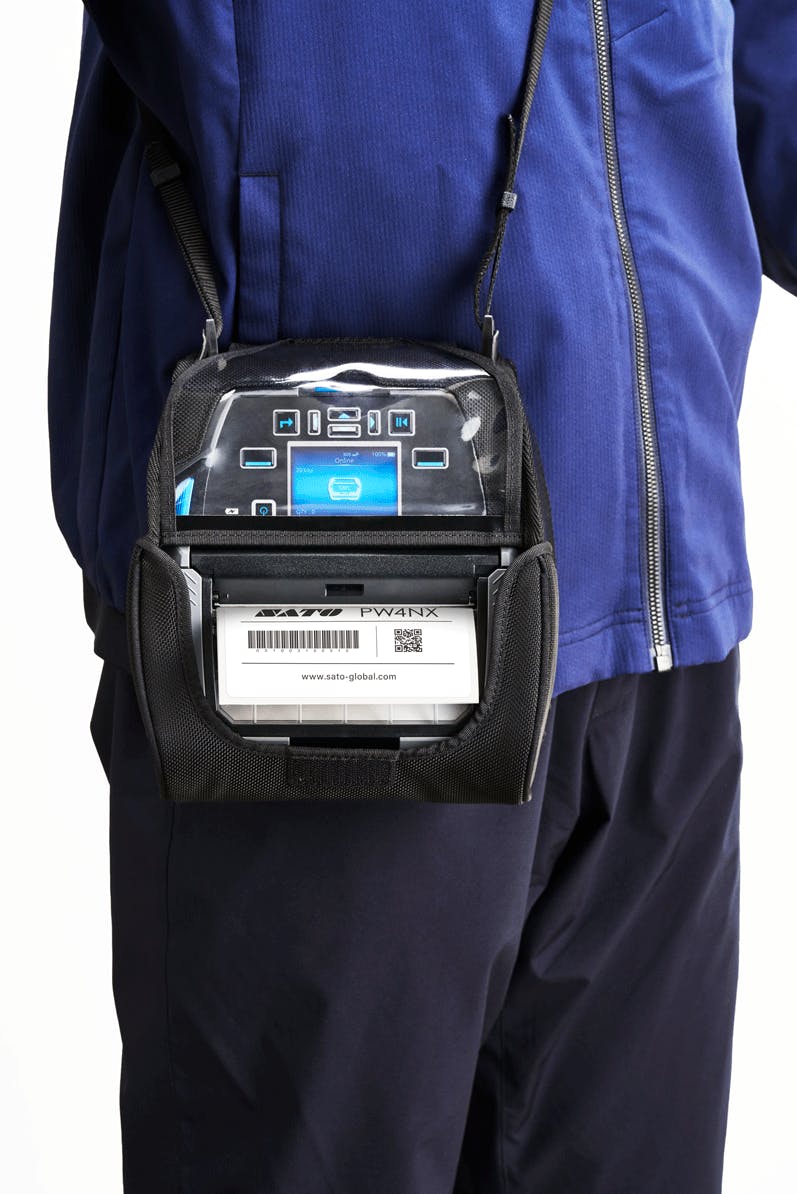
Transform Warehouse and Distribution Labeling With the SATO PW4NX Mobile Barcode Printer
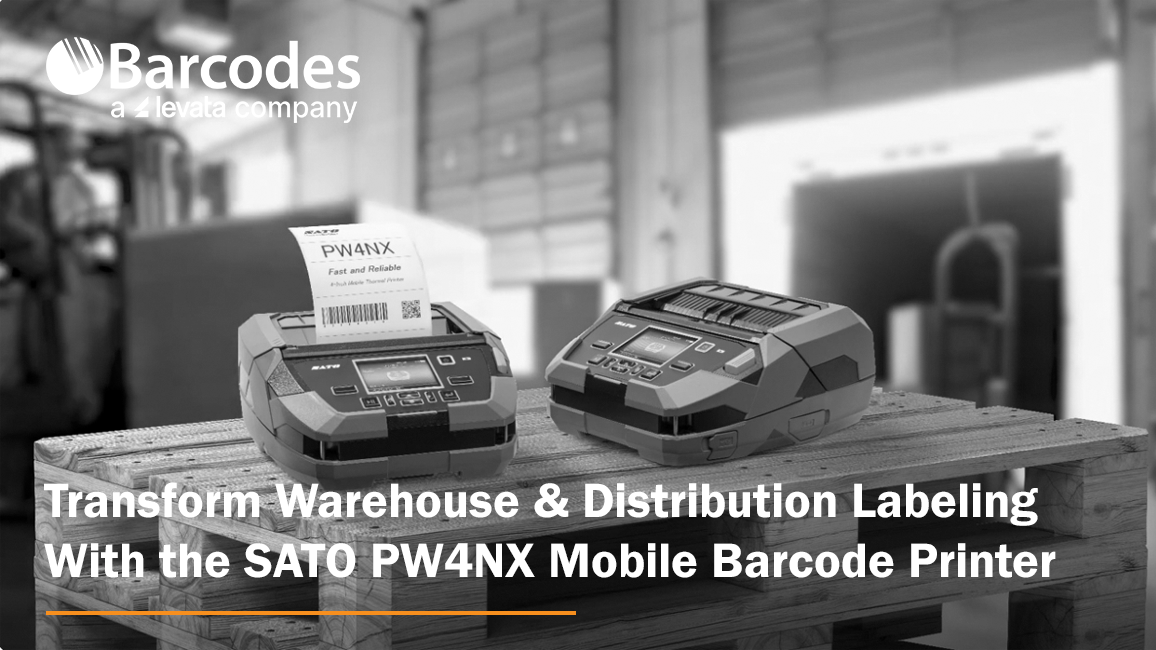
Each stage of the logistics chain, from inventory management to shipment tracking, is vital for ensuring smooth operations and timely deliveries. For a robust printing solution that streamlines warehouse inventory labeling, enhances distribution center label printing, and optimizes route and transportation labeling, Barcodes, Inc. recommends the SATO PW4NX mobile thermal printer.
Key Features of the SATO PW4NX Label Printer:
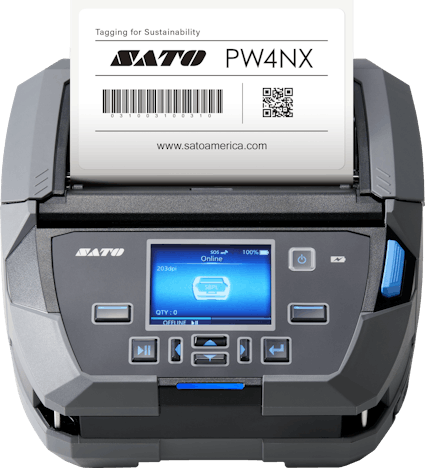
- Compact footprint ideal for mobile printing features an easy-to-read 2.4†color display
- Rugged design built to survive can withstand up to 7-foot drops
- IPS54 rated against dust and water
- Remote management enabled, plus connect to a barcode scanner or other peripherals for elevated workplace mobility
- Print 4-inch text and barcode labels in crisp, high-definition detail
- Industry-leading 6 ips print speed
- Choose from multiple label modes: continuous, tear-off, cutter, dispense, or linerless
- Optional forklift adapter
- A true side-kick that troubleshoots issues through self-diagnosis
Enhancing Warehousing Operations
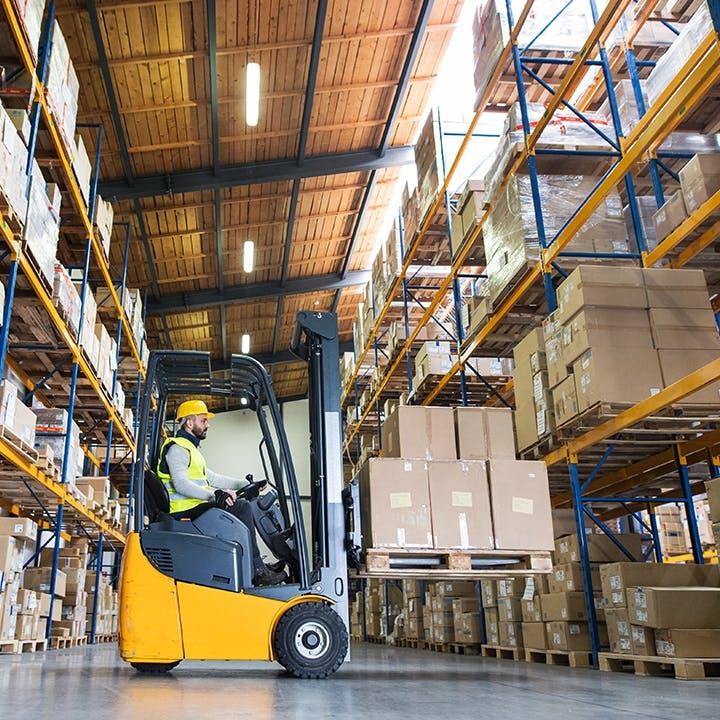
The SATO PW4NX is engineered for easy forklift mounting, enabling warehouse operators to print labels on-demand directly from their forklifts. This integration removes the need for manual label printing stations, saving time and enhancing workflow efficiency. With the 4-inch PW4NX label maker, forklift operators can swiftly generate labels for inventory items, pallets, and locations, minimizing downtime and boosting productivity.
Optimizing Distribution Center Depot Labeling
Distribution centers often handle a wide variety of products destined for various destinations. The PW4NX offers customizable label designs, allowing distribution centers to create labels tailored to their specific needs. From depot identification labels to shipping destination tags, the PW4NX enables distribution centers to maintain consistency and clarity in labeling, reducing errors and confusion during sorting and routing processes.
Streamlining Route and Transportation Labeling
On-demand label printing for shipment preparation is essential for ensuring timely deliveries and accurate routing. The PW4NX mobile label printer enables logistics personnel to quickly generate shipping labels, packing slips, and routing tags as needed. With the ability to print labels on-the-fly, transportation operations can adapt to changing demands and expedite the shipment preparation process, reducing turnaround times and improving customer satisfaction.
Compliance Labeling for Regulatory Requirements:
In the transportation industry, compliance with regulatory standards is non-negotiable. The PW4NX label printer supports compliance labeling with customizable templates for barcoded shipping labels, hazardous materials warnings, and other required information. By ensuring adherence to regulatory requirements, organizations can avoid fines and penalties while maintaining the integrity of their supply chain operations.
Popular Industry Applications
- Manufacturing
- Supply Chain
- Transportation + Logistics
- Automotive
- Retail
- Horticulture
- Aerospace
- Government
- Law Enforcement
- Utilitites
The SATO PW4NX is a versatile printing solution that addresses the unique challenges of warehousing, distribution center depot labeling, and route and transportation labeling. With its forklift integration capabilities, customizable label designs, durability, and on-demand printing capabilities, the PW4NX empowers organizations to optimize their operations, increase efficiency, and deliver superior customer service in today’s dynamic logistics landscape.
Contact Barcodes, Inc. to learn more about rugged label printers like the SATO PW4NX
Cab SQUIX 4 M: The Best Label Maker for Small Label Printing
Navigating the vast array of label printers to meet your specific needs can be overwhelming, especially when seeking a solution for printing very small labels on diverse materials. If rapid, small label printing for industrial operations is what you need, then simplify your search with the Cab SQUIX 4 M small label printer. Exclusively designed for very small label printing, The Cab SQUIX 4 M is a compact, yet powerful, label printer engineered for precision, speed, and quality printing on any material.
The Power of Precision Labeling
The SQUIX 4 M industrial label maker is engineered to tackle all your printing needs with precision and ease. Whether you’re working with materials wound on rolls or reels, or even fanfold configurations, the SQUIX 4 M excels, making it the ultimate choice for versatility. Its capability to handle very small labels, as tiny as 3mm in length and under 25mm wide, sets it apart, ensuring no detail is overlooked. Plus, with remarkably consistent print registration, you can trust in professional-quality results every time you hit print.
Versatility at Its Core
From label application for printed circuit boards (PCB), type plates, or on cardboard shipping boxes, the Cab SQUIX 4 M Label Printer can accommodate a variety of labeling needs on multiple materials – even very small labels or slim continuous materials such as pressed shrink tubers. Width-adapted print rollers are provided, requiring no additional adjustments for slim materials. With support for a wide range of label types and sizes, it lends itself to any industry, including automobile and aviation component manufacturing where cable cover barcode labels are commonly used. Plus, high-speed printing up to 300 mm/second with 300 dpi print resolution ensures that you can get the job done quickly, without sacrificing quality.
Compact Yet Mighty
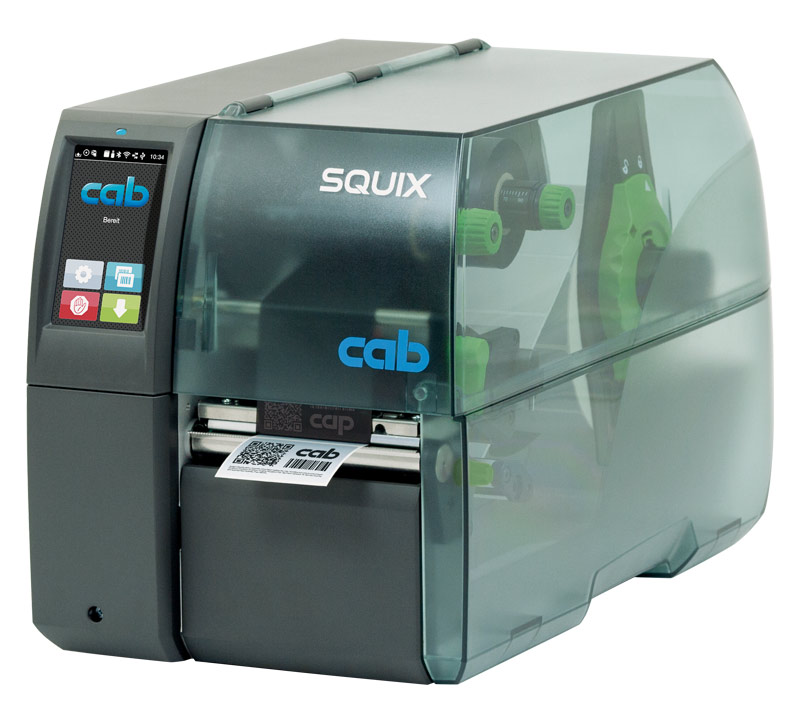
One of the standout features of the Cab SQUIX 4 M Label Printer is its rugged industrial composition in a compact design. Despite its small footprint, this printer packs a punch in terms of durability and performance. Its sleek design means it can fit seamlessly into any environment, but under the surface the print mechanics and chassis are made of high-quality materials that support long-lasting, continuous use. A center guided material guide offers additional printing accuracy and flexibility across label sizes and materials compared to left-aligned components.
User-Friendly Interface
Technology is at its best when it’s intuitive, and the C SQUIX 4 M Label Printer delivers on that front. Featuring a user-friendly interface, it’s easy to set up and operate, even for those who aren’t tech-savvy. With its simple navigation and straightforward controls, you can start printing professional-quality labels in no time.
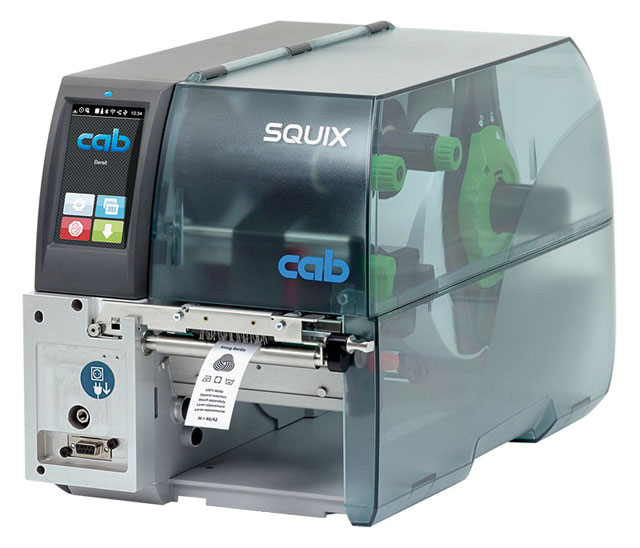
Enhanced for Textile Printing: The Cab SQUIX 4 MT
Do you have the unique requirement to print on fabric? The SQUIX 4 MT printer is expertly adapted to handle textile materials typically found on continuous rolls. With added features like a static brush and separator, the SQUIX 4 MT ensures smooth printing, overcoming high static levels for flawless results.
The SQUIX 4 MT’s versatility is underscored by its ability to print labels on common materials along with fabric. This dynamic printer seamlessly transitions between various materials and printing formats, ensuring it meets a diverse range of label printing requirements with ease.
The Bottom Line
If you’re looking for a versatile, small label maker capable of continuous roll, multi-material printing, look no further than the Cab SQUIX 4 M Label Printer. With its unmatched combination of power and precision, it’s sure to become an indispensable tool in your operations.
If you’re interested in exploring the Cab SQUIX 4 M further, or have any questions about label machines, feel free to contact us. Our team is here to help you find the perfect label printer solution for your business.