


Meet the Brother Titan Industrial Printer Series

As 2021 continues to unfold, Brother stands ready to support the evolving printing needs during the pandemic and beyond. Brother’s Titan Industrial Printers are purpose-built and designed for a powerful labeling experience. The Brother Titan Industrial Printer series delivers a complete printing solution in a box. Choose from a range of LCD and touch panel displays to make set-up a breeze for admins, see printer status quickly, or make selections on the fly. Select models are designed to have built-in full roll rewinders allowing users to safely preprint rolls of labels entirely inside the printer.
With an unpredictable future ahead, Brother remains a force to be reckoned with. The Brother Titan Industrial Printer series is among the smallest industrial label printer in the industry, has an easy design software for WYSISYG previewing, and cutter & peeler options for a print-and-apply solution to increase efficiency. The Brother Titan Industrial Printers can print labels as small as 0.78″ wide and 0.2″ long, fonts sizes 6 and under and Asian fonts less than 10 pts, serial numbers and rating plates with regulatory symbols and more.
Features & Benefits:
- Option of either LCD or full-color touch panel display
- Intuitive navigation buttons
- Space-saving foldable media cover
- Side media-view window
- Two USB 2.0 host ports
- Compact design
- High-capacity ribbons up to 600m
- Ethernet, USB, USB Host and RS-232 Serial
- Print speeds up to 14 ips
- Optional cutter & peeler
The Brother Titan Industrial Printer series deliver the quality barcode labels you need with the support you want. Ideally suited for harsh conditions and long-term warehouse use, you can count on speed and reliability, unmatched support, intuitive assembly and upfront affordability. Contact us today to choose which of the purpose-built Brother Titan Industrial Printers is right for you.
Seamlessly Accomplish Daily Operations with Honeywell’s CT40 XP Mobile Computer
With customers constantly moving between online and offline experiences, it’s important that there is an efficient solution that supports both. Honeywell’s CT40 XP Enterprise Mobile Computer is a one stop productivity solution for store associates and mobile workers. The device seamlessly accomplishes daily workflows from inventory lookup and in-store merchandising to last mile delivery. The CT40 XP is an essential, connected, all-purpose business tool designed for hours of comfortable, productive use without sacrificing functionality, performance or ruggedness.
The sudden explosion in ecommerce makes it imperative to empower associates and highly mobile workers with mobile devices that allow them to deliver speed, accuracy and visibility for customers. Built on Honeywell’s Mobility Edge platform, the CT40 XP is a smart, versatile enterprise mobile solution with a rugged design that enhances productivity, offers longer lifecycle and better security. Featuring Device Finder solution, the CT40 XP can easily locate lost or misplaced devices even when the batteries are drained after a certain period of time.
Select CT40 XP models are now available with disinfectant-ready housings and can withstand being cleaned regularly with a wide range of cleaning solutions.
Features & Benefits:
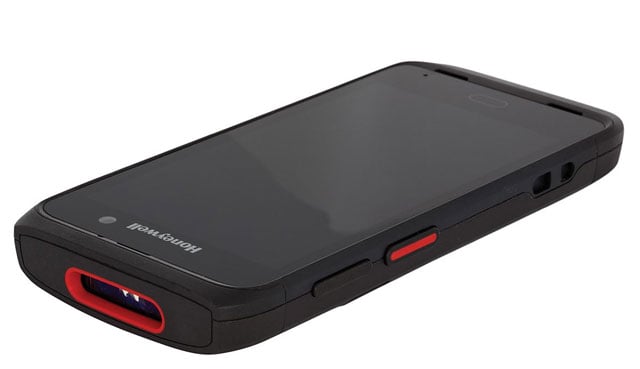
- 13-megapixel, auto-focus camera and 8-megapixel front-facing camera
- Incorporates a powerful 2.2 GHz Qualcomm Snapdragon 660 octa-core processor
- Easily upgradable to Android 11 (R), with a commitment to support Android 12 (S) and 13 (T), subject to feasibility
- Wireless Connectivity: Wi-Fi, Bluetooth, Integrated Near Field Communication (NFC), Push to Talk (PTT)
- Ability to capture barcodes from within a few centimeters to the retail top shelf up to 10 meters (32.8 feet)
- 1920 x 1080 pixel full high-definition display
- Warm swap capability
- Can survive repeated 1.8 meter drops
Whether in or out of the storefront, count on dependable mobility and connectivity with Honeywell’s CT40 XP Mobile Computer. From design to deployment to support, empower teams with a mobility solution that’s committed to increasing productivity, lowering operational cost and providing better customer service.
Choose Enterprise-ready mobility with Honeywell’s CT40 XP Mobile Computer. Contact us today to begin capitalizing on a dependable productivity solution.
3 Signs Your Operations Need to Speed Up Efficiency
In the age of instant gratification, speed and accuracy are imperial to keeping businesses competitive. However, the rising number of omnichannel shoppers has posed a challenge to maximizing speed and accuracy at the same time. Inefficient speed can be harmful to supply chains, which is why Barcodes, Inc. helps small and growing businesses recognize the signs of ineffective acceleration through the following signs:
- More inaccurate orders are leaving the loading dock
- Workers are consistently overwhelmed
- Inventory counts are rarely accurate or updated
While there are multiple optimization routes businesses may take to streamline operations, Barcodes, Inc. recommends starting with simplified inventory labeling.
Accelerate productivity and maximize accuracy with Zebra Mobile Printers
When inventory is readily and accurately identified, workers can quickly move products down the supply chain without wasting time. Zebra’s mobile printers go a step further by bringing optimized labeling to every point of the warehouse along with:
- Dramatic reduction in travel and wait times since workers no longer need to walk over to centralized printing stations.
- Long-lasting battery power that makes sure workers can count on continuous uptime throughout longer shifts.
- Faster printing speeds and easy media loading to eliminate any technical complications and downtime.
- Easy Bluetooth tap-to-pair for faster connectivity with your mobile devices.
- Pre-installed PrintSecure that protects any sensitive data printed through your device by warding off unauthorized users.
In their commitment to strengthening small and growing businesses, Barcodes, Inc. strives to lower operational costs with future-forward solutions that grow with your operations. See how you can speed up productivity when you contact Barcodes, Inc. for a free consultation of your workflows to target growth opportunities.
6 Key Performance Indicators Every Small and Medium Business Should Track
No matter the operation’s size, every business strives for better profitability and customer retention. To do so, companies often track several key performance indicators (KPIs) to monitor and forecast business growth. While there are many viable KPIs to track, small and growing businesses are often encouraged to monitor the following indicators:
- Order accuracy rates address how often orders are shipped with the correct products to the correct customer within the correct allotted time.
- Inventory turnover rates can record the fluctuating demands for any particular product while assessing your ability to move goods down the supply chain.
- Gross profit margins provide a clear picture of final profits after operational expenses such as labor, shipping, and the like are paid off.
- Cash flow forecast assists small businesses in predicting the costs of high demand, so they can make adjustments accordingly before profits are hindered.
- Funnel drop-off rates allow you to see how many potential customers abandon purchases to optimize business tactics.
- Market share clearly depicts how your business compares to competitors by measuring company sales with total industry purchases.
To track multiple KPIs in real-time without costly errors, Barcodes, Inc. recommends simplified and scalable digitization
Track it all with Barcodes, Inc. Digitization Solutions – built with Zebra’s Scanners
Unlike paper-based systems, digitized warehouse management curbs the likelihood of manual data entry errors, misplaced files, missed sales, late deliveries, and bottlenecks. Zebra’s enterprise-ready scanners successfully transfer all your crucial data into the digital system of your choice, all for…
- Faster order throughout
- Increased order accuracy rates
- Sharable data with minimized workflow disruptions
- Easy configuration for faster deployment
- Faster onboarding thanks to their intuitive user-friendly build
At Barcodes, Inc., digitization doesn’t have to be complicated. Take a closer look into how we make optimized inventory management seamless, simple, and scalable with Zebra’s rugged scanners. Contact us for a free assessment.
How to Maximize Visibility and Minimize Costs at the Same Time
Inventory management is a prominent struggle for most businesses, especially small and growing warehouses. Inconsistent stock counts can severely impact customer loyalty as they lead to surprise out-of-stocks, shipping delays, and misplaced products within the warehouse. Since the effects of improper inventory management can be detrimental, enhancing operational visibility is key to remaining competitive in today’s high-demand markets. To do so, businesses have sought to eliminate:
- Paper-based systems – Small data entry errors can yield enormous costly consequences over time.
- Disparate spreadsheets – Although digital spreadsheets are less likely to contain errors compared to paper-based systems, disparate logs can cause more confusion in the future as employees must navigate through several databases to find needed information.
As a Zebra Premier Solutions Partner, Barcodes, Inc. simplifies inventory management for small and growing businesses with Zebra’s adaptable mobile computers.
Increasing Visibility With Zebra Mobile Computers
Reduce the number of deployed devices and increase digital visibility when you optimize your inventory management system with Zebra. No matter which device you choose to integrate, Barcodes, Inc. closely assists you in connecting your workflows on a digitized platform, enabling:
- Streamlined data capture and processing – Capture barcodes and upload data immediately via your handheld computer to eliminate wait times for faster order fulfillment.
- Greater data security – Not only does Zebra’s fortified Android facilitate onboarding, but it also protects your data with government-grade encryption and recurring security patches.
- Sustained communication systems – Keep your teams unified with integrated push-to-talk capabilities along with long-range WiFi connectivity.
- Maximized uptime from day one – Barcodes, Inc. works alongside your team from design, to deployment, to ongoing support to make sure your visibility solution remains functional whenever and wherever you need it.
- Mobile device management – Barcodes, Inc. can help augment your IT staff by loading mobile device management software, pushing out updates and troubleshooting devices that are down in order to keep your mobile workforce fully operational.
Contact Barcodes, Inc. today to see how you can start optimizing your crucial tasks with technologies built for more efficiency and affordability.
How to Create a Printing Solution That Grows With Your Business
Compared to other prominent warehouse tools like mobile computers and scanners, labeling systems are relatively low-cost, yet they play a vital role in securing inventory accuracy for proper stock counts. As supply chains become more fast-paced, growing businesses may require a scalable and easy-to-use identification solution to:
- Eliminate manual data entry
- Prevent downtime from printer jams
- Maximize printhead lifespan
- Shave off wait times from printing stations
To remain competitive in today’s demanding market, printing and labeling solutions must be adaptable, scalable, and cost-effective, much like Zebra’s Warehouse Printers featured in our video below:
Assessing Your Printing Solution
When evaluating your options, Barcodes, Inc. recommends that you consider the following questions:
1. Can printers handle sudden high printing volumes?
As seen in previous years, order demand can change drastically in a matter of days, automatically ruling out consumer-grade printers as an optimal choice. Enterprise-grade printers such as Zebra’s barcode label printers come in varying sizes to fit different workspaces while harnessing durable printheads, intelligent printing software, and trusted security to prevent breakdowns and cyberthreats during peak seasons. The result is a printing solution that can readily handle greater demand without compromising uptime.
2. Can printers be mobilized?
While industrial and desktop printers can successfully deliver needed labels, they may not be the best mobility choice. Past studies have shown mobile printers to boost processing time by as much as 62% while reducing picking times by almost 50%. This frees up your staff to accomplish other important tasks faster while increasing printer availability without more wait times.
3. Which labeling supplies will I use?
Lastly, efficient printing systems heavily depend on your chosen consumables since they directly impact your hardware’s printhead. Inferior consumables can scratch printheads over time, leading to jams and downtime. On the flipside, smoother quality thermal ribbons protect printheads while retaining legibility in varying conditions, ultimately decreasing operational costs.   Â
As leaders in scalable optimization for big and growing businesses alike, Barcodes, Inc. is ready to assist you in navigating through these questions to create a tailored printing solution that matches your needs. Contact us today to see how you can begin your solution design for seamless deployment and maintenance.Â
Citizen Disinfectant-Ready Barcode Label Printers
Cleanliness and sanitation are very critical dynamics in healthcare, retail, restaurant, and hospitality; Citizen recognizes that and strives to provide the best-in-class customer service and safety.
With disinfecting products and solutions more readily available, it is important to promote a cleaner environment for customers and employees who must come in contact with products.
Citizen’s line of disinfectant-ready printers has been designed to allow for use of various readily available cleaning agents. Observing and implementing the below Cleaning & Care Instructions will play an important role in achieving best practices and results.
The following agents* are compatible with and can be used for cleaning Citizen disinfectant-ready barcode label printers:
- Ethanol 70%
- IPA (Isopropyl alcohol) 70%
- Oxydol 3%
- Sodium Hypochlorite Solution 0.05%
*No other cleaning agents, including the above agents used in concentrations other than those shown, have been tested by Citizen or approved by it for use in cleaning Citizen disinfectant-ready (or other Citizen) printers. Use of other agents or in different concentrations may impair printer performance and/or result in ineffective cleaning and disinfection and pose potential health and safety risks.
Citizen Disinfectant-Ready Barcode Label Printers
Citizen Disinfectant-Ready Printer Cleaning & Care Instructions
Important WARNINGS and Notes
- Unplug or turn off the printer prior to cleaning.
- Never spray or pour the cleaning agent directly onto the printer. The cleaning agent should be applied to a soft cloth, which can then be applied to the printer.
- The cleaning agent should be applied evenly and care should be taken to cover the entire surface to be cleaned.
- Strictly follow the cleaning agent manufacturer’s instructions (and CDC Guidelines*) for use of its product, including allowing sufficient time after application for the cleaning agent to achieve maximum cleaning and disinfection. Once achieved, cleaning agent residue can be removed by wiping with a damp cloth, ensuring no droplets remain on the printer.
- Do not mix cleaning agents.
- Cleaning agents, especially ethanol, which is extremely flammable, should never be used in proximity to high heat or open flame.
- Wear appropriate protective gear during the entire cleaning process to avoid potential adverse effects from contact with the cleaning agent or from its fumes. Citizen strongly recommends use of gloves, protective eyewear and masks that cover both the nose and the mouth.
- Ensure that others in the immediate vicinity of the cleaning are also properly protected or are moved a safe distance away from the printer for the entirety of the cleaning process.
*Centers for Disease Control and Prevention (CDC) guidelines for cleaning and disinfection, including cleaning agent use and information, can be found at CDC’s website: www.cdc.gov
For more information on the cleaning products, take a look a Citizen’s webpage here: https://www.citizen-systems.com/us/support/189/
If you have any questions regarding your Barcode Label Printing needs, please contact us here.
Are your barcode scanners COVID-19 ready?
Given the emphasis on infection control brought on by COVID-19, it is especially important that the devices workers are using are even more durable to the cleaners required to uphold infectious-disease control standards. Introducing the CR2700, Code’s fourth-generation barcode reader that combines nearly twenty years of market experience to meet the demands for shifting workflow and enhanced infectious control.
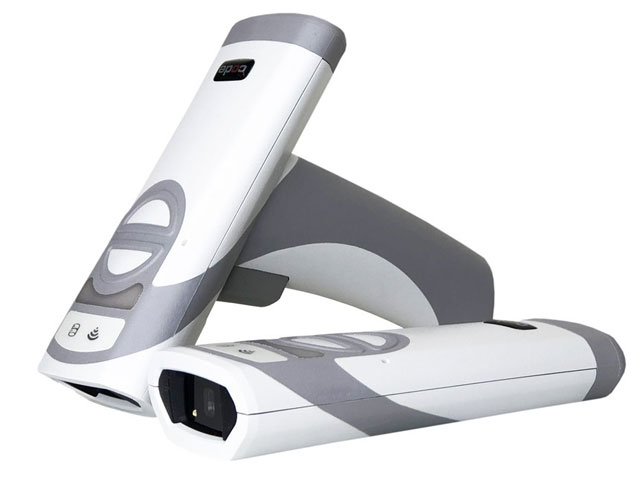
The CR2700 improves not only patient care but helps to keep nurses moving with a quick and easy routine disinfection, superior durability along with 6’ drop protection, and a proactive alert system for managing battery life. With the introduction of wireless (inductive) charging combined with seamless construction, an IP65 rating, and top-of-the-line CodeShield Plastics, the CR2700 can be quickly and completely wiped down with even the harshest chemicals. Wipe down the device in less than a minute and go with virtually no disruption to workflow.
Features & Benefits
- Inductive charging eliminates chemical corrosion caused by disinfectants
- PVC-Free CodeShield plastics stand up to harsh disinfectants
- Lightweight, ergonomic models in palm and handled configurations
- Smart battery shows battery health with a visible fuel gauge
- Using Bluetooth Dongle pair to any supported Android, iOS, or Windows computer, devices, or tablets
- IP65 rating seals out dust and moisture
With the standards for infectious-disease control adapting to the ever-evolving demands for shifting workflow and infection control, the CR2600 family of barcode scanners have been discontinued to make way for the latest and greatest CR2700 family.
Code Corporation knows healthcare barcode scanning and the CR2700 is the new gold standard. Shop the CR2700 online or contact your Barcodes, Inc. Account Manager for more information.
Error-free Printing with Honeywell’s PX940 Series
Distribution operations require dependable and durable industrial printers. Honeywell’s PX940 series takes industrial printing to a new level of accuracy and simplicity by providing customers with error-free precision printing intended to increase production efficiency and reduce operational costs. With integrated label verification technology and Operational Intelligence software, the PX940 industrial printer gives customers 100% readable printed barcodes, predictive analytics, and a lower overall cost of ownership.
You can expect extremely precise printing of up to +/-0.2 mm (0.0079 in) that virtually eliminates poor-quality, unreadable labels and barcodes. The smart printing capability allows end users to configure settings without the need of a host computer. With the inclusion of integrated label verification technology, the device checks and ensures that barcodes are accurate every time and instantly notifies you of pass/fail status and ANSI grade. The device is easy to use and maintain, with a color multilingual touchscreen interface and quick side-loading design.
The PX940 printer is ideal for transportation and logistics, pharmaceuticals and healthcare, shipping and distribution centers, industrial manufacturing, automotive parts suppliers, and applications that are regulated and require high precision and error-free printing.

Features:
- Thermal Transfer or Direct Thermal printing
- 3.5 inch color touchscreen LCD display
- All major 1D and 2D symbologies are supported
- Interfaces: USB 2.0 Host (x2), USB 2.0 Device, Ethernet, RS-232, Bluetooth, and Static NFC tag
- Void bad barcodes and a new label is printed
- Verification Mode: Pass/Fail and ANSI grades from 1-5
- Internal Real Time Clock
- Media Type: Gap, black mark, tag, hole, notch, or continuous
Honeywell’s PX940 series is a family of high-performing industrial printers that you can trust. Contact us to learn more about how the PX940 Industrial Printer can provide you with error-free precision printing.
Citizen Disinfectant-Ready Point of Sale Printers

Cleanliness and sanitation are very critical dynamics in healthcare, retail, restaurant, and hospitality; Citizen recognizes that and strives to provide the best-in-class customer service and safety. With disinfecting products and solutions more readily available, it is important to promote a cleaner environment for customers and employees who must come in contact with products.
Citizen’s line of disinfectant-ready printers has been designed to allow for use of various readily available cleaning agents. Observing and implementing the below Cleaning & Care Instructions will play an important role in achieving best practices and results.
The following agents* are compatible with and can be used for cleaning Citizen disinfectant-ready Point of Sale printers:
- Ethanol 70%
- IPA (Isopropyl alcohol) 70%
- Oxydol 3%
- Sodium Hypochlorite Solution 0.05%
*No other cleaning agents, including the above agents used in concentrations other than those shown, have been tested by Citizen or approved by it for use in cleaning Citizen disinfectant-ready (or other Citizen) printers. Use of other agents or in different concentrations may impair printer performance and/or result in ineffective cleaning and disinfection and pose potential health and safety risks.
Citizen Disinfectant-Ready Point of Sale Printers
Citizen Disinfectant-Ready Printer Cleaning & Care Instructions
Important WARNINGS and Notes
- Unplug or turn off the printer prior to cleaning.
- Never spray or pour the cleaning agent directly onto the printer. The cleaning agent should be applied to a soft cloth, which can then be applied to the printer.
- The cleaning agent should be applied evenly and care should be taken to cover the entire surface to be cleaned.
- Strictly follow the cleaning agent manufacturer’s instructions (and CDC Guidelines*) for use of its product, including allowing sufficient time after application for the cleaning agent to achieve maximum cleaning and disinfection. Once achieved, cleaning agent residue can be removed by wiping with a damp cloth, ensuring no droplets remain on the printer.
- Do not mix cleaning agents.
- Cleaning agents, especially ethanol, which is extremely flammable, should never be used in proximity to high heat or open flame.
- Wear appropriate protective gear during the entire cleaning process to avoid potential adverse effects from contact with the cleaning agent or from its fumes. Citizen strongly recommends use of gloves, protective eyewear and masks that cover both the nose and the mouth.
- Ensure that others in the immediate vicinity of the cleaning are also properly protected or are moved a safe distance away from the printer for the entirety of the cleaning process.
*Centers for Disease Control and Prevention (CDC) guidelines for cleaning and disinfection, including cleaning agent use and information, can be found at CDC’s website: www.cdc.gov
For more information on the cleaning products, take a look a Citizen’s webpage here: https://www.citizen-systems.com/us/support/189/
If you have any questions regarding your Point of Sale Printing needs, please contact us here.