


Barcoding News
Data tracking news, product updates, tips, and more
Socket Releases the SoMo 655 SDK

Socket has released the SoMo 655 SDK, offering developers control over several unique hardware features of the SoMo 655 handheld computer. The SDK(Software Development Kit) provides flexible control via Application Programming Interfaces so developers can optimize hardware features of the SoMo 655 for their specific application and end user environment.
Controllable hardware features supported by the SDK include:
- WLAN and Bluetooth wireless radios
- Socket Mobile CompactFlash barcode, RFID, and magnetic stripe readers
- Touch screen / backlight
- CompactFlash I/O and microSD slot management
- Audio, visual (LEDs), and vibrate notifications
- Audio volume and microphone
- Bottom connector pin-outs
- Power management / monitoring
Intermec Introduces the New CK3X and CK3R Mobile Computers
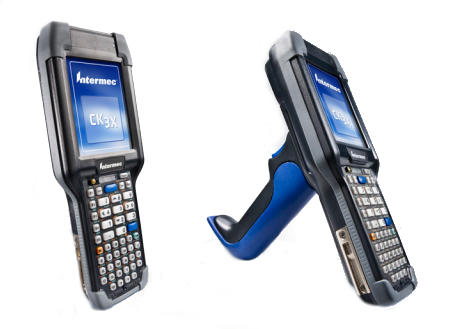 CK3X and CK3R Deliver Industry-Leading Performance, Best-in-Class Battery Life and an Easy Migration Option from Intermec’s Popular CK3B
Intermec has announced the Next Generation CK3Â Series of rugged mobile computers, offering one of the industry’s highest performing mobile computing options to date. For use in distribution center, manufacturing and retail operations, the CK3 Next Generation Series is comprised of two models – the CK3X and CK3R – which utilize a 1GHZ OMAP architecture to optimize workforce performance through industry-leading battery life, enhanced barcode scanning, superior device health monitoring and broad compliance for emerging industry standards such as HTML5.
The New Zebra Z-Band Ultrasoft Wristbands
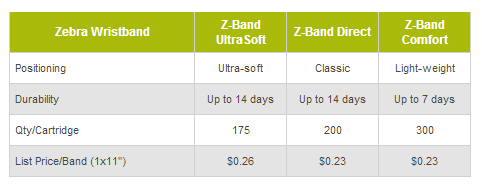
With Zebra’s new patent-pending Z-Band UltraSoft direct thermal adhesive wristband, healthcare providers can take a softer approach to patient identification.
Featuring a soft, flexible polypropylene and vinyl material, Z-Band UltraSoft is the softest direct thermal wristband in the market. Z-Band UltraSoft also offers excellent resistance to most hand sanitizers, supporting patient safety by insuring readable text and scannable barcodes for up to 14 days. Z-Band UltraSoft is being positioned as Zebra’s premium adhesive-closure wristband.
Z-Band UltraSoft is available in a cartridge for the HC100 printer in several size. For more details on the new Z-Band UltraSoft, contact us at Barcodes Inc.
Honeywell’s Dolphin 70e Black New Rugged Enterprise Hybrid Device
 Honeywell’s New Rugged Enterprise Hybrid Device Brings Smart Phone Looks, Ease of Use to Field Professionals, Logistics, Health Care and Retail Workers
- Pocket-Sized Device Scans, Accesses the Internet, Captures Data, and Can Withstand Drops, Dust and Submersion in Water
- Features Include Ruggedized Design, up to 12-Hours Battery Life, Enterprise-Grade Area-Imager for Scanning Barcodes
Consumer smart phones don’t last long in many field-based work environments – not because service contracts are too short, but because the phones aren’t tough enough to withstand drops on concrete, lack adequate battery life or don’t have enterprise scanning capabilities. Today’s mobile workers have a new option: Honeywell’s first-ever rugged Enterprise Hybrid Device , the Dolphin 70e Black.
The rugged smart device was created for traditional auto-identification and data capture customers who want something sleeker and lighter than a typical AIDC industrial device, but need something tougher than a consumer-grade phone. The Dolphin 70e Black is targeted to meet the needs of the growing mobile workforce, which is projected to reach 1.3 billion by 2015.
Add Barcode Scanning to Your Apple iPad, iPhone, or iPod with Socket
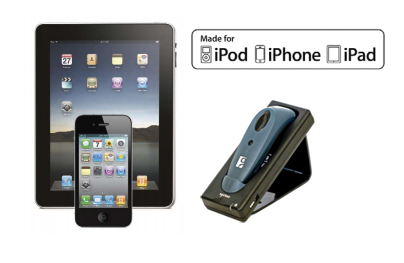 Smartphones and tablets have become commonplace in all business types. They offer advanced computing and wireless connectivity on the go whenever and wherever its needed. While they offer a lot of functionality to the average consumer, these devices can also be used in more professional settings to manage inventory, conduct sales, or track a customer base. Adding the ability to read barcodes to your iPad or iPhone can quickly turn it into a data collecting tool you can use for  a wide range of applications.
While there are many apps out there that turn the camera on your device into a barcode scanner, most users find that these apps are not able to keep up with consistent and volume of scanning an enterprise application requires. This is where the Socket line of cordless scanners are the perfect solution for any iOS device.
Datalogic is Now 40 Years Old!
 Datalogic is celebrating its 40th birthday. Thanks to Romano Volta’s vision and initiative, this small Auto-ID company that started out in a church rectory on the outskirts of Bologna, Italy, in 1972, is now a colossus with over 2,400 employees in 30 countries, more than 1,000 patents and a partner network that reaches every corner of the world.
This milestone was reached thanks to Datalogic’s constant commitment to delivering world-class, reliable and innovative solutions, which – over the past four decades – has led the company to the status it enjoys today as a global expert in Automatic Identification technology. “The key to our overall success and optimum sales growth year-on-year has first and foremost been our reputation for knowing our customers and understanding their needs,” stated Mauro Sacchetto, Datalogic Group’s CEO.
With a wide range of products from handheld scanners, mobile computers, and fixed readers, Datalogic has devices for any application.
Datamax Apex 3 Now Available with USB
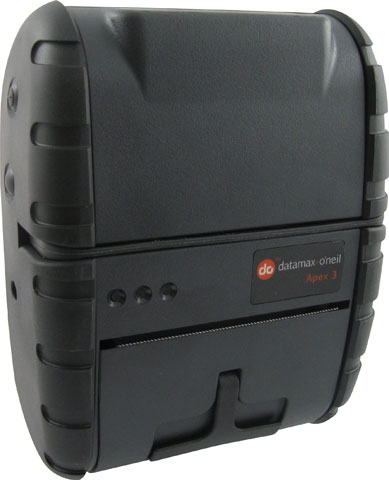 The Apex 3 line of printers is one of the most popular mobile printers on the market today due to its fast, reliable printing at a great price. Designed specifically for your mobile workforce, it  can meet your mobile printing  needs without sacrificing on quality and performance. The Apex 3 is an affordable way to meet the constantly changing requirements connected to field service, transportation, retail and law enforcement applications.
Historically this printer has been only available with an RS232 connection, Wi-Fi, or Bluetooth. Â With the added USB support to the line you can be sure that this printer will be a great fit for any application.
For more details and pricing on the new USB models, contact us at Barcodes Inc.
DENSO BHT-900 Handheld Barcode Terminals Now Certified for CAP Retail POS Software

Denso, inventor of the QR Code, announced that it has collaborated with CAP Software to make its  BHT-900 Series handheld barcode terminals compatible with CAP’s SellWise Pro 8 and Cash ‘n Carry Point of Sale retail POS software.
“Our BHT-900 Series handheld barcode terminals offer advanced-technology features at an affordable price,†said Fran Labun, vice president, Sales Groups. “Now CAP Software customers will be able to use BHT-900 terminals with no modifications or additions necessary. It’s a seamless fit.â€
Will Atkinson, president of CAP Software, added, “The Denso BHT-900 terminals are great data-collection devices for our market. They are compact, lightweight, easy to use and affordable, all of which goes along perfectly with the way we design our own POS products.â€
For more information on the BHT-900, contact us at Barcodes Inc.
Start a Mobile POS With Citizen and Socket
 Citizen & Socket: A Mobility Match
With the growing popularity of Android, iOS, and Blackberry devices there are more and more ways you can put theses devices to use. Â One of the most common, is bringing the point of sale outside the 4 walls. Â Mobile POSÂ software is available for almost any mobile device but one of the biggest challenges is incorporating barcode scanning and receipt printing. You could always email a receipt or use the camera on your device as a scanner but many customer will want a physical receipt copy and your camera is a poor substitute for a proper scanner.
DTC1000 – The perfect replacement for Fargo Persona C30e

Reliable and durable ID card printers tend to be around so long, they almost become part of your family. Â The difficult part is trying to find a replacement when the printer has finally run its course. For those of you who are finally parting with your Fargo Persona C30e, we have a suggestion for you.
The PersonaC30e was a simple, reliable and affordable ID card printing designed for everyone who wants to make great-looking plastic ID cards on a budget. Fargo can now offer an updated model DTC1000, which still offers great quality at a low price. The model offers single-side or dual-side printing, USB or Ethernet connectivity, and a variety of encoding options including magnetic stripe.
Shop our huge inventory to find the right printer for you. For more information about ID card systems, contact us at Barcodes Inc.