


UPC Barcodes Complete Guide to UPC-A and UPC-E
A UPC barcode identifies an asset so point-of-sale and inventory systems can retrieve the correct product record. For most consumer products, UPC-A is the standard choice. UPC-E is a smaller, zero-suppressed version used when packaging does not have enough room for a full UPC-A symbol. The correct format, number assignment, label material, printing method and scanner all matter if the product barcode must work reliably across stores and distribution networks.
The most important distinction is that a barcode generator creates the machine-readable symbol, but it does not give a business ownership of a globally unique product number. Before generating or printing UPC labels, product managers should obtain and assign valid product identifiers, confirm retailer requirements and test the complete workflow.
What Is a UPC Barcode
UPC stands for Universal Product Code. In the GS1 system, a UPC-A barcode carries a 12-digit Global Trade Item Number, or GTIN-12. The barcode is the data carrier that scanners read; the GTIN-12 is the unique product identifier stored in business systems and shared with trading partners.
A UPC barcode normally identifies a product variation, not an individual physical unit. Different sizes, colors, flavors, pack counts or other variants typically need different GTINs. The symbol itself does not contain the retail price. When a scanner decodes the number, the POS or inventory application uses it to retrieve information such as the item description, price, tax category and inventory record from a database.
For a broader view of linear and two-dimensional options, compare the major barcode symbologies in the types of barcodes overview.
UPC-A vs. UPC-E: Which Product Barcode Should You Use
| Buying consideration | UPC-A barcode | UPC-E barcode |
| Best use | Most retail products and packages | Small packages with limited label space |
| Visible number | 12 digits | Compact 8-digit presentation |
| Underlying identity | GTIN-12 | A zero-suppressed representation of an eligible GTIN-12 |
| Data capacity | Numeric retail product identification | The same product identity in a smaller symbol |
| Key limitation | Requires more horizontal space | Only certain GTIN-12 number patterns can be compressed |
| Buyer guidance | Use by default unless space is constrained | Use only after confirming eligibility and retailer acceptance |
When to Use a UPC-A Barcode
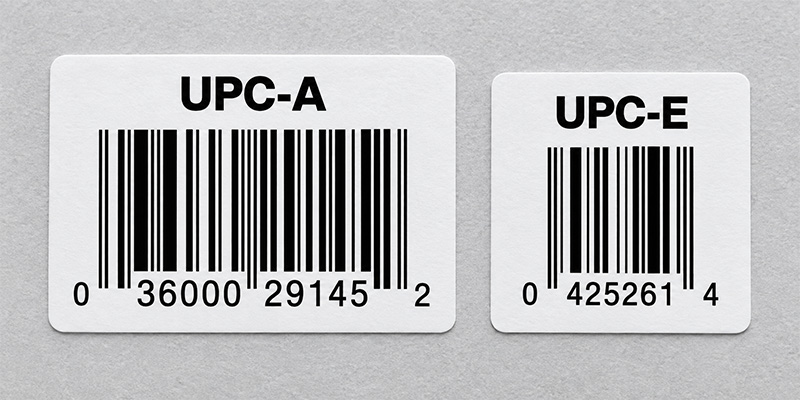
Use UPC-A for most products sold at retail checkout. Its 12 digits include a GS1 Company Prefix and item reference whose lengths can vary, followed by a calculated check digit. UPC-A is familiar across retail supply chains, widely supported by POS scanners and easier to manage than a compressed format when the package provides sufficient space.
When to Use a UPC-E Barcode
Use UPC-E when a full UPC-A symbol will not fit on a small product or package. UPC-E removes eligible zeros from the symbol representation while preserving the underlying GTIN-12 identity. It is not a separate eight-digit product number like GTIN-8, and a business cannot create it by simply deleting zeros from any UPC-A value.
Not every UPC-A number can be represented as UPC-E. Use software that correctly validates the conversion, then confirm how deployed scanners transmit the result to the host system. Some scanners can report the compact UPC-E value, while others may be configured to expand it to the equivalent UPC-A number. The output must match the format expected by the POS or inventory application.
How Do You Get a Valid UPC Barcode Number
Creating a scannable image is only one part of launching a retail product. The number must be unique, assigned to the correct product and accepted by the retailers or marketplaces where it will be used. A practical process is:
- Count the products and variations. Determine how many separate sellable items need identifiers, including changes in size, color, flavor or pack quantity.
- License identifiers through GS1. Brand owners can obtain a single GS1 US GTIN or a GS1 Company Prefix sized for a larger product portfolio.
- Assign and document each GTIN-12. Keep product data, packaging level and lifecycle status accurate so trading partners receive a consistent identity.
- Choose UPC-A or UPC-E. Use UPC-A for the standard case. Consider UPC-E only when space is limited and the assigned number is eligible for zero suppression.
- Generate, print and test the symbol. Confirm the check digit, dimensions, print quality, placement and scanner output before a production run.
Do not reuse a discontinued product’s GTIN for a different item. If product attributes change, consult the current GS1 allocation rules and the requirements of the retailer or marketplace before deciding whether a new identifier is required.
Can a UPC Barcode Generator Create a Valid UPC
A UPC barcode generator converts an existing valid number into bars, spaces and human-readable digits. It can calculate a check digit and produce an image for testing or design work, but it does not assign a globally unique number or register a product with GS1 or a retailer.
Start with the free Barcodes, Inc. barcode generator tools, then open the dedicated UPC/EAN generator to create a UPC-A or an eligible UPC-E symbol. For a production workflow, barcode label software is usually a better choice because it can control dimensions, connect to product data, create batches, manage templates and drive compatible printers.
How to Print UPC Barcodes That Scan Reliably
A valid number can still fail at checkout if the UPC label is resized incorrectly, printed with weak contrast, placed on a difficult surface or damaged in distribution. Use these practices when deciding how to print UPC barcodes:
- Preserve the barcode proportions. Generate the symbol at its intended size instead of stretching or squeezing an exported image.
- Protect the quiet zones. Keep text, borders, artwork and package seams away from the blank areas on both sides of the barcode.
- Use dependable contrast. Dark bars on a light, solid background are the safest choice. Avoid reflective finishes, patterns and low-contrast color combinations unless they have been tested.
- Match printer resolution to symbol size. Small UPC labels require enough resolution to reproduce narrow bars cleanly. Test how the chosen module width maps to the printer’s dots.
- Choose the right label material and adhesive. Account for moisture, refrigeration, abrasion, heat, curved surfaces and the required product life.
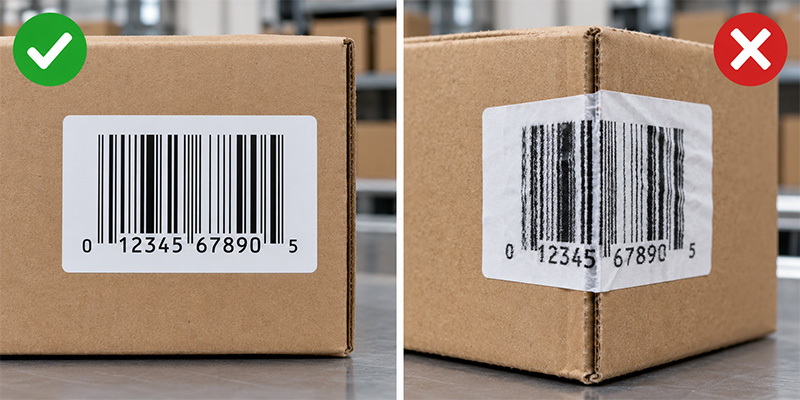
- Place the code on a scanner-friendly surface. Avoid folds, corners, seams, sharp curves and areas likely to be covered or damaged.
- Test production samples. Scan labels from the actual printer on the actual package with the scanners and software used in the workflow. Use formal barcode verification when a retailer or quality program requires it.
Use the complete barcode label design best practices to review quiet zones, contrast, size, materials and testing before production.
Should You Print UPC Labels In-House or Buy Pre-Printed Labels
The best production method depends on volume, change frequency, staffing and quality-control requirements.
| Operating need | Likely approach | Why it fits |
| Small or changing product line | Print on demand with a desktop barcode printer and label software | Fast changes, low setup burden and control over quantities |
| Stable designs or outsourced production | Order pre-printed or custom UPC labels | Consistent output without maintaining an internal print process |
| High-volume manufacturing | Use an industrial printer, managed templates and verification | Throughput, durability and repeatable control across shifts |
| Short-life indoor labels | Consider direct thermal media after testing | No ribbon and a simpler print process |
| Longer-life or demanding labels | Consider thermal transfer media and ribbon | Greater resistance to abrasion, heat and environmental exposure |
Browse UPC labels and barcode media and compatible barcode label printers for in-house production. If printing is not the right fit, compare pre-printed barcode label options or request a custom label quote for a project-specific recommendation.
What Equipment Do You Need for a UPC Barcode Workflow
- UPC labels. Select the size, material, adhesive and print technology for the package and environment.
- Barcode printer. Match the printer to daily volume, label width, resolution, connectivity and operating conditions. A desktop model may suit a small product line, while an industrial printer is better for sustained output.
- Label design software. Use true UPC encoding, controlled templates and trusted data sources. Avoid treating an ordinary font as a complete production system.
- POS barcode scanner. Confirm UPC-A and UPC-E support, decode configuration, presentation style, connectivity and compatibility with the POS application.
- Quality process. Establish approval, sample testing, printhead maintenance and periodic checks so label quality does not drift over time.
Retailers replacing scanning equipment should evaluate two-dimensional imaging as well as 1D UPC performance. A modern 2D imager can read UPC symbols while supporting the growing use of QR Code and Data Matrix at checkout. Compare POS barcode scanners and use the barcode scanner buying guide to assess form factor, scan volume and future requirements.
Common UPC Barcode Use Cases
- Retail checkout. The scanner reads the GTIN and the POS system retrieves the item and price record.
- Receiving and replenishment. Workers scan products or cases to confirm receipts, update inventory and direct restocking.
- E-commerce listings. Marketplaces use product identifiers to match listings with the correct trade items and product data.
- Inventory counts. UPC scanning can improve count speed and accuracy when each unit carries a readable product barcode.
- Returns and price verification. The UPC connects the physical product to the retailer’s transaction and item records.
UPC identifies the product type, not a unique serialized unit, lot or expiration date. If a workflow needs internal alphanumeric identifiers, Code 128 may be a better choice. If it needs richer standardized data in a small area, evaluate a GS1-compatible 2D barcode. Inventory teams can also compare inventory barcode scanners and review how a complete inventory scanning system connects labels, hardware and software.

Are UPC Barcodes Going Away
UPC-A and UPC-E remain important retail product barcodes, but retail scanning is expanding. GS1 Sunrise 2027 is accelerating the ability of POS systems to process approved two-dimensional barcodes that can carry a GTIN plus additional data or connect consumers to digital information. During this transition, brands and retailers may support both established UPC workflows and newer 2D use cases.
The practical buying decision is to solve today’s UPC requirement while avoiding unnecessary hardware limits. If a retailer is purchasing new POS scanners, software or packaging systems, it should confirm current UPC performance and a clear path to standards-based 2D scanning.
Frequently Asked Questions About UPC Barcodes
UPC-A is the full-size format most people mean when they say UPC barcode. It carries a 12-digit GTIN-12. UPC-E is the compact, zero-suppressed form used for eligible numbers on small packages.
No. Only GTIN-12 values with specific zero patterns can be represented in UPC-E. Use a compliant encoder to validate the conversion instead of removing zeros manually.
No. A generator turns a valid number into a barcode image. The brand owner still needs a properly assigned GTIN and accurate product data.
Many retail scanners support both formats, but the symbologies must be enabled and the transmitted data format must match the POS application. Test the final printed label and scanner configuration.
No. The UPC identifies the product. The POS system uses that number to retrieve price and other item data from the retailer’s database.
Usually, yes. Each distinct trade item or sellable variation generally needs its own GTIN. Confirm the current GS1 allocation rules and trading-partner requirements for the change being made.
Build the Complete UPC Labeling and Scanning Workflow
A reliable UPC barcode program connects a valid product identifier with the right symbol, label, printer, software and scanner. Start with UPC-A for most retail products, use UPC-E only when space and number eligibility support it, and validate the full workflow before production. Barcodes, Inc. can help match UPC labels, barcode printers, label software and POS scanners to your product, volume and operating environment.
Contact the Barcodes, Inc. team for help selecting and testing a complete solution that supports dependable scans from packaging through checkout.
Code 128 Barcode: What It Is, How It Works, and When to Use It
A Code 128 barcode is a high-density, one-dimensional barcode used to identify inventory, shipments, assets, warehouse locations and work in process. It can encode numbers, uppercase and lowercase letters, punctuation and control characters, making it more flexible and compact than many older linear barcode formats. For the underlying symbol rules and character table, see the Code 128 technical specification.
Code 128 is often a strong choice when a business needs to create its own internal identification system. However, choosing the symbology is only the first decision. Reliable scanning also depends on a consistent data structure, correctly generated symbols, suitable label material, a printer matched to the workload and scanners selected for the operating environment.
What Is a Code 128 Barcode
Code 128 is a variable-length linear, or 1D, barcode. Unlike a UPC, it is not limited to a fixed set of 12 numeric digits. A Code 128 symbol can represent the full 128-character ASCII set through three code sets, which allows businesses to encode identifiers such as INV-20481, BIN-A17, LOT-0826 or a longer numeric shipment reference.
The barcode usually identifies a record in an inventory management system, warehouse management system, ERP or other database. When a worker scans the label, the application uses the decoded value to retrieve or update information about the item. For that reason, a successful Code 128 inventory barcode program requires both readable labels and a disciplined method for assigning and managing the values behind them.
How Does Code 128 Work
A scanner reads the changing widths of the bars and spaces and converts the pattern into data. Each valid Code 128 symbol includes a quiet zone, a start character, encoded data, a required check character, a stop character and a second quiet zone. Barcode software or a properly configured Code 128 barcode generator normally selects the code set and calculates the check character automatically.
Code 128 can also switch code sets within one symbol. That flexibility lets encoding software use a compact numeric mode for a run of digits and then switch back for letters or punctuation. Buyers rarely need to calculate this manually, but they should use software that supports true Code 128 encoding rather than applying an ordinary font to unprocessed text.
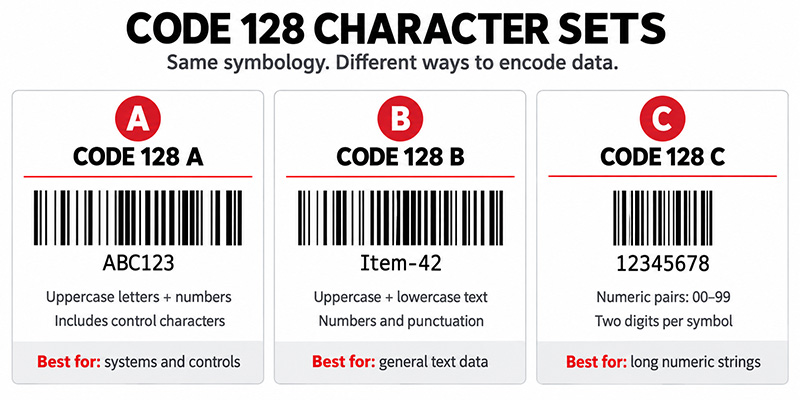
What Are Code 128 A, B, and C
| Code set | Best suited for | Buyer guidance |
| Code 128 A | Uppercase letters, numbers and ASCII control characters | Useful when control characters are required. Most everyday inventory labels do not need users to select it manually. |
| Code 128 B | Uppercase and lowercase letters, numbers and punctuation | A common choice for mixed alphanumeric identifiers such as item, asset and location IDs. |
| Code 128 C | Long strings of digits encoded in pairs | Produces a denser symbol for even-length numeric data. It is not intended for letters. |
| Automatic switching | Mixed strings with numeric runs and text | Usually the best production setting because capable software chooses and changes code sets to reduce symbol width. |
When Should You Use Code 128
Use Code 128 when you control the identifier format, need alphanumeric data and want a compact 1D barcode that is compatible with common business scanners. It is especially practical when existing systems and processes are already built around linear scanning.
Common applications include:
- Inventory labels for products, bins, totes and storage locations
- Shipping, receiving and order-fulfillment labels
- Asset tags for tools, equipment and IT devices
- Manufacturing work-in-process, lot and component tracking
- Laboratory samples, documents, tickets and internal records
A Code 128 inventory barcode works best when every encoded value is unique, stable and tied to a defined record. Learn how the hardware and software fit together in this overview of an inventory scanning system.
When Is Another Barcode Type a Better Choice
| Requirement | Consider | Why |
| Retail point-of-sale identification | UPC or EAN | Retail channels commonly require standardized product identifiers rather than an internally assigned Code 128 value. |
| Trading-partner or logistics data using GS1 rules | GS1-128 | GS1-128 uses the Code 128 symbol structure with FNC1 and GS1 Application Identifiers to give data standardized meaning. |
| Simple legacy industrial identifiers | Code 39 | Code 39 remains common in some installed systems, although its symbols are generally wider for the same data. |
| More data in a smaller area | Data Matrix or QR Code | A 2D barcode can hold more data and may fit applications where a long linear symbol is impractical. |
For a broader comparison, review the types of barcodes overview.
Is Code 128 the Same as GS1 128
No. GS1-128 is based on the Code 128 symbology, but it follows the GS1 system for structuring data. A GS1-128 symbol uses an FNC1 character and GS1 Application Identifiers to distinguish fields such as an SSCC, GTIN, lot number, serial number or date. A plain Code 128 barcode can encode the same letters and numbers without giving them standardized GS1 meaning.
Choose plain Code 128 for a proprietary internal ID when no customer, carrier, retailer or regulator requires a GS1 data structure. Choose GS1-128 when a trading partner or industry process requires standardized supply-chain data. Generating an ordinary Code 128 image of GS1-looking text does not make it GS1-128 compliant.
How Do You Create a Code 128 Barcode
Start with the data and workflow, not the artwork. Decide what the code will identify, which system owns the record, how values will remain unique and what should happen after a scan. Then choose a generation method that fits the scale of the project.
1. Define a stable naming convention. Keep the identifier as short as practical and avoid reusing values for different items.
2. Choose Code 128 and allow automatic code-set selection when your software supports it. Use Code 128 C only when the data is strictly numeric and formatted appropriately.
3. Create a prototype with the free Barcodes Inc barcode generator. The tool supports Code 128 A, B and C and is useful for individual test symbols.
4. Use dedicated label-design software for repeatable production, database connections, serialized labels, user controls and automated printing. This barcode generator software overview explains the difference between individual generation and production workflows.
5. Test the decoded value in the receiving application. A symbol that beeps successfully can still send the wrong format, add an unexpected prefix or update the wrong field.
How to Print Code 128 Labels Reliably
Knowing how to print Code 128 correctly matters as much as generating the data. A technically valid image can fail after it is resized, printed on unsuitable media or placed too close to text and graphics.
1. Preserve the quiet zones. Keep text, borders and graphics away from the blank areas on both sides of the symbol.
2. Do not stretch or compress a barcode image to force it into a layout. Set the required dimensions in the barcode software and regenerate it.
3. Match printer resolution to barcode density and label size. A 203 dpi printer can handle many common labels, while small or dense symbols may benefit from 300 or 600 dpi after testing.
4. Choose label material and adhesive for the environment. Consider moisture, abrasion, chemicals, cold storage, heat, sunlight, surface texture and the required service life.
5. Include human-readable text so workers can identify or enter the value if a label is damaged.
6. Test production samples with the actual printers, scanners, distances, lighting and surfaces used in the workflow. For external compliance or high-risk processes, use formal barcode verification when required.
Use the complete barcode label design best practices to review size, contrast, quiet zones, label materials and testing before production.
What Equipment Do You Need for a Code 128 System
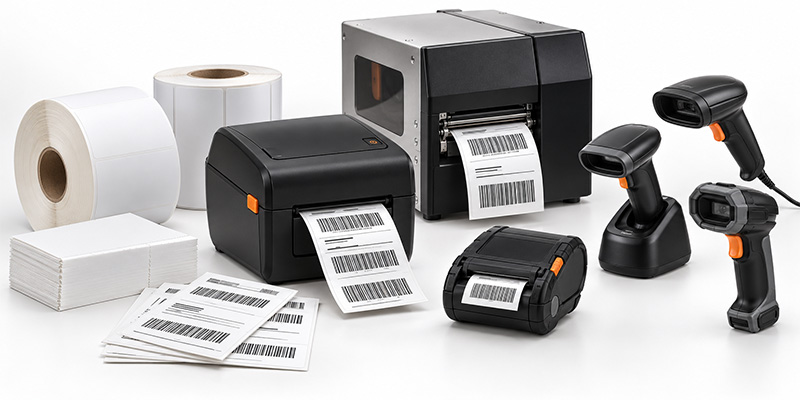
Code 128 Labels
The right media depends on how long the label must last and what it will encounter. Direct thermal labels can suit short-term shipping, receiving and temporary inventory workflows. Thermal transfer Code 128 labels are often better for assets, racks, manufacturing and other applications that require greater resistance to abrasion, chemicals or environmental exposure. Browse barcode labels by printer, material and application.
Barcode Printers
Select a printer according to daily volume, label width, resolution, connectivity and operating environment. Desktop printers fit lower-volume workstations; industrial printers support sustained, high-volume output; and mobile printers produce labels at the point of activity. Compare barcode printers or use the barcode printer buying guide to narrow the options.
Barcode Scanners
Code 128 is a common 1D symbology supported by many modern linear and 2D imagers, but buyers should still confirm that it is enabled and test the exact label. Consider scan distance, label size, motion, damage, screen scanning, cable requirements, wireless range and ruggedness. Shop barcode scanners and review the barcode scanner buying guide.
Build the Complete Workflow Before Buying
A Code 128 barcode is only one component of the solution. Before purchasing equipment, test the full path from source data to label generation, printing, application, scanning and the final software action. Confirm who creates identifiers, how duplicate values are prevented, what happens when a label is damaged and how changes will be managed across locations.
Barcodes Inc can help match the symbology, software, printer, Code 128 labels and scanners to the operating environment. Explore the free generator for a prototype, then speak with a barcoding expert before scaling a business-critical deployment. The right combination can reduce manual entry, avoid relabeling and improve inventory accuracy across the workflow. For more context, see how barcode technology can reduce operational costs.
Frequently Asked Questions About Code 128
Can any barcode scanner read Code 128
Many current 1D scanners and 2D imagers support Code 128. Confirm support in the scanner specifications, make sure the symbology is enabled and test the final printed label under real conditions.
Does Code 128 require a check digit
Yes. A required modulo-103 check character is part of the symbol. A true Code 128 generator or label-design application normally calculates and inserts it automatically.
What is the difference between Code 128 and Code 39
Code 128 supports a broader character set, includes a required check character and generally encodes data more densely. Standard Code 39 supports uppercase letters, numbers and a limited set of symbols, and it remains common in some legacy and industrial applications.
Can I create Code 128 barcodes in Excel or Word
It is possible, but applying a barcode font directly to text may not calculate the required check character or choose code sets correctly. Use an encoder, add-in or dedicated labeling application designed for Code 128, then test the output.
What data should a Code 128 inventory barcode contain
In many systems, the barcode should contain a short, unique identifier that points to a database record instead of every descriptive detail about the item. The best structure depends on the WMS, ERP or inventory application and any customer or industry requirements.
Ready to put Code 128 to work in your operation?
Whether you need help selecting compatible labels, printers and scanners or planning a complete barcode solution, contact the Barcodes, Inc. team for expert guidance tailored to your application.
Rugged Handheld Barcode and RFID Scanners Compared
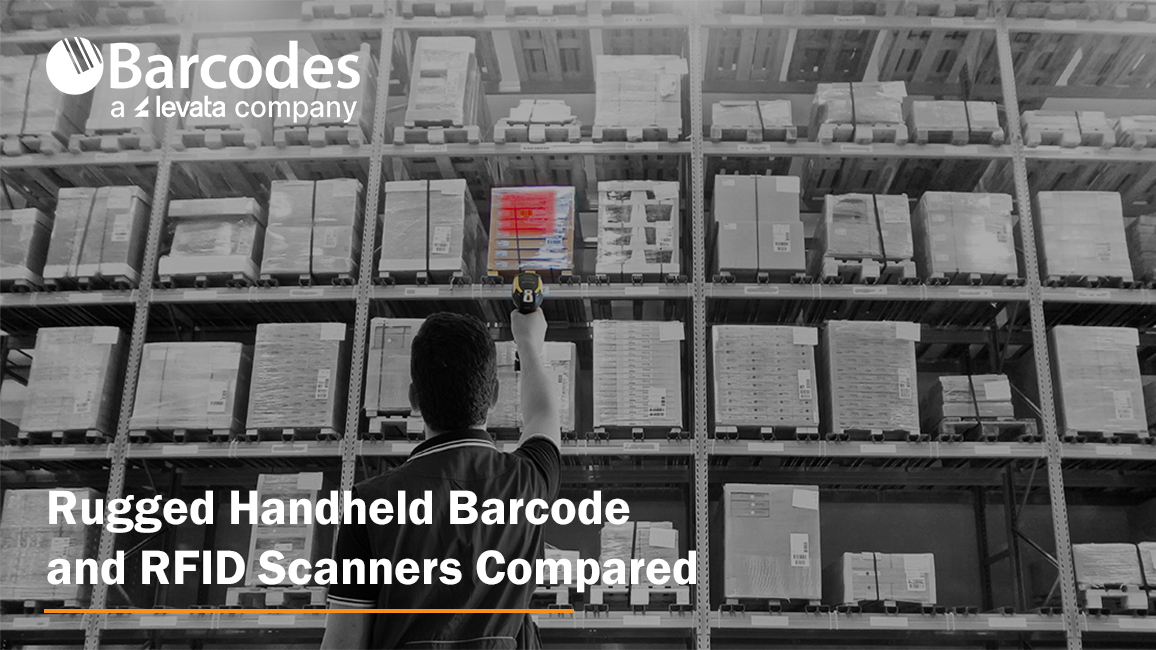
Choosing the right handheld scanner starts with the workflow. A barcode scanner is often the most cost-effective choice for item-by-item data capture. An RFID scanner can deliver greater value when workers need to identify multiple tagged items or read data without direct line of sight.
Warehouses, factories, transportation hubs, retailers and healthcare facilities also need devices that withstand drops, dust, moisture and continuous use. The Datalogic PowerScan 9600 and PowerScan 9600 RFID provide options for rugged barcode scanning or hybrid barcode-and-RFID capture.
Why Invest in a Rugged Handheld Scanner?
A general-purpose scanner may cost less initially, but failures can interrupt receiving, production, picking and shipping. Downtime, repairs, replacements and manual data entry can quickly outweigh the upfront savings.
When buying an industrial scanner, compare verified drop resistance, IP ratings, trigger durability, operating temperatures and charging design. These factors indicate whether a device can remain available through demanding shifts—not simply whether it carries a “rugged” label.
Barcode Scanner vs. RFID Scanner
The right choice of technology depends on what employees must identify and how quickly they need to capture it.
| Buying consideration | Barcode handheld scanner | RFID scanner |
| Capture method | Reads printed 1D or 2D barcodes | Reads radio-frequency tags; hybrid models may also scan barcodes |
| Line of sight | Usually required | Not required for RFID |
| Items captured | Typically one targeted code at a time | Can capture multiple tags simultaneously |
| Cost | Lower-cost labels and simpler implementation | Higher tag and deployment costs |
| Best uses | Picking, receiving, checkout and parcel processing | Inventory counts, asset searches and shipment verification |
| Key advantage | Precise item-level scanning | Faster bulk and non-line-of-sight identification |
RFID is most valuable when it reduces time spent counting inventory, locating assets or verifying groups of products. Results depend on tag selection, placement, surrounding materials, software and process design.
Organizations can also use both technologies. A hybrid scanner supports existing barcodes while adding RFID to selected products, assets or workflows.

Where Are Rugged Barcode and RFID Scanners Used?
Manufacturing
Manufacturers use rugged handheld scanners for work-in-process tracking, component verification, material picking, quality control and finished-goods identification. Extended-range barcode scanning can help workers capture labels at different distances, while direct-part-mark reading supports components marked through laser etching, dot peening or other methods.
An RFID scanner can accelerate component identification and track tools, reusable containers or materials when barcodes are obstructed or difficult to reach.
Warehousing and Transportation
Warehouse and logistics teams rely on scanners for receiving, put-away, picking, packing, shipping and parcel processing. Auto-range barcode models allow workers to scan nearby picklists and labels positioned on elevated racks with one device.
RFID can improve cycle counting, tagged-item searches and shipment verification by capturing multiple tags without requiring employees to aim at each label.
Retail
Retailers can use handheld scanners for inventory management, price verification, checkout, returns and backroom operations. Rugged construction is particularly valuable in high-volume, warehouse-style and home-improvement stores.
RFID supports faster inventory counts, product searches and loss-prevention processes. A hybrid scanner lets employees process conventional barcodes while using RFID where merchandise has been tagged.
Healthcare
Healthcare organizations use barcode scanners to identify supplies, medications, equipment and laboratory items. RFID can support faster counts and help locate tagged medical assets, instruments and consumables. Any healthcare deployment should also evaluate cleaning protocols, tag placement and integration with clinical or inventory systems.
Datalogic PowerScan 9600 Product Comparison
| Feature | PowerScan 9600 | PowerScan 9600 RFID |
| Best fit | Rugged barcode workflows | Hybrid barcode and UHF RFID workflows |
| Data capture | 1D/2D barcodes; DPM or images on select models | 1D/2D barcodes and UHF RFID; images and OCR on select models |
| Mobility | Corded, Bluetooth or Datalogic STAR cordless | Cordless |
| Configurations | Standard Range, High Performance, Document Capture, Auto Range and DPX | Standard Range and Document Capture |
| Charging | Inductive charging on cordless models | Inductive charging |
| Primary advantage | Broad optical and connectivity choices | Barcode and RFID in one device |
| Main consideration | No RFID capability | Requires RFID tags, software and workflow planning |
Datalogic PowerScan 9600 Review
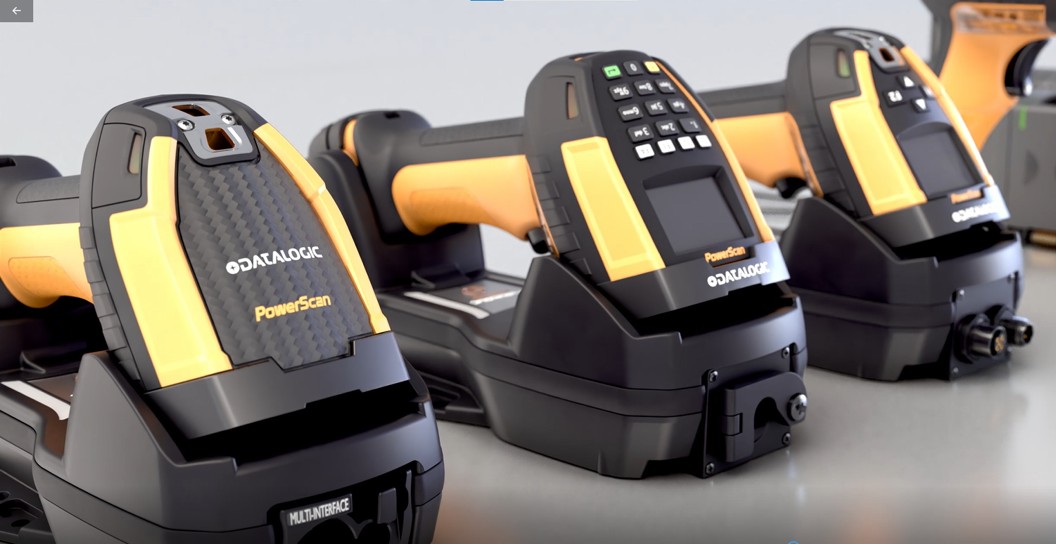
The rugged Datalogic PowerScan 9600 suits businesses that primarily use barcodes but need more durability, range or connectivity than a general-purpose scanner provides.
Datalogic rates the handheld scanner at IP65 and IP67 and for drops from 2.5 meters onto concrete. Its trigger is tested for up to 10 million activations. Standard Range, High Performance, Document Capture, Auto Range and DPX configurations support applications ranging from conventional barcode reading to elevated rack labels and direct part marks.
Buyers can choose corded PD9600, STAR cordless PM9600 or Bluetooth PBT9600 models. Modular interfaces include USB, USB-C, RS-232, Ethernet, EtherNet/IP and PROFINET. Cordless models use inductive charging, eliminating exposed contacts that can become dirty or damaged.
Best for: Barcode-intensive warehouse, manufacturing and logistics applications requiring ruggedness and configuration flexibility.
Buyer’s tip: Businesses planning or currently using RFID should compare the RFID version.
Datalogic PowerScan 9600 RFID Review
The Datalogic PowerScan 9600 RFID combines UHF RFID read-and-write capability with 1D and 2D barcode scanning in one rugged cordless device.
Its configurable RFID range reaches approximately one meter, supporting tagged-item searches, inventory verification and asset tracking. The Standard Range model handles barcode and RFID capture. The Document Capture model adds dual cameras, color image capture, OCR, an OLED display and a 16-key keypad.
Best for: Organizations adopting UHF RFID while retaining barcode-based processes.
Buyer’s tip: Remember compatible RFID tags and software
Which PowerScan 9600 Should You Buy?
Choose the standard PowerScan 9600 when barcodes remain the primary identifier, corded operation is required or the workflow needs Auto Range or DPX scanning.
Choose the PowerScan 9600 RFID when employees must read UHF tags, barcode and RFID tasks overlap or faster inventory counts and asset searches can generate measurable savings.
Frequently Asked Questions
It requires compatible UHF RFID tags for RFID functions. The correct tag depends on the item, material, read range and environment. It can still scan standard barcodes without RFID tags.
The scanner is designed for UHF RFID. NFC and high-frequency RFID use different technologies, so buyers should verify tag standards and regional frequency requirements.
Metal and liquids can reflect or absorb UHF signals. Specialized tags, careful placement and testing may be necessary around machinery, tools, beverages or medical supplies.
Test real labels and tags, read distances, damaged codes, peak volumes, wireless conditions, employee usability and integration with the intended host application.
Yes, especially when downtime could delay production or shipments.
One platform for today’s needs and tomorrow’s technology
The right data-capture technology should make work faster, more accurate and more reliable—not add unnecessary complexity. The biggest advantage of the PowerScan 9600 family is its ability to support different stages of an organization’s data-capture strategy.
For businesses that primarily rely on barcodes, the PowerScan 9600 provides an ultra-rugged platform with high-performance scanning, flexible connectivity, cordless mobility and wireless charging.
For businesses ready to incorporate RFID, the PowerScan 9600 RFID Series adds UHF RFID capabilities without requiring workers to carry a completely separate handheld device. That hybrid capability can make it easier to introduce RFID into existing workflows while continuing to support traditional barcodes.
Contact Barcodes, Inc.to learn more and get help finding the right handheld scanning solution for your needs.
A Familiar Device Takes on Data Capture Frontline Work
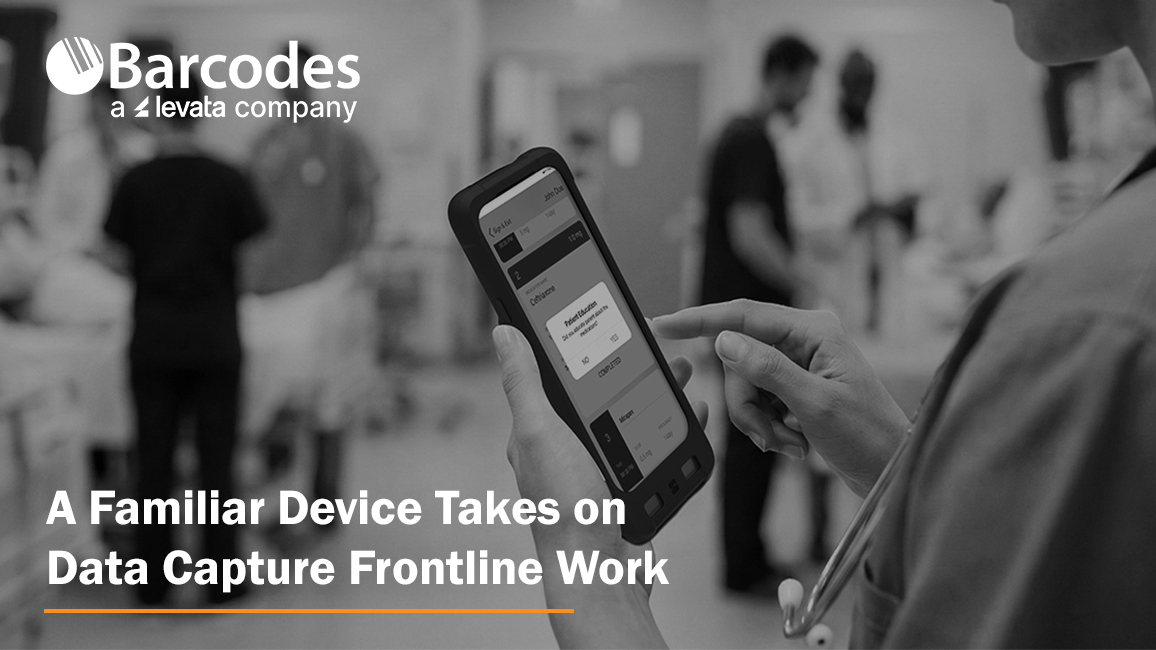
Frontline workers increasingly depend on mobile technology to scan inventory, communicate with teammates, access applications, capture information, complete forms and respond to customers. But supporting all those tasks can create a device problem of its own.
A worker may need a smartphone for communication, a device for enterprise barcode scanning, and access to additional tools for specialized workflows. More devices can mean more hardware to purchase, carry, charge, manage and support.
For many organizations, a more flexible approach is emerging: use a smartphone barcode scanner to perform more of the work—while potentially lowering total cost of ownership compared with deploying separate purpose-built devices.
The new IPCMobile Linea® Pro G (LPG) S1 brings purpose-built enterprise barcode scanning and data capture to the Google Pixel™ 10a. Designed in partnership with Google Pixel for Business, the LPG S1 is a form-fitted smart case that transforms the Pixel 10a into a versatile, enterprise-grade mobile device—with optional 1D/2D barcode scanning, programmable buttons, push-to-talk capabilities and swappable, extended battery power. The LPG S1 is also available for the Google Pixel 9a.
Why Familiar Form Factors Matter for Enterprise Mobility
Familiar smartphone interfaces can reduce training and accelerate adoption while giving employees one multifunctional device for scanning, communication and business applications. Standardizing on a common platform can also simplify device management and support. With purpose-built enterprise accessories, organizations can gain the scanning performance, battery life and durability frontline operations require without abandoning a familiar form factor.
The LPG S1 gives organizations a way to take the familiar Google Pixel experience and add the functionality frontline workers need. Rather than relying solely on the smartphone’s touchscreen or camera, the smart case adds dedicated hardware controls and optional scanning capabilities designed for fast-moving business environments.
The modular approach can also help organizations tailor devices to specific workflows. Accessories, battery options and scanning configurations can be selected based on how each team works, while custom branding options can help organizations create a consistent, company-specific device experience.
Industry Applications for Smartphones Scanners
The new LPG S1 can help organizations equip mobile workers across:
- Retail: Real-time inventory visibility, mobile orders and customer engagement
- Hospitality: Mobile check-in, service requests and maintenance ticketing
- Public Sector: Field inspections, code enforcement and public safety
- Healthcare: Faster data capture from intake through discharge
- Supply Chain & Logistics: Inventory tracking, warehouse workflows and proof-of-delivery
- Travel: Ramp and baggage operations, gate changes and mobile check-in validation
- Postal: Package tracking, postage verification and route optimization
What Is the IPCMobile Linea Pro G S1?
The IPCMobile Linea Pro G S1 is a purpose-built enterprise smart case available for the Google Pixel 10a and Pixel 9a. Rather than relying solely on a smartphone camera and touchscreen for business data capture, it adds dedicated controls and optional scanning technology designed for repetitive, fast-moving frontline workflows.
This makes the device more than simply a smartphone with a barcode scanner attached. Depending on how it is configured, the Pixel and LPG S1 combination can become a scanner, communication tool, data-entry device, AI-enabled capture tool and mobile workstation in one familiar form factor.
Four programmable buttons can be configured to trigger specific actions and send information directly to the application currently open on the Pixel.
Depending on the workflow, employees can use dedicated buttons to:
- Push to Scan 1D and 2D barcodes
- Push to Talk for team communications
- Push to Capture forms and information
- Push to Dictate information into workflows
- Push to Translate using speech recognition
- Push to Verify identification or other information
- Push to Recognize objects using AI
- Push to Emergency for rapid-response workflows
- Push to AI for supported AI functions
- Push to Workflow to initiate customized actions
This physical push-button functionality can be especially useful when employees repeatedly perform the same tasks throughout a shift and need a faster, more predictable alternative to navigating touchscreen menus.
Through the AIWedge app, the LPG S1 can go beyond traditional barcode scanning. Users can inspect camera frames, recognize speech and objects, verify information, automate item counts and build customized workflows using AI-powered capabilities.
Enterprise Scanning Without Giving Up the Smartphone
For organizations that want to leverage Google Pixel devices while adding purpose-built data capture, the LPG S1 offers a compelling alternative to traditional rugged handheld computers. By combining a smartphone employees already know with purpose-built scanning and data-capture capabilities, organizations may be able to consolidate devices and reduce the total cost of ownership associated with purchasing and supporting separate smartphones and scanners.
Its optional integrated 1D/2D scan engine can read a wide range of barcodes—including dirty, torn, low-contrast and damaged labels and tags. An optional extended-range engine supports scans from up to 30 feet away.
The Pixel’s native NFC capabilities can also be used to read access and loyalty cards and tags, expanding the device’s capabilities beyond barcode scanning.
Power for Multiple Shifts
Frontline teams can’t always stop to recharge or swap devices during the workday. The LPG S1 features a swappable smart battery available in 2,500mAh and extended 5,000mAh capacities. With the extended battery, the system provides up to 10,000mAh of total power, helping support continuous use across multiple shifts.
A range of charging accessories helps further reduce downtime during high-volume scanning and other demanding workflows. Additional accessories and configuration options allow organizations to adapt the LPG S1 to specific operational needs rather than deploying a one-size-fits-all device.
Built for Frontline Environments
The LPG S1 adds rugged protection to the Pixel platform, with an IP65 rating for dust and moisture protection and a 1.2-meter drop-to-concrete rating per MIL-STD-810G. It is also designed to withstand strong disinfectants and operate in harsh climates.
Despite its rugged capabilities, the LPG S1 is designed to remain lightweight and slim enough for employees to carry throughout the workday.
Explore a More Flexible Approach to Enterprise Scanning
The IPCMobile Linea Pro G S1 for Google Pixel 10a bridges the gap between familiar smartphones and purpose-built enterprise data capture. Organizations can gain professional scanning, programmable controls, rugged protection, extended battery capabilities and AI-enabled workflows without abandoning a smartphone platform employees already understand. With configurable scanning, battery and accessory options—and the potential to consolidate devices and lower total cost of ownership—the LPG S1 gives organizations a flexible way to equip frontline workers for today’s workflows while allowing room to adapt as those needs evolve. Custom branding options can also help organizations extend their identity directly to the devices employees use every day.
Could the smartphone your workforce already knows become the enterprise data capture device they need?
Explore the IPCMobile Linea Pro G S1 now.
Need help from an expert? Contact Barcodes, Inc. today.