


UPC Barcodes Complete Guide to UPC-A and UPC-E
A UPC barcode identifies an asset so point-of-sale and inventory systems can retrieve the correct product record. For most consumer products, UPC-A is the standard choice. UPC-E is a smaller, zero-suppressed version used when packaging does not have enough room for a full UPC-A symbol. The correct format, number assignment, label material, printing method and scanner all matter if the product barcode must work reliably across stores and distribution networks.
The most important distinction is that a barcode generator creates the machine-readable symbol, but it does not give a business ownership of a globally unique product number. Before generating or printing UPC labels, product managers should obtain and assign valid product identifiers, confirm retailer requirements and test the complete workflow.
What Is a UPC Barcode
UPC stands for Universal Product Code. In the GS1 system, a UPC-A barcode carries a 12-digit Global Trade Item Number, or GTIN-12. The barcode is the data carrier that scanners read; the GTIN-12 is the unique product identifier stored in business systems and shared with trading partners.
A UPC barcode normally identifies a product variation, not an individual physical unit. Different sizes, colors, flavors, pack counts or other variants typically need different GTINs. The symbol itself does not contain the retail price. When a scanner decodes the number, the POS or inventory application uses it to retrieve information such as the item description, price, tax category and inventory record from a database.
For a broader view of linear and two-dimensional options, compare the major barcode symbologies in the types of barcodes overview.
UPC-A vs. UPC-E: Which Product Barcode Should You Use
| Buying consideration | UPC-A barcode | UPC-E barcode |
| Best use | Most retail products and packages | Small packages with limited label space |
| Visible number | 12 digits | Compact 8-digit presentation |
| Underlying identity | GTIN-12 | A zero-suppressed representation of an eligible GTIN-12 |
| Data capacity | Numeric retail product identification | The same product identity in a smaller symbol |
| Key limitation | Requires more horizontal space | Only certain GTIN-12 number patterns can be compressed |
| Buyer guidance | Use by default unless space is constrained | Use only after confirming eligibility and retailer acceptance |
When to Use a UPC-A Barcode
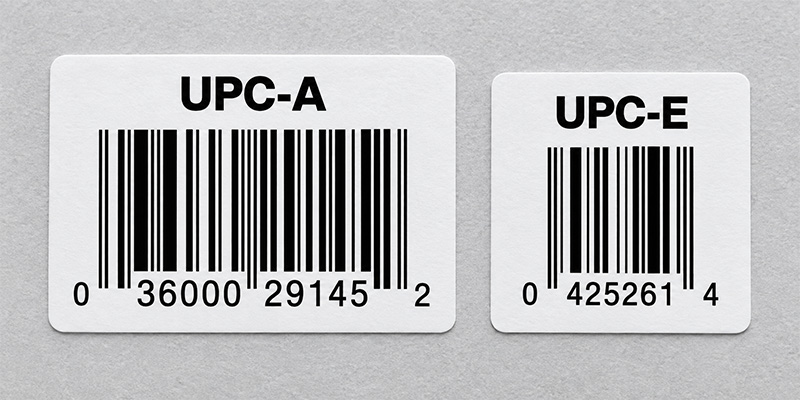
Use UPC-A for most products sold at retail checkout. Its 12 digits include a GS1 Company Prefix and item reference whose lengths can vary, followed by a calculated check digit. UPC-A is familiar across retail supply chains, widely supported by POS scanners and easier to manage than a compressed format when the package provides sufficient space.
When to Use a UPC-E Barcode
Use UPC-E when a full UPC-A symbol will not fit on a small product or package. UPC-E removes eligible zeros from the symbol representation while preserving the underlying GTIN-12 identity. It is not a separate eight-digit product number like GTIN-8, and a business cannot create it by simply deleting zeros from any UPC-A value.
Not every UPC-A number can be represented as UPC-E. Use software that correctly validates the conversion, then confirm how deployed scanners transmit the result to the host system. Some scanners can report the compact UPC-E value, while others may be configured to expand it to the equivalent UPC-A number. The output must match the format expected by the POS or inventory application.
How Do You Get a Valid UPC Barcode Number
Creating a scannable image is only one part of launching a retail product. The number must be unique, assigned to the correct product and accepted by the retailers or marketplaces where it will be used. A practical process is:
- Count the products and variations. Determine how many separate sellable items need identifiers, including changes in size, color, flavor or pack quantity.
- License identifiers through GS1. Brand owners can obtain a single GS1 US GTIN or a GS1 Company Prefix sized for a larger product portfolio.
- Assign and document each GTIN-12. Keep product data, packaging level and lifecycle status accurate so trading partners receive a consistent identity.
- Choose UPC-A or UPC-E. Use UPC-A for the standard case. Consider UPC-E only when space is limited and the assigned number is eligible for zero suppression.
- Generate, print and test the symbol. Confirm the check digit, dimensions, print quality, placement and scanner output before a production run.
Do not reuse a discontinued product’s GTIN for a different item. If product attributes change, consult the current GS1 allocation rules and the requirements of the retailer or marketplace before deciding whether a new identifier is required.
Can a UPC Barcode Generator Create a Valid UPC
A UPC barcode generator converts an existing valid number into bars, spaces and human-readable digits. It can calculate a check digit and produce an image for testing or design work, but it does not assign a globally unique number or register a product with GS1 or a retailer.
Start with the free Barcodes, Inc. barcode generator tools, then open the dedicated UPC/EAN generator to create a UPC-A or an eligible UPC-E symbol. For a production workflow, barcode label software is usually a better choice because it can control dimensions, connect to product data, create batches, manage templates and drive compatible printers.
How to Print UPC Barcodes That Scan Reliably
A valid number can still fail at checkout if the UPC label is resized incorrectly, printed with weak contrast, placed on a difficult surface or damaged in distribution. Use these practices when deciding how to print UPC barcodes:
- Preserve the barcode proportions. Generate the symbol at its intended size instead of stretching or squeezing an exported image.
- Protect the quiet zones. Keep text, borders, artwork and package seams away from the blank areas on both sides of the barcode.
- Use dependable contrast. Dark bars on a light, solid background are the safest choice. Avoid reflective finishes, patterns and low-contrast color combinations unless they have been tested.
- Match printer resolution to symbol size. Small UPC labels require enough resolution to reproduce narrow bars cleanly. Test how the chosen module width maps to the printer’s dots.
- Choose the right label material and adhesive. Account for moisture, refrigeration, abrasion, heat, curved surfaces and the required product life.
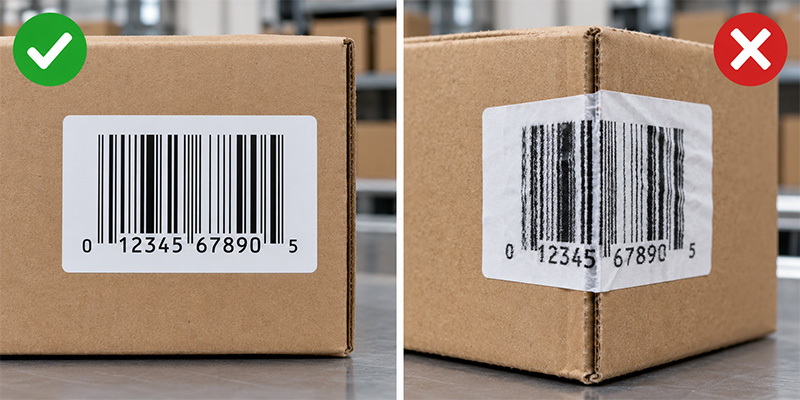
- Place the code on a scanner-friendly surface. Avoid folds, corners, seams, sharp curves and areas likely to be covered or damaged.
- Test production samples. Scan labels from the actual printer on the actual package with the scanners and software used in the workflow. Use formal barcode verification when a retailer or quality program requires it.
Use the complete barcode label design best practices to review quiet zones, contrast, size, materials and testing before production.
Should You Print UPC Labels In-House or Buy Pre-Printed Labels
The best production method depends on volume, change frequency, staffing and quality-control requirements.
| Operating need | Likely approach | Why it fits |
| Small or changing product line | Print on demand with a desktop barcode printer and label software | Fast changes, low setup burden and control over quantities |
| Stable designs or outsourced production | Order pre-printed or custom UPC labels | Consistent output without maintaining an internal print process |
| High-volume manufacturing | Use an industrial printer, managed templates and verification | Throughput, durability and repeatable control across shifts |
| Short-life indoor labels | Consider direct thermal media after testing | No ribbon and a simpler print process |
| Longer-life or demanding labels | Consider thermal transfer media and ribbon | Greater resistance to abrasion, heat and environmental exposure |
Browse UPC labels and barcode media and compatible barcode label printers for in-house production. If printing is not the right fit, compare pre-printed barcode label options or request a custom label quote for a project-specific recommendation.
What Equipment Do You Need for a UPC Barcode Workflow
- UPC labels. Select the size, material, adhesive and print technology for the package and environment.
- Barcode printer. Match the printer to daily volume, label width, resolution, connectivity and operating conditions. A desktop model may suit a small product line, while an industrial printer is better for sustained output.
- Label design software. Use true UPC encoding, controlled templates and trusted data sources. Avoid treating an ordinary font as a complete production system.
- POS barcode scanner. Confirm UPC-A and UPC-E support, decode configuration, presentation style, connectivity and compatibility with the POS application.
- Quality process. Establish approval, sample testing, printhead maintenance and periodic checks so label quality does not drift over time.
Retailers replacing scanning equipment should evaluate two-dimensional imaging as well as 1D UPC performance. A modern 2D imager can read UPC symbols while supporting the growing use of QR Code and Data Matrix at checkout. Compare POS barcode scanners and use the barcode scanner buying guide to assess form factor, scan volume and future requirements.
Common UPC Barcode Use Cases
- Retail checkout. The scanner reads the GTIN and the POS system retrieves the item and price record.
- Receiving and replenishment. Workers scan products or cases to confirm receipts, update inventory and direct restocking.
- E-commerce listings. Marketplaces use product identifiers to match listings with the correct trade items and product data.
- Inventory counts. UPC scanning can improve count speed and accuracy when each unit carries a readable product barcode.
- Returns and price verification. The UPC connects the physical product to the retailer’s transaction and item records.
UPC identifies the product type, not a unique serialized unit, lot or expiration date. If a workflow needs internal alphanumeric identifiers, Code 128 may be a better choice. If it needs richer standardized data in a small area, evaluate a GS1-compatible 2D barcode. Inventory teams can also compare inventory barcode scanners and review how a complete inventory scanning system connects labels, hardware and software.

Are UPC Barcodes Going Away
UPC-A and UPC-E remain important retail product barcodes, but retail scanning is expanding. GS1 Sunrise 2027 is accelerating the ability of POS systems to process approved two-dimensional barcodes that can carry a GTIN plus additional data or connect consumers to digital information. During this transition, brands and retailers may support both established UPC workflows and newer 2D use cases.
The practical buying decision is to solve today’s UPC requirement while avoiding unnecessary hardware limits. If a retailer is purchasing new POS scanners, software or packaging systems, it should confirm current UPC performance and a clear path to standards-based 2D scanning.
Frequently Asked Questions About UPC Barcodes
UPC-A is the full-size format most people mean when they say UPC barcode. It carries a 12-digit GTIN-12. UPC-E is the compact, zero-suppressed form used for eligible numbers on small packages.
No. Only GTIN-12 values with specific zero patterns can be represented in UPC-E. Use a compliant encoder to validate the conversion instead of removing zeros manually.
No. A generator turns a valid number into a barcode image. The brand owner still needs a properly assigned GTIN and accurate product data.
Many retail scanners support both formats, but the symbologies must be enabled and the transmitted data format must match the POS application. Test the final printed label and scanner configuration.
No. The UPC identifies the product. The POS system uses that number to retrieve price and other item data from the retailer’s database.
Usually, yes. Each distinct trade item or sellable variation generally needs its own GTIN. Confirm the current GS1 allocation rules and trading-partner requirements for the change being made.
Build the Complete UPC Labeling and Scanning Workflow
A reliable UPC barcode program connects a valid product identifier with the right symbol, label, printer, software and scanner. Start with UPC-A for most retail products, use UPC-E only when space and number eligibility support it, and validate the full workflow before production. Barcodes, Inc. can help match UPC labels, barcode printers, label software and POS scanners to your product, volume and operating environment.
Contact the Barcodes, Inc. team for help selecting and testing a complete solution that supports dependable scans from packaging through checkout.