


1 Minute Tour of 123Scan², Motorola Barcode Scanner Configuration Utility
123Scan² is a free, PC-based software tool that enables rapid and easy set-up of Motorola scanners. Loaded with time-saving features and functionality, 123Scan² will help simplify and reduce the time and cost associated with Motorola scanner deployment — improving scanner TCO. The easy-to-use Windows-based utility sports a simple graphic user interface (GUI) and a patented wizard tool to streamline the setup process. 123Scan² can upgrade scanner firmware, check online for software updates, generate a multi-setting bar code for single scan programming, stage large number of barcode scanners simultaneously, generate reports with asset tracking information and create custom products. Compatible with many of today’s most popular office tools, 123Scan² enables users to generate and email configuration files plus save bar code configuration sheets as Microsoft Word documents for easy re-branding, archive asset tracking information directly to Microsoft Access and more.
Free Update allows Symbol MC70 to read 8GB SDHC cards
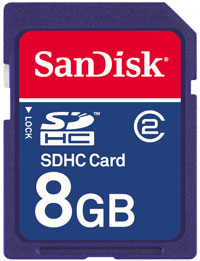 Current Symbol MC70 devices running Windows Mobile 5 can only use standard capacity SD cards. This SDHC driver enables the device to work with high capacity SD cards. Cards up to 8GB have been tested.
Barcode Scanner Software
See our page on barcode scanner software to help you choose between the many types of available software.
Mac OS X Barcode Scanners

Â
Many of our customers think they need to get a special barcode scanner to use with their Macintosh computer. This may have been true many years ago when USB was not prevalent and Apple computers used ADB connector for their keyboards.
Today, virtually every USB barcode scanner on the market is automatically recognized by Mac OS X thanks to the Apple Generic Keyboard driver that is built into the Operating System. Therefore, all you have to do is plug the barcode scanner in to your USB port and scan your barcodes. They will be entered into any application as if you typed the corresponding keystrokes on a keyboard.
Metrologic software and drivers
 Metrologic’s public FTP site is a good place to check if you are looking for software or drivers for your Metrologic barcode scanner or Metrologic handheld computer.
Honest TCO: Calculating the Cost of Mobile Compters
By Jeff Sibio, Intermec Director, Industry Marketing
I was somewhere in the middle of Montana when it happened, on a bitterly cold November night, 20 miles from the nearest town. My decade-old, four-door hatchback – a rusted, dented, green beast with a cracked windshield and a headlight that died every three months – began making a subtle whine that steadily grew into an angry cough. And then Rita, as I had named the car, died for the eighth and final time.
This was years before the age of the modern cell phone, and as I made my trek back to civilization, I recalled what my grandfather had warned me the last time I had taken Rita to the shop: “If you keep putting good money into a broken-down car for repairs, you’ll never have enough for a better one.â€
I had rolled my eyes at the time, turned to the repairman, and told him to fix up my green beast. But walking along the highway through the Montana snow long after midnight, it occurred to me that he was right. Besides, after all the money I had tossed toward repairing Rita, I had to wait six months before I was able to afford my next car.
I still tell this story to businesses that are researching AIDC, mobile computing and printing solutions, because it underscores the importance of the long-term costs of critical technology. Buy the inferior solution in the here-and-now, and hidden repair and replacement costs will negate any savings from the purchase. And that’s why total cost of ownership (TCO) matters so much.
Barcode Verifier mil-size guide
Use the table below to determine what barcode verifier is best for the barcode you need to verify.
| Barcode being verified | Barcode verifier mil size |
|---|---|
| UPC barcodes | 6 mil |
| 1D barcodes up to 7.5 mil | 3 mil |
| 1D barcodes between 7.6-13 mil | 5 mil |
| 1D barcodes between 13.1-25 mil | 10 mil |
| 1D barcodes over 25 mil | 20 mil |
Purchasing a Magnetic Stripe Reader (MSR): What You Need to Know
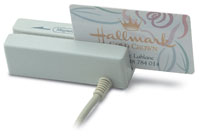 Shopping is a lot of work. Regardless of what it is that you are buying, there are numerous things to consider, research, and compare. So what are the things to think about when choosing a mag stripe reader (MSR)?
As with any product, a lot of thought goes into the design of each MSR. From the interface to the cosmetics to the feel of the card swipe, each unit is designed for a specific purpose. Your job is to figure out which one best fits your needs.
Terry Conant, the Executive VP of ID Tech, provides his list of the top things to consider when purchasing a Point of Sale (POS) MSR:
Reading Reliability
The purpose of a card reader, of course, is to read cards. Not just the new cards but real-world cards, and failure to do so can mean extra transaction costs, or even worse, a lost sale. Manually entered card information means additional transaction costs. At an unmanned kiosk, a customer’s unread card can mean a lost sale.
Minimum Number of Card Swipes
A card reader needs to be able to stand up to the rigors of swiping card after card, day after day. If a reader breaks down, it can severely handicap sales. Long warranties are great, but more importantly, look for the amount of swipes the reader is guaranteed for.
Configure your Motorola/Symbol LS2208 to Send a Tab Key Character After Each Scan
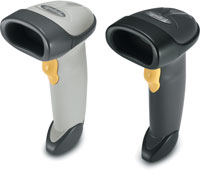 The Symbol LS2208 is one of the most popular handheld barcode scanners that we sell.
Follow the steps below to enable the LS2208 to send a Tab Key suffix after each barcode scan.
Print out and scan the programming barcodes below in the order listed
Common Receipt Printer Interfaces
Use the chart below to identify what type of interface your receipt printer has.
Adapted from http://www.transact-tech.com/products/ithaca_8000_info_faq.html
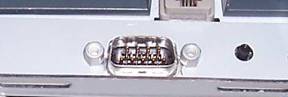 |
9 pin Serial InterfaceCable Required: |
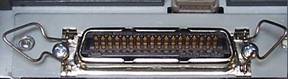 |
36 pin Centronics Parallel InterfaceCable Required: |
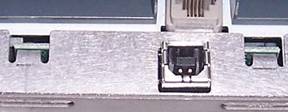 |
USB InterfaceCable Required: |
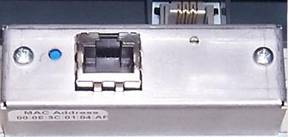 |
Ethernet InterfaceCable Required: |
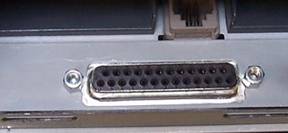 |
25 pin Parallel InterfaceCable Required: |
|
25 pin Serial InterfaceCable Required: |
 |
Caution: The 25 pin Parallel and 25 pin Serial interfaces look exactly the same externally. They both use a 25 pin D-shell connection. |
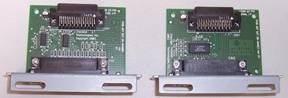 |
A closer look will reveal that the electronics on the actual interfaces boards are different. The best way to determine which 25 pin communication interface is present in the printer is to print a configuration listing from the printer. This listing will show either RS232 Serial or P1284 Parallel. See Manual Configuration for how to print out this listing. |