

Aldelo For Restaurants: Lite Edition Wasp POS Software
Aldelo For Restaurants: Lite Edition -
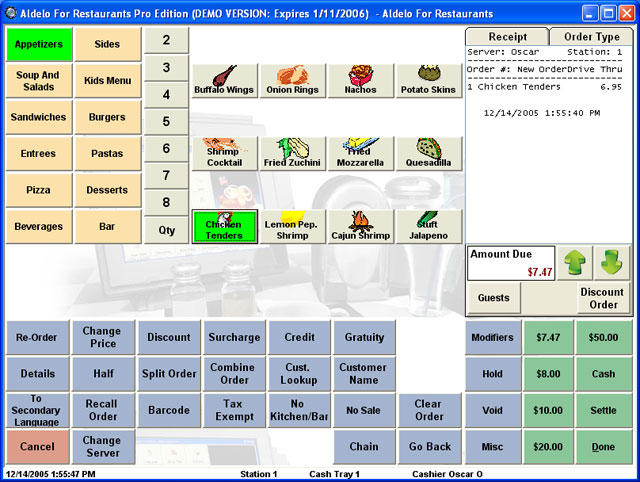
Aldelo for Restaurants Lite is a smarter cash register replacement for Take Out and Delivery Restaurants. It is ideal for restaurants that only need the ability to create, modify, and settle orders. Standard features include easy order taking and settlement, complete delivery tracking, visual map integration, Caller ID, and integrated credit card processing. The software can be seamlessly uprdaded to the Pro edition when you are ready. The software also includes 30 days of complimentary technical support with engineers staffed 7 days a week to make sure you get up and running successfully. The software operates on Windows XP Pro.
 Full specifications (PDF)

Price Match Guarantee
Found a better price? We'll match it within 60 days of your purchase.
for Qty Discount
Add to Quote
Starting at:
$607.69
Item on backorder — chat for lead time



Aldelo For Restaurants: Lite Edition Wasp POS Software Options
-
Aldelo 102 Software
Each Station License. This item is download-only. A software license is a non-returnable/non-cancelable item.In Stock$607.69
Aldelo For Restaurants: Lite Edition Wasp POS Software Model Overview
Aldelo For Restaurants Lite Edition is the ultimate cash register replacement crafted specifically for take-out and delivery restaurants. Ideal for establishments that need simple order creation, modification, and settlement, this software also integrates Caller ID and credit card processing for a seamless experience. With its low entry price, it provides exceptional value for restaurants not yet ready for the advanced features of the Pro Edition. Plus, when you're ready to upgrade, the Lite Edition transitions effortlessly to the Pro Edition, ensuring your growth is supported.
Key Features:
Specifications:
Key Features:
- Supports Take Out, Drive Thru & Delivery
- Delivery Dispatch & Visual Map Integration
- Caller ID Integration
- Easy Order Taking & Settlement
- Extensive Built In Reports
Specifications:
- Compatibility: Runs on Windows XP or later
- Point of Sale Features:
- Easy to Use Order Entry Screens
- Flexible Kitchen & Bar Printing
- Integrated Credit Card Processing
- Discounts & Surcharges
- Order Types: Take Out, Drive Thru, Delivery, Dine In
- Back Office Features:
- Easy to Use Data Entry Screens
- Export Report Data to Excel
- Extensive Built In Reports