
Zebra 10012164-R Barcode Label
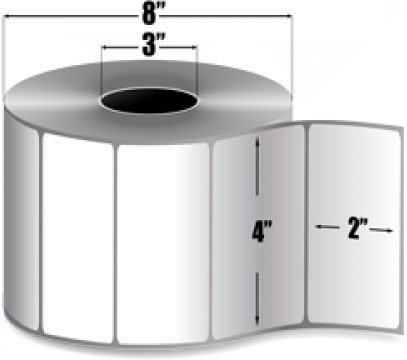





Zebra Z-Perform 2000D Barcode Label Model Overview
Frequently Asked Questions
What are the key features of the Honeywell PX940 barcode label printer?
The Honeywell PX940 is a high-performance industrial printer featuring a full touch display, 203 dpi print resolution, 14 inches per second print speed, and universal firmware support. It offers multiple connectivity options including Ethernet, USB, Serial, and Low Power Bluetooth, plus an integrated verifier option that automatically voids and reprints labels that don't meet ANSI quality grades 1-4. We offer the PX940 with or without the integrated verifier depending on your regulatory compliance needs.
What are the display specifications of the Dell P5525QC touchscreen?
The Dell P5525QC is a 55-inch LCD collaboration display with a 16:9 aspect ratio and 3840 x 2160 resolution (2160p). It features edge LED backlighting with 400 nits brightness and a 1,200:1 contrast ratio, making it ideal for high-visibility conference rooms and collaborative workspaces. We offer this model as part of our comprehensive touchscreen display selection available from barcodesinc.com.
What connectivity options does the PX940 support?
The Honeywell PX940 supports Ethernet, USB, Serial (RS-232), and Low Power Bluetooth connectivity, making it flexible for integration into various warehouse management and logistics systems. This multi-protocol approach ensures compatibility with legacy systems and modern networked environments. Contact us today to discuss which connectivity options best fit your operation.
What connectivity options does the Dell P5525QC provide?
The Dell P5525QC includes USB and HDMI connectivity ports for seamless integration with various devices and systems. These standard connections ensure compatibility with laptops, media players, and other peripherals commonly used in enterprise environments. Contact us today to discuss your specific connectivity requirements for your deployment.
Is the Honeywell PX940 suitable for thermal transfer and direct thermal printing?
Yes, the PX940 supports both direct thermal and thermal transfer printing modes with a 3-inch media core hub, giving you flexibility in label material selection. The printer handles various label stocks and ribbon types with ribbon ink in/out capability, making it ideal for diverse labeling applications across transportation, logistics, pharmaceuticals, and manufacturing. Visit barcodesinc.com to explore compatible media options available from us.
Is the Dell P5525QC suitable for warehouse or logistics operations?
While the Dell P5525QC is primarily designed as a collaboration display for conference rooms and meeting spaces, its large 55-inch touchscreen and high resolution make it suitable for command centers, control rooms, and centralized monitoring stations in warehouse and logistics facilities. Its robust LED technology and contrast ratio support extended viewing periods in various lighting conditions. Visit barcodesinc.com to explore how this display can enhance your operational visibility.
How does the integrated verifier help with regulatory compliance?
The PX940's integrated verifier uses pass/fail detection and ANSI quality grading (1-4) to automatically identify substandard labels and trigger reprinting before they enter your supply chain. This built-in quality control eliminates unscannable barcodes that could result in regulatory fines and operational delays in healthcare, pharmaceutical, and shipping environments. We offer the verifier-equipped model specifically for customers requiring strict compliance with industry standards.
What are the key environmental and durability features of the Dell P5525QC?
The Dell P5525QC features edge LED technology designed for reliable performance in professional environments. The display is engineered to provide consistent brightness output at 400 nits, supporting visibility in well-lit spaces typical of industrial and warehouse settings. Our team can provide detailed specifications regarding environmental certifications and durability standards—contact us today for complete technical documentation.
What industries and applications is the PX940 designed for?
The Honeywell PX940 is purpose-built for transportation and logistics, pharmaceuticals and healthcare, shipping, distribution centers, industrial manufacturing, and automotive parts manufacturing where barcode print quality directly impacts compliance and efficiency. Its precision printing, integrated verifier option, and robust connectivity make it suitable for high-volume, mission-critical labeling environments. Contact us today to discuss how the PX940 can optimize labeling operations in your specific industry.
How does the Dell P5525QC compare to smaller touchscreen displays?
The Dell P5525QC's 55-inch size delivers significantly larger viewing area compared to standard 17-19 inch or portable touchscreen displays, making it ideal for group viewing and collaborative applications. Its 3840 x 2160 resolution maintains sharp image quality at this larger scale, while the 1,200:1 contrast ratio ensures excellent visibility for detailed content. We offer a range of touchscreen sizes—visit barcodesinc.com to find the right display for your specific application needs.
What are the print specifications and environmental capabilities of the PX940?
The Honeywell PX940 delivers 203 dpi resolution at 14 inches per second print speed, with a full touch display for intuitive operation and universal firmware for multi-language support. The printer includes a 3-inch media core hub, supports both direct thermal and thermal transfer modes, and comes with a US power cord. Available from us, the PX940 is TAA-compliant and engineered for demanding industrial environments where reliability and consistent output are essential.
What aspect ratio does the Dell P5525QC use and why does it matter?
The Dell P5525QC features a 16:9 aspect ratio, which is the standard widescreen format for modern content including presentations, videos, and collaborative applications. This ratio maximizes screen real estate for horizontal content display while maintaining compatibility with most business software and media sources. Contact us today if you need guidance on selecting the right display format for your workflow requirements.
