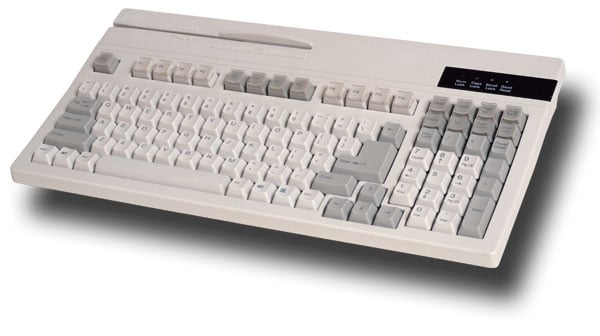
Unitech's K2714 POS Keyboard is the ultimate data entry solution for various applications including Point of Sale, kiosks, and banking. Its unique design enhances productivity while minimizing training costs and error rates, thanks to its 21 relegendable keys that can be customized with colors, icons, and text. The included Windows® Keyboard Configuration Manager makes it easy to configure and edit data outputs with just a few clicks. Built for durability, this compact keyboard features a rugged design, a dual-track Magnetic Stripe Reader, and a spill-resistant structure, making it an ideal choice for high-traffic environments.
Key Features
Rugged, durable design for long-lasting performance
Spill resistant construction to safeguard against accidental spills
Compact size with a small footprint fits various spaces
Built-in Magnetic Stripe Reader for convenient transactions
Windows® compatible with good read LED indicator
21 relegendable keys for enhanced customization options
Specifications
Keys: 104
Key travel: 4.0 ± 0.3 mm
Switch type: Membrane with a life of 20 million cycles
Layout: Qwerty
Indicators: Num Lock, Caps Lock, Scroll Lock, Good Read LEDs
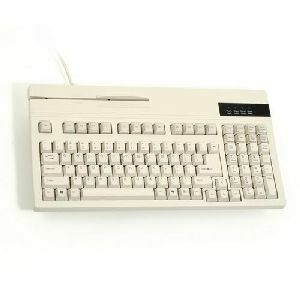
The K2714 POS Keyboard features a rugged, space saving design ideal for a wide range of environments. It incorporates a built in, dual track Magnetic Stripe Reader, 104 keys including Windows Start and Properties keys. Its spill resistant construction guarantees an extended life cycle.
It offers thermal transfer and direct thermal printing, with print speeds up to 12 ips at 203 dpi (or 8 ips at 300 dpi), and a maximum print width of 4.09 inches.
What connectivity options are available?
Standard connections include USB, RS-232 serial, Ethernet, and USB Host. Optional upgrades include a second Ethernet port, 802.11ac Wi-Fi, Bluetooth Low Energy (BTLE), and an NFC tap-to-pair feature.
Does the ZT231 support RFID printing?
Yes, the ZT231 supports UHF RFID printing and encoding with an optional field-installable RFID kit featuring adaptive encoding technology for simplified calibration.
How user-friendly is the ZT231 for operators and IT teams?
The printer features a 4.3" full-color touchscreen with intuitive navigation, tool-less maintenance, Zebra’s Print DNA software suite for remote management, and security features via PrintSecure.
Can I upgrade the ZT231 after purchase?
es, the ZT231 is future-ready with field-installable upgrades for media handling (peeler, cutter), RFID, and wireless connectivity—enabling scalability as business needs evolve.
What industries and applications is the ZT231 designed for?
The ZT231 is ideal for manufacturing, transportation and logistics, healthcare, and retail use cases such as product labeling, order picking, shipping, blood bank labeling, and return tagging.
What are the key specifications of the Zebra ZT510 barcode printer?
The Zebra ZT510 offers 203 dpi print resolution with a maximum print speed of 12 inches per second and a 4-inch print width, making it ideal for industrial labeling applications. It supports both thermal transfer and direct thermal printing modes, providing flexibility for different label requirements. The printer features advanced Link-OS capabilities for simplified management and seamless integration with common device management software. We offer the ZT510 as a cost-effective solution that delivers proven, durable design without unnecessary premium features.
What are the maximum print speeds and resolution options for the Zebra ZT231?
The ZT231 delivers industry-leading print speeds of up to 12 ips at 203 dpi resolution, with an optional 300 dpi resolution available for applications requiring crisp, detailed text and barcodes. We offer both standard and high-resolution configurations to match your specific labeling requirements, whether you're prioritizing throughput or print quality.
What are the main improvements of the Zebra ZT510 over the 105SLPlus?
The Zebra ZT510 builds on the proven design of the 105SLPlus while adding expanded performance, advanced management and monitoring capabilities, and Link-OS features for easier software updates and device management. The ZT510 maintains the rugged reliability and high-duty cycle of its predecessor while offering better value through field-installable upgrades and simplified hardware integration. We offer the ZT510 as the ideal choice for cost-conscious operations that need industrial-grade performance without unnecessary features.
What are the print speeds and resolution capabilities of the Zebra ZT231?
The Zebra ZT231 delivers industry-leading print speeds up to 12 inches per second (ips) at 203 dpi resolution, with an optional 300 dpi resolution available for applications requiring crisper text and barcode detail. This combination of speed and quality makes it ideal for high-throughput warehouse and manufacturing environments where both efficiency and print clarity are critical.
What connectivity options does the Zebra ZT51042-T010000Z support?
The ZT510 includes multiple connectivity options: Bluetooth, Serial, USB, and Ethernet, allowing you to integrate it into various warehouse and logistics environments. This multi-protocol support ensures compatibility with existing infrastructure whether you're using mobile devices, legacy systems, or modern networked environments. The diverse connectivity options make it easy to deploy across different operational workflows without requiring additional hardware adapters.
Is the Zebra ZT231 suitable for warehouse and logistics environments?
Yes, the ZT231 is ideal for light industrial environments like warehouses and logistics operations. Its durable metal frame construction, combined with a compact space-saving footprint and intuitive 4.3" color touchscreen, makes it perfect for order picking, shipping/receiving, cross-docking, and compliance labeling applications. We recommend this printer for any operation requiring reliable, fast label production in demanding environments.
What connectivity options does the Zebra ZT510 support?
The ZT510 includes standard connectivity with USB, Serial (RS-232), Gigabit Ethernet, and Bluetooth Low Energy, making it easy to integrate into existing warehouse and manufacturing systems. Optional connectivity upgrades include Parallel, 802.11a/c WiFi with Bluetooth 4.0, USB Host, and IPv6 support for flexible network configurations. Contact us today to discuss which connectivity options best fit your facility's infrastructure.
Is the ZT231 suitable for light industrial warehouse environments?
Yes, the ZT231 is specifically designed for light industrial environments with its durable metal frame and metal enclosures that withstand demanding warehouse conditions. The printer features tool-less platen and printhead removal for easy maintenance, plus onboard analytics and printhead element out detection to help you plan maintenance in advance and minimize downtime.
What connectivity options does the ZT231 offer?
The ZT231 includes standard connectivity options including USB 2.0, RS-232 Serial port, 10/100 Ethernet, and USB Host. Additionally, it features Bluetooth Low Energy (BTLE) technology for enhanced location precision, and you can add optional 802.11ac wireless connectivity or a second Ethernet port as field-installable upgrades. We offer flexible connectivity to integrate seamlessly with your existing warehouse management systems.
What connectivity options does the ZT231 offer?
The ZT231 includes standard connectivity options of USB 2.0, RS-232 Serial port, 10/100 Ethernet, USB Host, and Bluetooth Low Energy (BTLE) technology. Additional connectivity can be added through field-installable upgrades, including a second Ethernet port and 802.11ac wireless connectivity, allowing you to expand capabilities as your operational needs evolve.
Is the Zebra ZT510 suitable for both direct thermal and thermal transfer printing?
Yes, the ZT510 supports both direct thermal and thermal transfer printing methods, giving you flexibility to choose the best option for your labeling needs. This dual capability makes it ideal for various applications in manufacturing, transportation, and logistics without requiring separate equipment. Visit barcodesinc.com to explore compatible media and ribbon options for your specific application.
How does the Zebra ZT510 compare to the 105SLPlus predecessor?
The ZT510 builds on the proven, durable design legacy of the 105SLPlus while adding advanced management and monitoring capabilities at a competitive price point. It maintains the high duty cycle and rugged reliability that made the 105SLPlus an industry standard, but with improved Link-OS functionality and easier software updates. The ZT510 is engineered to grow with your business needs through simplified hardware upgrades and streamlined integration with device management software.
Can the ZT231 be upgraded with RFID encoding capabilities?
Yes, the ZT231 supports field-installable UHF RFID printing and encoding upgrades, allowing you to incorporate greater visibility and tracking into your supply chain operations. Zebra's adaptive encoding technology eliminates complex placement guidelines and offers greater media flexibility, making RFID implementation straightforward without complication. Contact us today to discuss adding RFID capabilities to your printer configuration.
What print speed and resolution does the ZT510 deliver?
The ZT510 prints at 12 inches per second (305 mm/second) with a standard 300 dpi resolution, enabling fast throughput of even complex graphics and barcodes. The printer features a thin film printhead with E3 Element Energy Equalizer technology for superior print quality at industrial speeds. This combination of speed and resolution makes it well-suited for high-volume order picking, shipping, and compliance labeling operations.
Can the ZT231 be upgraded with RFID encoding capability?
Yes, the ZT231 supports field-installable UHF RFID printing and encoding upgrades, allowing you to incorporate RFID functionality without replacing your printer. Zebra's adaptive encoding technology eliminates complex placement guidelines and provides greater media flexibility, making RFID implementation straightforward for supply chain visibility and asset tracking applications.
Is the Zebra ZT510 suitable for high-volume warehouse and logistics operations?
Yes, the ZT510 is designed for high duty cycle operations with a rugged, industrial-grade construction that delivers reliable performance in demanding warehouse and logistics environments. Its 12 inch-per-second print speed and thermal transfer capability make it well-suited for continuous labeling operations in distribution centers and fulfillment facilities. The printer's advanced monitoring capabilities and Link-OS integration help optimize uptime and reduce operational disruptions in mission-critical applications.
How does Zebra's Print DNA software help manage ZT231 printers?
Zebra's Print DNA software suite provides robust fleet management capabilities through Printer Profile Manager Enterprise, allowing you to configure, troubleshoot, and manage your networked ZT231 printers from any location via a web-based dashboard. The software includes PrintSecure for enhanced security, onboard analytics for predictive maintenance, and printhead element out detection to minimize downtime. We recommend leveraging Print DNA to optimize your printer operations and protect against cyber vulnerabilities.
How does the ZT231's touchscreen interface help reduce operator training time?
The ZT231 features a 4.3-inch full-color touchscreen with an intuitive menu design, built-in wizards, and helpful how-to videos that significantly reduce operator training time. The interface allows operators to see printer status at a glance and make configuration changes with a simple touch, even while wearing gloves, making it accessible for any warehouse or manufacturing team.
What printing technologies does the ZT51042-T010000Z support?
The Zebra ZT510 supports both thermal transfer and direct thermal printing technologies, giving you flexibility to choose the best option for your label durability and cost requirements. Thermal transfer printing uses a ribbon to transfer ink onto labels, ideal for applications requiring long-lasting, high-quality labels in harsh environments. Direct thermal printing eliminates the need for ribbons, reducing consumable costs for applications where label longevity is less critical.
What are the environmental operating conditions for the ZT510?
The Zebra ZT510 operates reliably in temperatures ranging from 40°F to 104°F (5°C to 40°C), making it suitable for standard warehouse and manufacturing environments. The printer's rugged metal frame construction and proven design ensure durability in demanding industrial settings. We offer the ZT510 as an ENERGY STAR certified solution that balances performance with operational efficiency.
What management and security features does Zebra's Print DNA software provide for the ZT231?
Zebra's Print DNA software suite includes Printer Profile Manager Enterprise for centralized management of networked printers from any location, plus PrintSecure for comprehensive printer security that identifies vulnerabilities, blocks unauthorized access, and detects events before they occur. These tools allow your IT team to configure, troubleshoot, and monitor ZT231 printers remotely via a web-based dashboard while protecting your data from cyber threats.
What makes the ZT231 easy to operate and maintain?
The ZT231 features a user-friendly 4.3" full-color touchscreen with intuitive menus, wizards, and helpful how-to videos that reduce training time for your team. Its design includes a bi-fold media door that reduces opening height, color-coded media loading cues, and tool-less platen and print head removal for simplified maintenance. We've engineered this printer to minimize operational complexity while maximizing uptime in your facility.
Can the Zebra ZT510 be integrated with existing device management systems?
Yes, the ZT510 is engineered to integrate seamlessly with common device management software through its advanced Link-OS capabilities, simplifying deployment and ongoing administration. Link-OS applications streamline software updates and enable remote monitoring and management of printer performance across your fleet. This integration reduces IT overhead and helps you maintain consistent printer configurations across your warehouse or logistics operation. Contact us today to discuss integration options for your specific environment.
Can the ZT510 be upgraded in the field, and what management features does it offer?
Yes, the ZT510 features field-installable upgrades for communication cards, cutters, and peelers, allowing you to adapt the printer as your business needs evolve without requiring factory service. The printer includes Managed Visibility Services with Operational & Asset Visibility (OVS) and Asset Visibility Services (AVS) to monitor printer health, status, usage, and performance. Advanced onboard diagnostics, how-to videos, and Link-OS applications enable guided troubleshooting and simplified software updates. Contact us today to learn how these management capabilities can optimize your printing operations.
Get help from a Barcoding Expert!
The Unitech K2714 Keyboards is also known as
UNI-K2714
or K2714.
IMPORTANT UPDATE: Due to memory chip industry demands, manufacturers are signaling price increases and supply constraints. Contact us now to secure inventory and pricing.IMPORTANT UPDATE: Due to memory chip industry demands, manufacturers are signaling price increases and supply constraints. Contact us now to secure inventory and pricing.





 Full specifications (PDF)