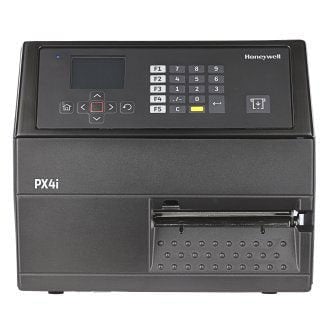
Honeywell PX45 Barcode Label Printer Model Overview
The PX45 and PX65 Series industrial printers are built to meet the needs of round-the-clock, mission-critical applications. These rugged printers deliver advanced connectivity and network protocols, ensuring peace of mind today and a reliable, scalable solution for the long haul.
The rugged, all-metal PX45 and PX65 printers deliver outstanding performance– up to 12 inches per second from first label to last – and incorporate features that reduce downtime and minimize maintenance costs. Both versions are available with 203 or 300 dpi resolution, and the PX45 also offers 406 dpi, for precision labeling without any loss of speed. This is ideal for compliance labeling applications with variable data requiring immediate results.
The PX45 and PX65 printers’ smart design features support increased productivity in demanding environments. As Smart Printers, they can host standalone applications, developed through the Fingerprint and C# programming languages, helping reduce errors and streamline operational processes.
The printers’ device management and diagnostic capabilities – provided in webbased PrintSet 5 Configuration Management tool, configuration tool PrintSet MC for mobile devices and cloud-based Operational Intelligence– reduce downtime and simplify deployment. Replacing printheads is fast and easy, thanks to the magnetic QuickMount™ printhead design. The PX45 and PX65 printers are co-engineered and tested with Honeywell labels and other media products, optimizing performance when used with genuine Honeywell media.
Features & Benefits:
The PX45 and PX65 printers’ compact, modular design facilitates integration into automated labeling applications.
Smart Printers can eliminate the PC and control other devices directly (such as scanners, scales, and applicators), improving efficiency and decreasing infrastructure costs and complexity
With user-selectable, all-in-one printer command languages (DP/FP, IPL, ZSim, DPL), the PX45 and PX65 printers fit with drop-in simplicity in mixed printer environments, supporting fast deployment.
Every printer ships with 10/100 Mbps Ethernet connectivity and high speed USB ports, ensuring long-term, enterprise scalability. Multiple interface options are available.
What printing speed does the Honeywell PX45A achieve?
The Honeywell PX45A delivers efficient thermal transfer printing at up to 12 inches per second, enabling fast label production from your first label to the last. This speed makes it ideal for high-volume warehouse and logistics operations where throughput is critical.
What connectivity options are available on the PX45A barcode printer?
The PX45A offers multiple connectivity options including Ethernet and RS-232 interfaces, allowing flexible integration into your existing warehouse management and inventory systems. These standard industrial connections ensure compatibility with most enterprise software platforms.
Is the Honeywell PX45A compatible with third-party media and supplies?
Yes, the PX45A is compatible with media products beyond Honeywell's own line, giving you flexibility in sourcing labels and supplies. This compatibility helps reduce operational costs while maintaining print quality and reliability.
What makes the PX45A easy to maintain and service?
The PX45A features a magnetic QuickMount printhead design that enables fast and easy replacement without complex tools or procedures. This low-maintenance design minimizes downtime and keeps your shipping and logistics operations running smoothly.
What resolution does the Honeywell PX45A printer support?
The PX45A supports 300 DPI thermal transfer printing, delivering sharp, scannable barcode labels suitable for industrial warehousing, shipping, and inventory management applications. This resolution ensures reliable barcode reads across your supply chain.
Is the PX45A suitable for industrial warehouse environments?
Yes, the PX45A is specifically designed as an industrial-grade printer built for durability and reliable performance in demanding warehouse and logistics settings. Its compact, flexible design optimizes printing operations while withstanding the rigors of high-volume production environments. Contact us today to find the right configuration for your facility.
The Honeywell PX45A00000030300 Barcode Label Printer is also known as
HSM-PX45A00000030300
or PX45A00000030300.