
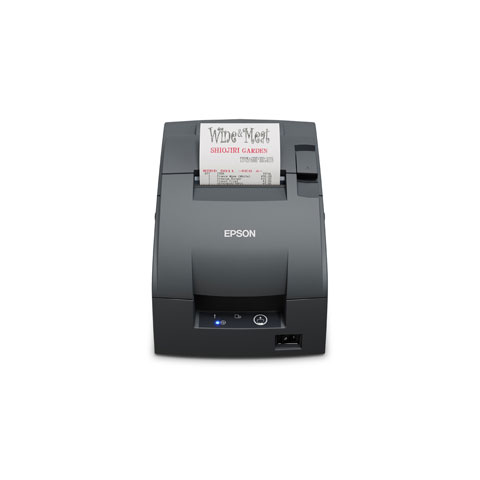
Epson C31CL26042AB Receipt Printer







 Full specifications (PDF)
Epson TM-U220II Receipt Printer Model Overview
Key Features
- Two-color (black and red) impact printing for easy-to-read receipts
- Choice of auto-cutter, journal, or tear-bar configurations
- Durable construction built for kitchens and high-volume environments
- Flexible connectivity with Serial standard and optional USB, or wireless interfaces
- Fast, consistent performance to handle peak periods
Specifications
- Print Speed: Up to 6 lines per second
- Print Technology: 9-pin dot matrix impact
- Interface Options: Serial (RS-232), optional USB, or wireless
- Printer Type: Impact, receipt, and kitchen printer
- Included Features: ERC-38BR ribbon cassette, starter roll paper, and optional mounting or cutter modes
- Operating Environment: Handles grease, heat, and moisture typical in food service locations
Recommended Accessories
Category
- Printer Accessories (1)
Recommended Accessories for Model: Epson C31CL26042AB Receipt Printer
Top Printer Accessories Purchased With Epson C31CL26042AB
-
 Epson 1064973 AccessoryPrinter Accessories, Epson TM-U220II , Rolled Paper Roller for TM-U220Item on backorder — chat for lead timePlease Call for Pricing or to Purchase
Frequently Asked Questions
What printing technology does the Epson TM-U220II use?
The Epson TM-U220II uses 9-pin dot matrix impact printing technology, which delivers clear, reliable output on standard receipt rolls. This proven technology is ideal for high-volume kitchen and receipt printing in demanding food service and retail environments.
Can the Epson TM-U220II print in color?
Yes, the TM-U220II supports two-color printing in black and red, making it easy to highlight important information on receipts and kitchen orders. The two-color capability helps improve readability and draw attention to key details without requiring multiple passes.
What connectivity options are available for the Epson TM-U220II?
The TM-U220II comes standard with Serial (RS-232) connectivity and offers optional USB, Ethernet, or wireless modules to suit your POS system integration needs. This flexible connectivity makes it easy to integrate into existing restaurant, retail, or service station workflows.
What configuration options does the Epson TM-U220II offer?
The TM-U220II is available in multiple configurations including auto-cutter, journal, and tear-bar models to match your specific workflow requirements. You can choose the configuration that best fits your operation, whether you need automatic cutting, continuous journal printing, or manual tear functionality.
Is the Epson TM-U220II suitable for kitchen environments?
Yes, the TM-U220II is specifically designed for kitchen and high-volume environments, with durable construction built to withstand grease, heat, and continuous operation. Its robust design makes it an ideal choice for restaurants, cafés, and food service locations that require reliable, long-lasting performance.
What is the print speed of the Epson TM-U220II?
The TM-U220II delivers print speeds of up to 6 lines per second, providing fast and consistent performance to handle peak business periods. This speed ensures efficient order processing and receipt generation without slowing down your operations.
