Dell Misc Parts ACCESSORIES & MISC. ITEMS Model Overview
Products and parts from Dell.
Dell YRPDK Computer Docking Station Overview
Replaces need for multiple adaptors
The compact Dell Adapter - USB-C to HDMI/VGA/Ethernet/USB 3.0 offers a plug-and-play solution for connecting your laptop or notebook to an external display and other essential devices. The adapter also features an Ethernet port, which means it can replace as many as three dongles to save you space on your desk and in your bag. Onboard USB 3.0 means you still have an open port to connect with USB peripherals.
Choose from VGA or HDMI video output
Choose from available VGA and HDMI ports to connect your mobile computer to an external monitor. The Dell Adapter gives you the flexibility to use a wide variety of monitors to expand your desktop and stay productive while managing multiple applications.
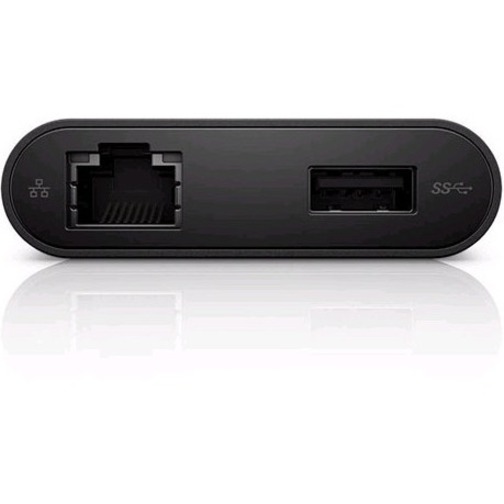
Ethernet port connects to wired networks
The Dell Adapter - USB-C to HDMI/VGA/Ethernet/USB 3.0 lets you connect to wired networks via an Ethernet port when needed. This ensures you can connect to the Internet and stay productive in virtually any environment.
USB 3.0 port lets you connect to more peripherals
With the Dell Adapter you can add productivity options without sacrificing USB connectivity. Using the included USB 3.0 port, you're free to connect to a range of everyday peripherals, such as printers, scanners, and external hard drives.
What ports and connectivity options does the Dell YRPDK USB-C docking station provide?
The Dell YRPDK (DA200) adapter provides comprehensive connectivity including HDMI, VGA, Ethernet (RJ-45), and USB 3.0 ports, all accessible through a single USB Type-C connection. This makes it ideal for connecting notebooks and tablet PCs to external displays, networks, and peripherals without requiring multiple adapters. We offer this genuine Dell docking solution to streamline your mobile workstation setup.
Is the Dell YRPDK docking station compatible with all USB-C devices?
The Dell YRPDK is designed primarily for Dell notebooks and tablet PCs with USB Type-C ports, though it may work with other USB-C equipped devices depending on their operating system and driver support. For optimal compatibility and performance, we recommend verifying your specific device model before purchasing. Contact us today if you need help determining compatibility with your equipment.
What video output options does the Dell YRPDK adapter support?
The Dell YRPDK supports both HDMI and VGA video outputs, allowing you to connect to modern digital displays via HDMI or legacy analog displays through VGA. This dual-output capability provides flexibility for connecting to various monitor types in office, warehouse, or mobile environments. We stock this adapter to support your multi-display needs.
Can I use the Dell YRPDK docking station for network connectivity?
Yes, the Dell YRPDK includes a wired Ethernet connection via RJ-45 port, enabling reliable network connectivity for your notebook or tablet PC. This is particularly valuable in warehouse and logistics environments where stable network access is critical for barcode scanning, inventory management, and data synchronization. Available from us for immediate deployment.
What is the difference between the Dell YRPDK and other Dell docking solutions?
The Dell YRPDK (DA200) is a compact USB-C adapter designed for portability and simplicity, offering essential connectivity through a single connection point rather than a full docking station. Its lightweight form factor makes it ideal for mobile professionals and field workers who need connectivity without the bulk of traditional docking stations. Visit barcodesinc.com to compare our full range of Dell docking and connectivity solutions.
Does the Dell YRPDK require external power or drivers to operate?
The Dell YRPDK operates through USB-C power delivery from your connected device and typically requires minimal driver installation on Windows and Linux systems, as it uses standard protocols for video and Ethernet. Installation is straightforward—simply connect the USB-C adapter to your device and attach your peripherals. Our team can provide setup guidance; contact us today for technical support.