Dell Misc Parts ACCESSORIES & MISC. ITEMS Model Overview
Products and parts from Dell.
Dell YP126 Computer Docking Station Overview
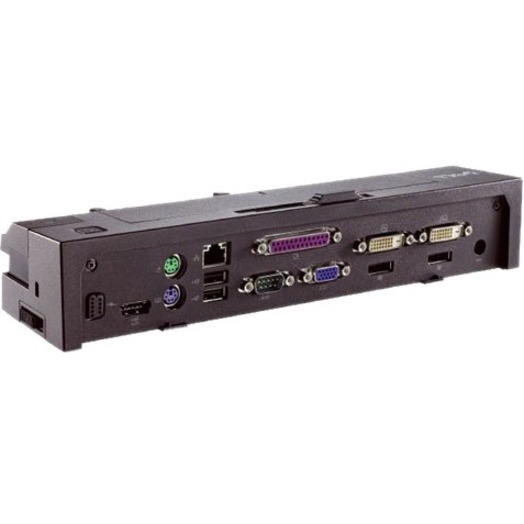
Maximize your workspace with the Dell™ E-Port Plus Replicator. This E-Port Plus Replicator gives you a comfortable work space where you can plug a keyboard, mouse and monitor to the port replicators and use your laptop like a desktop! Simplified connectivity facilitates a single interface to connect to your printer, monitor or other peripheral devices. It also gives you ease of mobility wherein you need not unplug and re-plug multiple peripherals to access your printer or other devices. This product is tested and validated with Dell Systems. It is supported by Dell Technical Support, when used with a Dell system.
What ports and connectivity options does the Dell YP126 docking station provide?
The Dell YP126 E-Port Plus Port Replicator offers comprehensive connectivity with 5 total USB ports (all USB 2.0), network connectivity via RJ-45, dual video outputs (DVI and VGA), DisplayPort, eSATA, headphone and microphone jacks, serial port, PS/2 port, and parallel port. This extensive port selection makes it ideal for expanding your notebook's connectivity in a desktop environment. We offer the YP126 as part of our complete docking station lineup available from barcodesinc.com.
Is the Dell YP126 compatible with modern laptops and operating systems?
The Dell YP126 was designed for legacy Dell notebooks and is compatible with systems running Windows 7 and Linux Ubuntu. Due to its age and the prevalence of USB-C and Thunderbolt connections on modern laptops, this docking station is best suited for older Dell systems rather than current-generation devices. Contact us today if you need docking solutions compatible with your specific notebook model.
What is the primary use case for the Dell YP126 docking station?
The Dell YP126 E-Port Plus is designed to transform a notebook into a desktop workstation by providing multiple connectivity options for monitors, peripherals, and network access. It's particularly useful for warehouse and logistics professionals who need to dock their Dell laptops at stationary workstations while maintaining access to legacy peripherals like serial devices and parallel ports. Visit barcodesinc.com to explore our full range of docking and connectivity solutions.
What video output options does the Dell YP126 support?
The Dell YP126 supports multiple video outputs including DVI, VGA, and DisplayPort, allowing you to connect multiple external displays or choose the connector that matches your monitor setup. This multi-display capability is beneficial for warehouse management systems and logistics applications requiring extended screen real estate. We have the YP126 available from our inventory at barcodesinc.com.
Does the Dell YP126 support USB 3.0 or only USB 2.0?
The Dell YP126 features 5 USB 2.0 ports and does not include USB 3.0 connectivity. For applications requiring faster data transfer speeds, you may want to consider more modern docking solutions that we offer. Contact us today to discuss alternatives that better suit your current technology requirements.
What legacy connectivity features make the Dell YP126 unique?
The Dell YP126 stands out for its inclusion of legacy ports including serial DB9, PS/2, parallel port, and eSATA—features rarely found on modern docking stations. These connectors make it invaluable for organizations still operating legacy warehouse equipment, industrial scanners, or specialized barcode devices that require serial or parallel connections. Visit barcodesinc.com to inquire about the YP126 or discover modern docking alternatives for your AIDC infrastructure.