
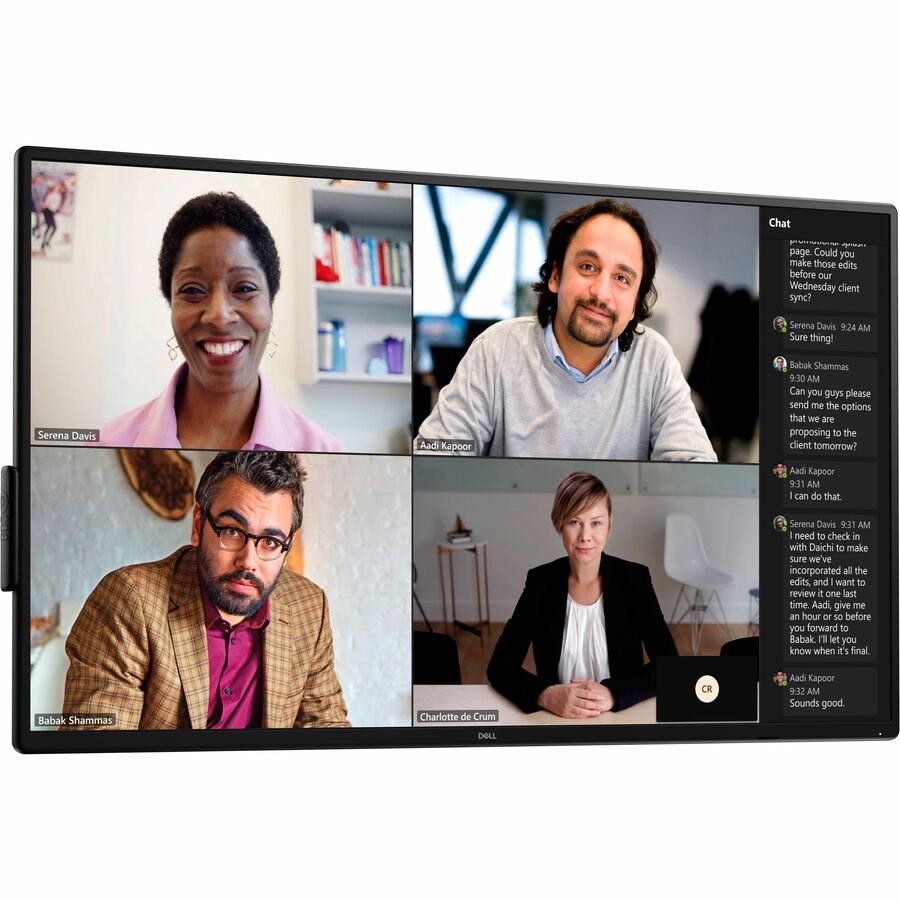

Dell DELL-P5525QC Touchscreen
Dell Misc Parts ACCESSORIES & MISC. ITEMS Model Overview
Power of USB-C
Keep your laptop powered during presentations with USB-C charging that delivers up to 90W of power.
Expand your efficiency
See more content at once and increase team engagement by daisy chaining two 4K monitors.
Extensive connectivity
Make your monitor a productivity hub with many connectivity options including HDMI and DP ports.
Simplified setup | Manage your meeting space
This monitor with Crestron Connected®and Crestron XiO Cloud®allows remote management and control within a network control system.
Easy to install
Our displays are VESA-compatible, so this monitor is easy to mount to a mobile cart, a stand or whichever mounting solution fits your space.
Lock it down
Reduce display changes in high traffic environments with lock mode, a feature that allows IT to control menu and power options.
Captivating collaboration | Sharp presentations
Display every detail brilliantly on a 55" screen with 4K resolution.
Easy on the eyes
Work without straining your eyes with the always-on, built-in ComfortView Plus, which reduces low blue light without compromising color.
Good views
See consistent colors from any seat in the room with the wide viewing angle enabled by In-Plane Switching (IPS) technology.
Instant audio
Built-in dual 10W speakers provide convenience without the need to connect additional devices.
Modern design
Rounded edge bezel enhances the refined look of your meeting room.
Convenient conferencing
Run video conferencing devices with power pass-through and secure a power adapter in the dedicated holder.
Organized cords
Cable management clips keep the meeting room clutter-free.
Easy to use
The simplified remote control is magnetic and can be placed on either side of the monitor.
Seamless integration
The convenient in/out slide gives you the option to integrate your preferred Dell OptiPlex Micro. IT can choose the best option based on business needs, upgrade as you grow and easily deploy system updates to the OptiPlex.
Securely fasten your OptiPlex Micro in the lockable, powered compartment that also protects and manages cables for a clutter-free setup.
Dell Display Manager | Multitasking
Organize your screen with Easy Arrange and save profiles with Easy Arrange Memory.
Manageability
Manage your fleet of monitors with remote management features that are automatic, comprehensive and compatible with several tools.
Customization
Quickly access your favorite features and functions with the menu launcher and hot keys.
Environmentally forward thinking | Material innovation
Designed with 30% recycled content including post-consumer recycled plastic, closed-loop ITE-derived plastic, recycled aluminum and recycled glass. Using recycled materials helps lower waste and your environmental footprint.
Environmental standards
This monitor is certified ENERGY STAR®, carries the TCO Certified Edge designation, and is registered EPEAT Gold with Climate+. With Climate+, this monitor has met environmental criteria that address climate change and reducing greenhouse gas emissions.
Low impact packaging
This monitor ships in a box made with 100% renewable content that is also recyclable.
3-Year Limited Hardware Warranty with Advanced Exchange Service
Frequently Asked Questions
What are the display specifications of the Dell P5525QC touchscreen?
The Dell P5525QC is a 55-inch LCD collaboration display with a 16:9 aspect ratio and 3840 x 2160 resolution (2160p). It features edge LED backlighting with 400 nits brightness and a 1,200:1 contrast ratio, making it ideal for high-visibility conference rooms and collaborative workspaces. We offer this model as part of our comprehensive touchscreen display selection available from barcodesinc.com.
What connectivity options does the Dell P5525QC provide?
The Dell P5525QC includes USB and HDMI connectivity ports for seamless integration with various devices and systems. These standard connections ensure compatibility with laptops, media players, and other peripherals commonly used in enterprise environments. Contact us today to discuss your specific connectivity requirements for your deployment.
Is the Dell P5525QC suitable for warehouse or logistics operations?
While the Dell P5525QC is primarily designed as a collaboration display for conference rooms and meeting spaces, its large 55-inch touchscreen and high resolution make it suitable for command centers, control rooms, and centralized monitoring stations in warehouse and logistics facilities. Its robust LED technology and contrast ratio support extended viewing periods in various lighting conditions. Visit barcodesinc.com to explore how this display can enhance your operational visibility.
What are the key environmental and durability features of the Dell P5525QC?
The Dell P5525QC features edge LED technology designed for reliable performance in professional environments. The display is engineered to provide consistent brightness output at 400 nits, supporting visibility in well-lit spaces typical of industrial and warehouse settings. Our team can provide detailed specifications regarding environmental certifications and durability standards—contact us today for complete technical documentation.
How does the Dell P5525QC compare to smaller touchscreen displays?
The Dell P5525QC's 55-inch size delivers significantly larger viewing area compared to standard 17-19 inch or portable touchscreen displays, making it ideal for group viewing and collaborative applications. Its 3840 x 2160 resolution maintains sharp image quality at this larger scale, while the 1,200:1 contrast ratio ensures excellent visibility for detailed content. We offer a range of touchscreen sizes—visit barcodesinc.com to find the right display for your specific application needs.
What aspect ratio does the Dell P5525QC use and why does it matter?
The Dell P5525QC features a 16:9 aspect ratio, which is the standard widescreen format for modern content including presentations, videos, and collaborative applications. This ratio maximizes screen real estate for horizontal content display while maintaining compatibility with most business software and media sources. Contact us today if you need guidance on selecting the right display format for your workflow requirements.