Dell CTKM5 Computer Docking Station

Part Number: CTKM5
Model: Parts
Please Call for Pricing or to Purchase
Item on backorder — chat for lead time

Price Match Guarantee - We'll match any authorized retailer's price

Quantity:

Product Highlights

View All
Connectivity Technology
Wireless
Device Supported
Notebook
Audio Line In
Yes
Audio Line Out
Yes

Product Description:

  Dell Wireless Dock - for Notebook - 5 x USB Ports - 2 x USB 2.0 - 3 x USB 3.0 - Network (RJ-45) - HDMI - VGA - Mini DisplayPort - Audio Line In - Audio Line Out - Wireless

Dell Misc Parts ACCESSORIES & MISC. ITEMS Model Overview

Products and parts from Dell.
Dell CTKM5 Computer Docking Station Overview

Introducing Dell's new wireless docking solution for laptops, ultrabooks™ and 2-in-1's with 5th generation Intel® Core™ vPro™ processors enabled with Intel® Tri-Band Wireless-AC 17265 for a desktop free of wires.

The Dell Wireless Dock provides high-speed wireless docking for all your desktop devices

Introducing Dell's new wireless docking solution for laptops, ultrabooks™ and 2-in-1's with 5th generation Intel® Core™ vPro™ processors enabled with Intel® Tri-Band Wireless-AC 17265 for a desktop free of wires.

The Dell Wireless Dock provides seamless high-speed wireless docking to your network through Intel® WiGig technology powering up to two external displays, keyboard, mouse, audio and other peripherals.

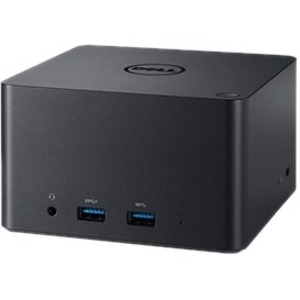
Simply connect all the devices and peripherals you use every day to the Dell Wireless Dock and your laptop will communicate wirelessly with the dock. With two USB ports in front and three USB ports in back, the dock unites everything conveniently in one place for your wireless desktop.

The Dell Wireless Dock helps increase productivity with connections for two external displays.

Work more efficiently and increase productivity with two external displays and all the devices on your desktop. The Dell Wireless Dock supports VGA, HDMI and mDP for up to two displays

Using Intel WiGig technology, the Dell Wireless Dock enables higher data transfer rates upto 4.6Ghz-higher than Wifi AC certified products.

Two USB ports in front and three USB ports in back connect your desktop devices to the Dell Wireless Dock.

Work confidently knowing your files are protected with data encryption and strong authentication protocols IEEE802.11 and current WLAN technologies.

Simplify access to presentation and collaboration tools in your meeting rooms and classrooms with fast, reliable connectivity to projectors and other compatible equipment.

When you collaborate on Skype, Lync or other communications tools you'll benefit from the Dell Wireless Dock's front audio in/out port for voice over IP.

Technical Information
Connectivity Technology:
Wireless
Device Supported:
Notebook
Interfaces/Ports
Audio Line In:
Yes
Audio Line Out:
Yes
Total Number of USB Ports:
5
Number of USB 2.0 Ports:
2
Number of USB 3.0 Ports:
3
Network (RJ-45):
Yes
VGA:
Yes
Mini DisplayPort:
Yes
HDMI:
Yes
Physical Characteristics
Weight (Approximate):
12.80 oz
Miscellaneous
Compatibility:
Dell Latitude Notebooks:
  • E7350
  • E7250
  • E7450
  • E5470
  • E7270
  • E5270
  • E7470
  • E5450
  • E5550
  • E3550
  • E5570
Item Numbers
UNSPSC: 43211602

Frequently Asked Questions

The Dell CTKM5 wireless dock provides comprehensive connectivity with 5 USB ports (2x USB 2.0 and 3x USB 3.0), network connectivity via RJ-45, HDMI and VGA video outputs, Mini DisplayPort, plus audio line in and line out. This multi-port design allows you to connect multiple peripherals and displays simultaneously, making it ideal for warehouse management systems and logistics operations that require extensive device integration.

The Dell CTKM5 is designed to work with Windows operating systems and supports Linux environments. Its universal docking architecture makes it compatible across various notebook platforms, ensuring broad deployment flexibility for enterprise environments. Contact us today to verify compatibility with your specific system configuration.

Yes, the Dell CTKM5 supports multiple display outputs through its HDMI, VGA, and Mini DisplayPort connections, enabling dual or extended monitor configurations. This makes it excellent for warehouse management applications where operators need to monitor multiple data streams or logistics dashboards simultaneously. Visit barcodesinc.com to explore our complete docking station solutions.

Wireless docking eliminates cable clutter and enables faster connection/disconnection cycles, which is critical in fast-paced warehouse and logistics environments where users frequently move between workstations. The Dell CTKM5 provides seamless transitions between mobile and desktop work modes while maintaining access to all peripherals, printers, and network resources without physical docking cables.

Yes, the Dell CTKM5 includes a built-in RJ-45 network connector for wired Ethernet connectivity, ensuring stable and secure network access for enterprise applications. This is particularly valuable in logistics and warehouse operations where reliable network connectivity is essential for real-time inventory management and barcode scanning systems.

The Dell CTKM5 features dedicated audio line in and audio line out connections, plus a stereo headphone/microphone combo jack for voice communications. These audio features support VoIP applications and hands-free communication, making it suitable for warehouse environments where workers need to coordinate across departments while maintaining hands-free operation.

Loading...
Dell CTKM5 Computer Docking Station

Dell CTKM5 Computer Docking Station

Please Call for Pricing or to Purchase