

ISM Band:
Yes
ISM Maximum Frequency:
2.40 GHz



Pair up to 6 compatible devices
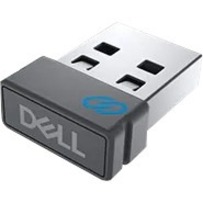
Plug in the Dell Universal Pairing Receiver to your PC and connect up to six different compatible keyboards and mice. Now you can switch between devices without needing multiple receivers.
Dell Universal Pairing feature
All keyboards and mice with the Dell Universal pairing icon can be paired with the Dell Universal Pairing Receiver. Enjoy the convenience of leaving your keyboard and mouse set at home and another mouse in the office without having to carry them around.
The Dell 570-ABKY is a Bluetooth adapter designed for wireless connectivity of Dell peripherals. It features a USB Type A connection and operates on the 2.40 GHz ISM band, making it compatible with Dell wireless keyboards and mice. We offer this genuine Dell accessory as a reliable solution for adding or replacing wireless connectivity on compatible systems.
The Dell WR221 Bluetooth adapter included in the 570-ABKY package uses a standard USB Type A connector for connection to your computer or device. This universal connection type ensures broad compatibility with most desktop and laptop systems available from us.
The Dell 570-ABKY operates on the 2.40 GHz ISM (Industrial, Scientific, Medical) band, which is the standard frequency for Bluetooth wireless communication. This frequency provides reliable wireless connectivity while minimizing interference with other wireless devices in your workspace.
Yes, the Dell 570-ABKY is suitable for professional warehouse and logistics settings where wireless input devices improve mobility and efficiency. The adapter's standard Bluetooth connectivity allows warehouse managers and operators to use wireless keyboards and mice for inventory management systems and logistics applications without being tethered to a workstation.
The Dell 570-ABKY is specifically designed for Dell wireless peripherals and optimized for Dell systems. While it may work with some third-party Bluetooth keyboards and mice, we recommend using it with genuine Dell input devices to ensure full compatibility and optimal performance. Contact us today if you need clarification on specific peripheral compatibility.
If your wireless peripherals lose connection, try removing and reinserting the USB adapter, restarting your computer, and re-pairing the wireless devices through your system's Bluetooth settings. If issues persist, the adapter may need replacement—visit barcodesinc.com or contact us today for troubleshooting assistance and replacement options for genuine Dell accessories.