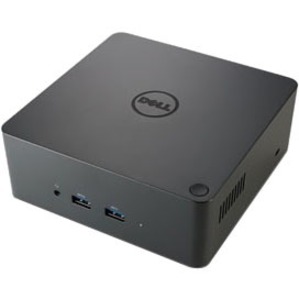
Dell Misc Parts ACCESSORIES & MISC. ITEMS Model Overview
Products and parts from Dell.
Dell 452-BCNU Computer Docking Station Overview
One dock. One cable. Ultimate Performance.
The Dell Thunderbolt™ Dock TB16 -240W with Intel® Thunderbolt 3 technology is the ultimate docking solution, designed for power users and traditional workstation clients, creating the ability to connect up to three FHD displays, two 4K displays, or one 5K display at 60Hz. Data transfers up to 40 Gbps allow lightning-fast transfers of larger files such as video editing files.
Small footprint and big flexibility
The Dell Thunderbolt™ Dock TB16 -240W is small in size-just 5.7 x 5.7 x 2 inches (145 x 145 x 51mm). By connecting one cable to your laptop, you can get access to a wide variety of ports, enhancing productivity.
One source for power
The Dell Thunderbolt™ Dock TB16 -240W can provide power to your laptop (at 19.5V) and can also provide up to 60W of power to attached Thunderbolt™ 3 peripherals. Dell Precision, Latitude or XPS notebooks with a Thunderbolt™ 3 port can receive up to 130W of power.
What ports and connectivity options does the Dell 452-BCNU Thunderbolt Dock TB16 provide?
The Dell TB16 docking station offers comprehensive connectivity with 5 USB ports (2 x USB 2.0 and 3 x USB 3.0), Thunderbolt 3, Network (RJ-45), Audio Line In, and Audio Line Out. This makes it ideal for connecting multiple peripherals, external storage, and network devices simultaneously to your notebook. We offer this dock to streamline your workstation setup and reduce cable clutter.
Is the Dell 452-BCNU compatible with my laptop?
The Dell TB16 is designed for notebooks with Thunderbolt 3 connectivity. To verify compatibility with your specific laptop model, we recommend checking your device's specifications for Thunderbolt 3 support. Contact us today with your laptop model number, and our team can confirm compatibility and help you select the right docking solution.
What power capacity does the Dell Thunderbolt Dock TB16 provide?
The Dell TB16 delivers 240W of power, which is sufficient for charging and powering most business notebooks and connected peripherals simultaneously. This robust power delivery makes it suitable for professional workstations in warehouse management, logistics, and IT environments where consistent power is critical.
Can I use the Dell TB16 dock with external monitors?
Yes, the Dell TB16 supports Thunderbolt 3 connectivity, which allows you to connect external displays through compatible adapters or Thunderbolt-enabled monitors. The dock's multiple ports also enable you to connect additional peripherals while maintaining video output. Visit barcodesinc.com for compatible monitor recommendations and adapter options available from us.
What are the environmental specifications and warranty for this docking station?
The Dell TB16 is ENERGY STAR® certified and EPEAT® registered, meeting strict environmental efficiency standards. It includes a 1-year limited warranty covering parts and labor. We stock this dock as part of our comprehensive AIDC and computer accessory offerings to support your IT infrastructure needs.
How does the Dell TB16 compare to previous Dell docking generations?
The Dell TB16 represents Dell's Thunderbolt 3 docking solution, offering faster data transfer speeds and greater power delivery (240W) compared to older USB-based docks. The Thunderbolt 3 standard provides significantly improved performance for users working with high-bandwidth applications and multiple displays. Contact us today to discuss whether the TB16 or alternative docking solutions best fit your warehouse or logistics operation.