Dell Misc Parts ACCESSORIES & MISC. ITEMS Model Overview
Products and parts from Dell.
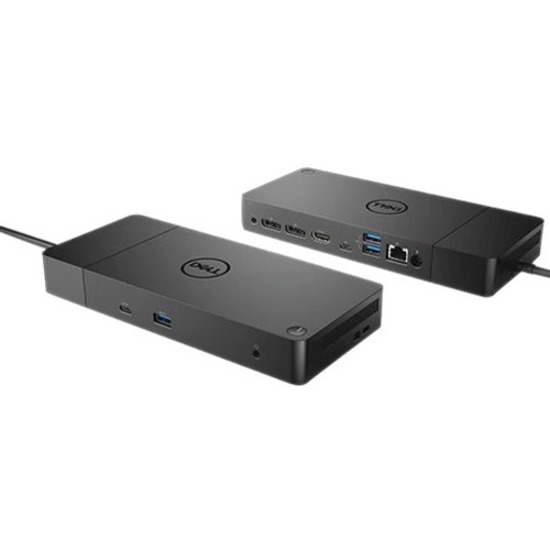
Dell 210-ARIO Computer Docking Station Overview
Power your connections
Power your day: Dell ExpressCharge allows you to charge up to 80% in one hour, making it the most efficient way to manage the workday.
Energize your workload: Get more done, even faster with Dell ExpressCharge Boost - a feature that provides up to a 35% charge in just 20 minutes.
Unmatched charging: Increase your power delivery and charge even faster with a dock that delivers up to 90W of power with 130W power adapter.
Built for the future
Mix and match: Evolve as your needs change with our most versatile dock. The future-ready design lets you swap out modules with ease if you need to do field replacements or upgrade your systems.
Ultimate connectivity: USB-C connectivity makes it easier than ever to deliver power, data, audio and video in one convenient cable, no matter what system you use.
Clean and clutter-free: Stay productive by mounting your dock behind your monitor or under your desk with the optional, secure VESA mount, that offers complete flexibility with the built-in one-meter cable.
Information in a flash: With data transfer speeds of up to 10Gbps, you can stay productive when connected to all your devices.
Optimize your workspace
Smooth and seamless: Work without disruptions utilizing a single firmware on our most manageable docks ever. Plus, with Dell Client Command Suite and Microsoft System Center Configuration Manager, you can quickly and easily update your firmware without rebooting your dock.
Secure manageability: Keep your information safe with MAC Address pass-thru and remote port-disablement. Plus, with features like PXE Boot, Wake-on-LAN and more, it's easier than ever to stay productive while managing your dock.
What ports and connectivity options does the Dell WD19 docking station provide?
The Dell 210-ARIO WD19 docking station offers comprehensive connectivity with 6 USB ports, USB Type-C support, network connectivity via RJ-45, HDMI and DisplayPort video outputs, and audio line in/out jacks. This multi-port configuration allows you to connect multiple peripherals simultaneously while maintaining high-speed data transfer and video display capabilities for your notebook, desktop PC, or workstation.
Is the Dell WD19 docking station compatible with my laptop?
The Dell WD19 is designed for use with Dell notebooks, desktop PCs, and workstations that support USB Type-C connectivity. We recommend verifying your specific device model's compatibility with the WD19 before purchase. Contact us today at barcodesinc.com for detailed compatibility information for your particular system.
What power capacity does the Dell WD19 docking station provide?
The Dell WD19 docking station features 130W total power delivery with 90W USB Type-C power output capability. This robust power capacity allows you to charge and power your connected devices while simultaneously running multiple peripherals without requiring additional power adapters.
Can I use the Dell WD19 docking station with external monitors?
Yes, the Dell WD19 supports dual external monitor connectivity through both HDMI and DisplayPort outputs, enabling extended or mirrored display configurations. This makes it ideal for warehouse managers and logistics professionals who need to monitor multiple data streams or applications simultaneously at their workstations.
What are the environmental certifications for the Dell WD19 docking station?
Dell docking stations are designed with energy efficiency standards in mind, supporting ENERGY STAR and EPEAT compliance for environmentally responsible IT procurement. These certifications ensure the device meets rigorous environmental and energy consumption standards suitable for corporate and enterprise environments.
Is the Dell WD19 suitable for warehouse and logistics operations?
Yes, the Dell WD19 is well-suited for warehouse and logistics environments where reliable connectivity and multiple peripheral support are essential. Its robust port selection, stable network connectivity via RJ-45, and multi-monitor capability make it an excellent choice for IT procurement teams managing mobile computing solutions. Visit barcodesinc.com to explore how we can support your warehouse technology infrastructure.